EasyManua.ls Logo

Sony RM-E300 - Location and Function of Controls; Main Unit Control Layout

Sony RM-E300
73 pages
Print Icon
To Next Page IconTo Next Page
To Previous Page IconTo Previous Page
Loading...
|
orors}
(celaMelele
Mat
lacoidloyame)
mere)
a)
(ae)
[>
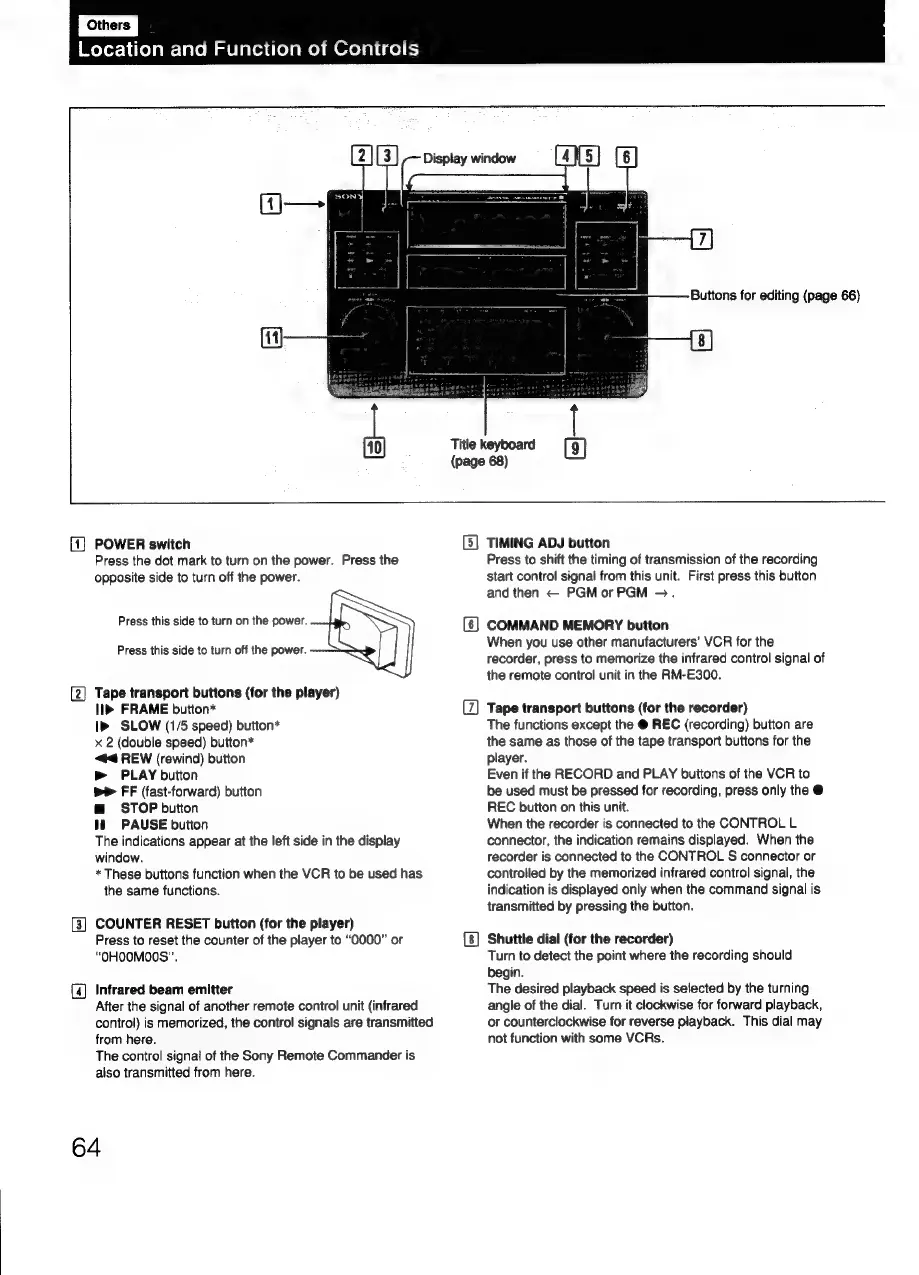
(1)
POWER
switch
Press
the
dot
mark
to
turn
on
the
power.
Press
the
opposite
side
to
turn
off
the
power.
Press
this
side
to
turn
on
the
power.
Press
this
side
to
turn
off
the
power.
{2}
Tape
transport
buttons
(for
the
player)
ll»
FRAME
button*
SLOW
(1/5
speed)
button*
x
2
(double
speed)
button*
#4
REW
(rewind)
button
>
PLAY
button
we
FF
(fast-forward)
button
@
STOP
button
tt)
~=PAUSE
button
The
indications
appear
at
the
left
side
in
the
display
window.
*
These
buttons
function
when
the
VCR
to
be
used
has
the
same
functions.
[3]
COUNTER
RESET
button
(for
the
player)
Press
to
reset
the
counter
of
the
player
to
“O000”
or
“OHOOMO0S”.
(4
Infrared
beam
emitter
After
the
signal
of
another
remote
control
unit
(infrared
control)
is
memorized,
the
control
signals
are
transmitted
from
here.
The
control
signal
of
the
Sony
Remote
Commander
is
also
transmitted
from
here.
64
Title
keyboard
(page
68)
(3)
(5)
TIMING
ADJ
button
Press
to
shift
the
timing
of
transmission
of
the
recording
start
control
signal
from
this
unit.
First
press
this
button
and
then
PGMorPGM
>.
COMMAND
MEMORY
button
When
you
use
other
manufacturers’
VCR
for
the
recorder,
press
to
memorize
the
infrared
control
signal
of
the
remote
control
unit
in
the
RM-E300.
Tape
transport
buttons
(for
the
recorder)
The
functions
except
the
@
REC
(recording)
button
are
the
same
as
those
of
the
tape
transport
buttons
for
the
player.
Even
if
the
RECORD
and
PLAY
buttons
of
the
VCR
to
be
used
must
be
pressed
for
recording,
press
only
the
@
REC
button
on
this
unit.
When
the
recorder
is
connected
to
the
CONTROL
L
connector,
the
indication
remains
displayed.
When
the
recorder
is
connected
to
the
CONTROL
S
connector
or
controlled
by
the
memorized
infrared
control
signal,
the
indication
is
displayed
only
when
the
command
signal
is
transmitted
by
pressing
the
button.
Shuttle
dial
(for
the
recorder)
Turn
to
detect
the
point
where
the
recording
should
begin.
The
desired
playback
speed
is
selected
by
the
turning
angle
of
the
dial.
Turn
it
clockwise
for
forward
playback,
or
counterclockwise
for
reverse
playback.
This
dial
may
not
function
with
some
VCRs.

Related product manuals