EasyManua.ls Logo

Sony RM-E300 - Editing Button Functions Explained

Sony RM-E300
73 pages
Print Icon
To Next Page IconTo Next Page
To Previous Page IconTo Previous Page
Loading...
|
Moler-\
(folem-larem
ae
laveidielamelmecelalice)
i)
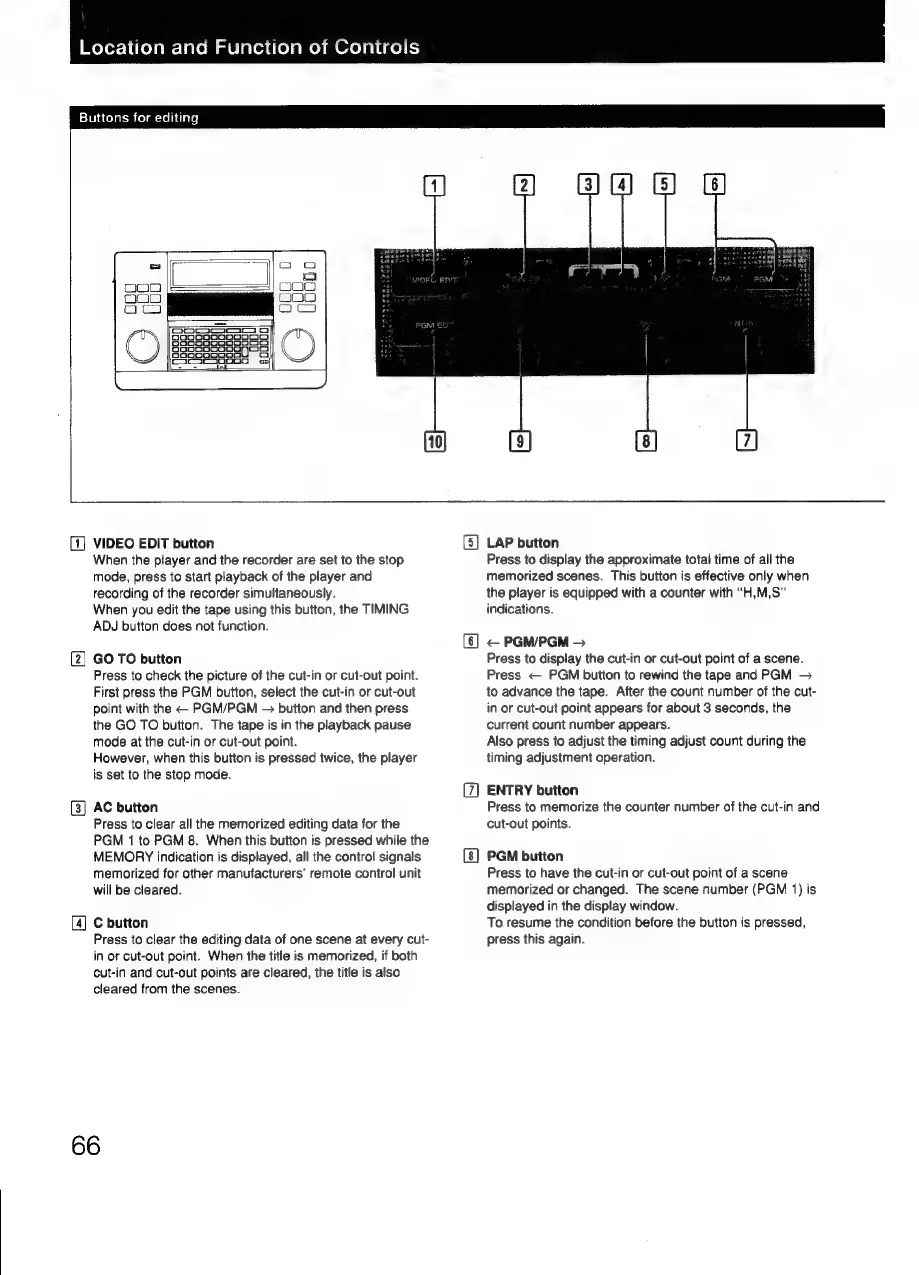
Buttons
for
ed
[1]
VIDEO
EDIT
button
When
the
player
and
the
recorder
are
set
to
the
stop
mode,
press
to
start
playback
of
the
player
and
recording
of
the
recorder
simultaneously.
When
you
edit
the
tape
using
this
button,
the
TIMING
ADJ
button
does
not
function.
(2]
GO
TO
button
Press
to
check
the
picture
of
the
cut-in
or
cut-out
point.
First
press
the
PGM
button,
select
the
cut-in
or
cut-out
point
with
the
PGM/PGM
button
and
then
press
the
GO
TO
button.
The
tape
is
in
the
playback
pause
mode
at
the
cut-in
or
cut-out
point.
However,
when
this
button
is
pressed
twice,
the
player
is
set
to
the
stop
mode.
3]
AC
button
Press
to
clear
all
the
memorized
editing
data
for
the
PGM
1
to
PGM
8.
When
this
button
is
pressed
while
the
MEMORY
indication
is
displayed,
all
the
control
signals
memorized
for
other
manufacturers’
remote
control
unit
will
be
cleared.
[4]
C
button
Press
to
clear
the
editing
data
of
one
scene
at
every
cut-
in
or
cut-out
point.
When
the
title
is
memorized,
if
both
cut-in
and
cut-out
points
are
cleared,
the
title
is
also
cleared
from
the
scenes.
66
&)
LAP
button
Press
to
display
the
approximate
total
time
of
all
the
memorized
scenes.
This
button
is
effective
only
when
the
player
is
equipped
with
a
counter
with
“H,M,S”
indications.
<
PGM/PGM
>
Press
to
display
the
cut-in
or
cut-out
point
of
a
scene.
Press
<
PGM
button
to
rewind
the
tape
and
PGM
—>
to
advance
the
tape.
After
the
count
number
of
the
cut-
in
or
cut-out
point
appears
for
about
3
seconds,
the
current
count
number
appears.
Also
press
to
adjust
the
timing adjust
count
during
the
timing
adjustment
operation.
ENTRY
button
Press
to
memorize
the
counter
number
of
the
cut-in
and
cut-out
points.
PGM
button
Press
to
have
the
cut-in
or
cut-out
point
of
a
scene
memorized
or
changed.
The
scene
number
(PGM
1)
is
displayed
in
the
display
window.
To
resume
the
condition
before
the
button
is
pressed,
press
this
again.

Related product manuals