EasyManua.ls Logo

Sony RM-E300 - Page 70

Sony RM-E300
73 pages
Print Icon
To Next Page IconTo Next Page
To Previous Page IconTo Previous Page
Loading...
|
Movers}
ilelam-lilem
alelaleicovamelmere)
ni
tce)
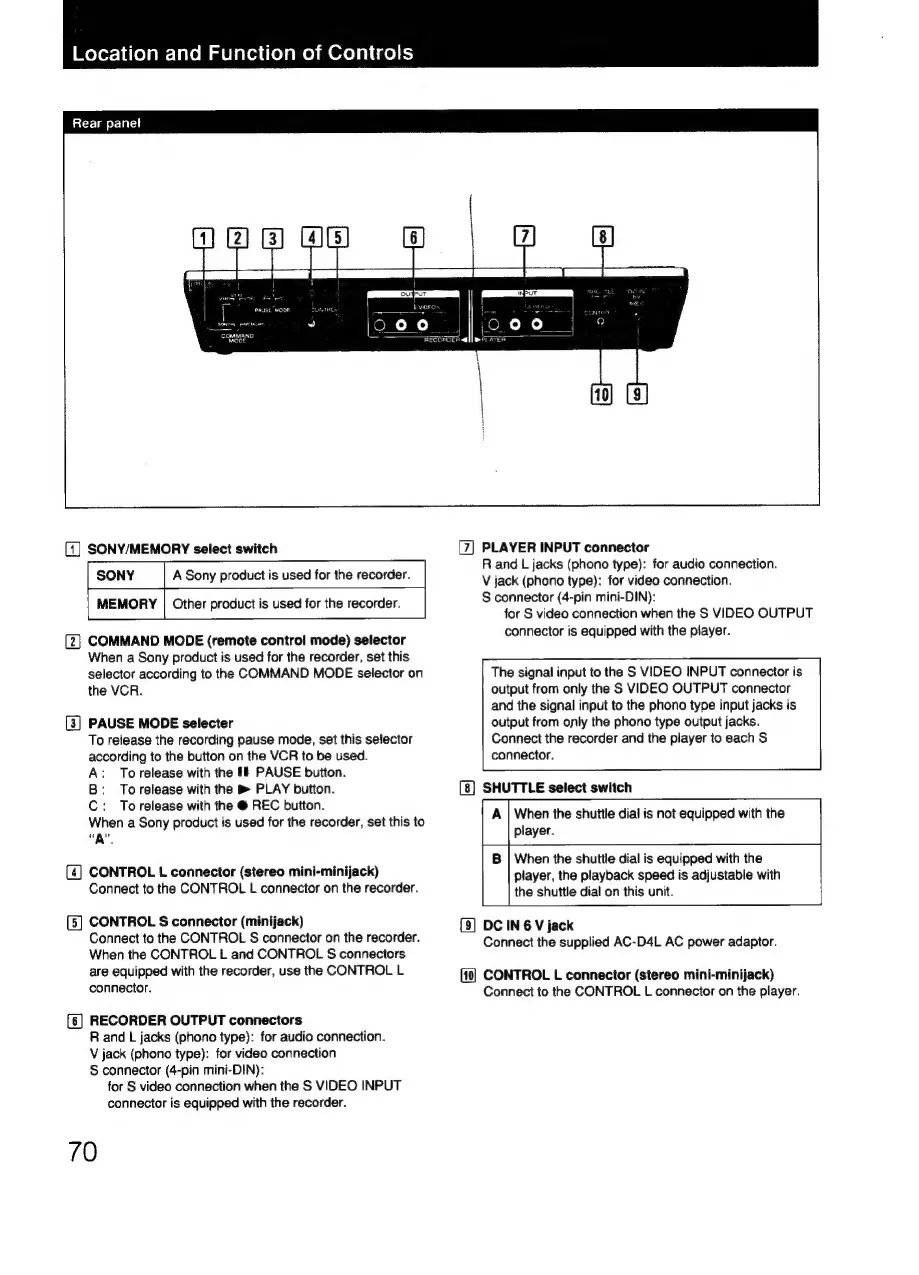
Rear
panel
(1)
SONY/MEMORY
select
switch
SONY
A
Sony
product
is
used
for
the
recorder.
MEMORY
|
Other
product
is
used
for
the
recorder.
(2}
COMMAND
MODE
(remote
control
mode)
selector
When
a
Sony
product
is
used
for
the
recorder,
set
this
selector
according
to
the
COMMAND
MODE
selector
on
the
VCR.
(3]
PAUSE
MODE
selecter
To
release
the
recording
pause
mode,
set
this
selector
according
to
the
button
on
the
VCR
to
be
used.
A:
Torelease
with
the
ff
PAUSE
button.
B:
Torelease
with
the
®
PLAY
button.
C:
Torelease
with
the
@
REC
button.
When
a
Sony
product
is
used
for
the
recorder,
set
this
to
“A”.
(4]
CONTROL
L
connector
(stereo
mini-minijack)
Connect
to
the
CONTROL
L
connector
on
the
recorder.
(5]
CONTROL
S
connector
(minijack)
Connect
to
the
CONTROL
S
connector
on
the
recorder.
When
the
CONTROL
L
and
CONTROL
S
connectors
are
equipped
with
the
recorder,
use
the
CONTROL
L
connector.
{6]
RECORDER
OUTPUT
connectors
R
and
L
jacks
(phono
type):
for
audio
connection.
V
jack
(phono
type):
for
video
connection
S
connector
(4-pin
mini-DIN):
for
S
video
connection
when
the
S
VIDEO
INPUT
connector
is
equipped
with
the
recorder.
70
[7]
PLAYER
INPUT
connector
R
and
L
jacks
(phono
type):
for
audio
connection.
V
jack
(phono
type):
for
video
connection.
S
connector
(4-pin
mini-DIN):
for
S
video
connection
when
the
S
VIDEO
OUTPUT
connector
is
equipped
with
the
player.
The
signal
input
to
the
S
VIDEO
INPUT
connector
is
output
from
only
the
S
VIDEO
OUTPUT
connector
and
the
signal
input
to
the
phono
type
input
jacks
is
output
from
only
the
phono
type
output
jacks.
Connect
the
recorder
and
the
player
to
each
S
connector.
SHUTTLE
select
switch
When
the
shuttle
dial
is
not
equipped
with
the
player.
When
the
shuttle
dial
is
equipped
with
the
player,
the
playback
speed
is
adjustable
with
the
shuttle
dial
on
this
unit.
(9)
DC
IN
6
V
jack
Connect
the
supplied
AC-D4L
AC
power
adaptor.
CONTROL
L
connector
(stereo
mini-minijack)
Connect
to
the
CONTROL
L
connector
on
the
player.

Related product manuals