EasyManua.ls Logo

Sony SLV-975HF - Manual Clock Setting

Sony SLV-975HF
90 pages
Print Icon
To Next Page IconTo Next Page
To Previous Page IconTo Previous Page
Loading...
Getting Started34
SLV-975HF 3-858-120-11 (1)
Setting the clock (continued)
If the clock is not activated
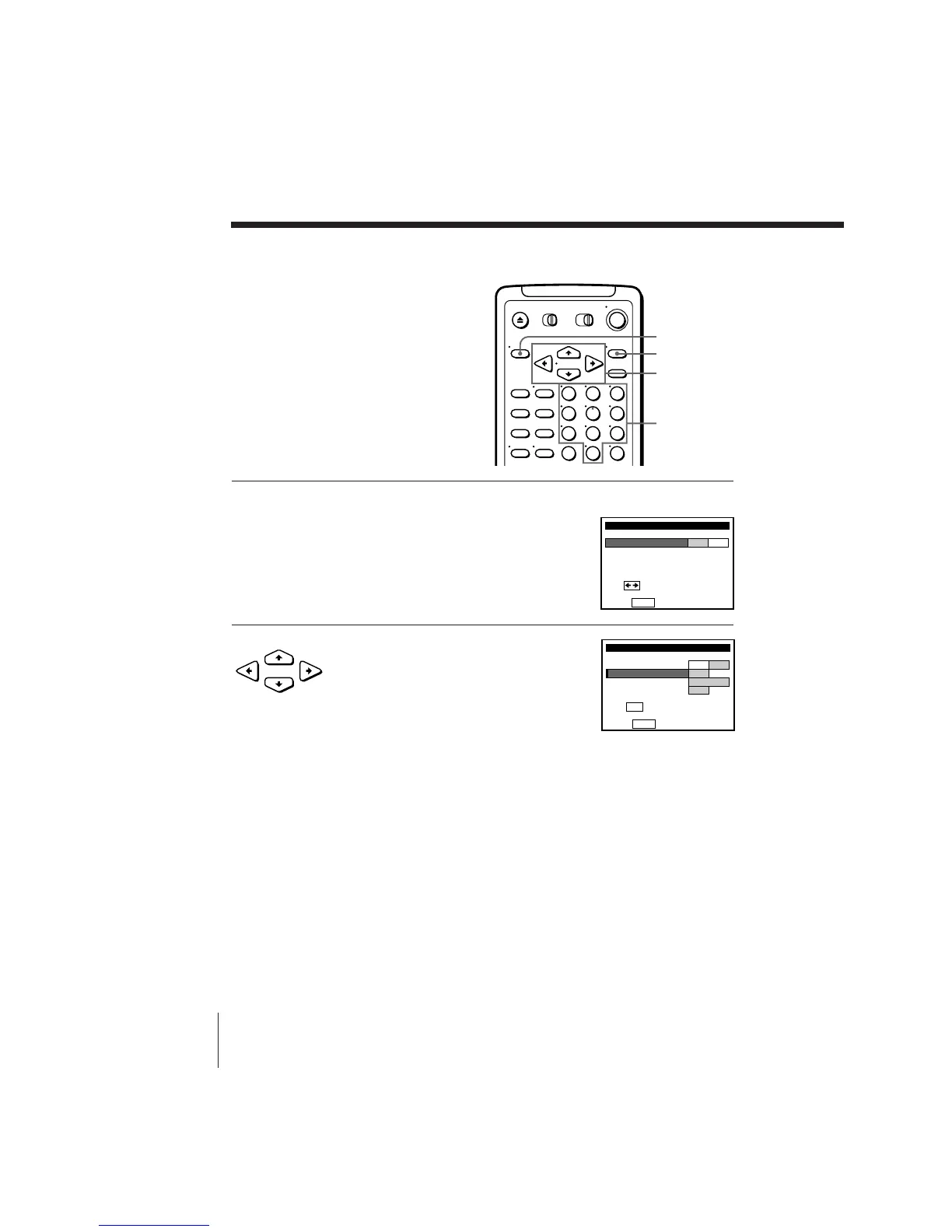
1 Follow steps 1 and 2 in “Using the Auto Clock Set feature.”
The AUTO CLOCK SET menu is displayed.
2 Press CURSOR ?// to select NO for
FULL AUTO.

AUTO CLOCK SET
Push
MENU
to quit
FULL AUTO
YES NO
CLOCK SET CH
TIME ZONE
DAYLIGHT SAVING
–
AUTO
–
AUTO
Use t o se l ec t0–9 keys
CLOCK SET CHANNEL
123
456
789
0
MENU
Number
buttons
EXECUTE
CURSOR
AUTO CLOCK SET
Use t o se l ec t
Push
MENU
to quit
FULL AUTO
YES NO
•
CURSOR