Getting Started
5Getting Started
SLV-975HF 3-858-120-11 (1)
123
456
789
0
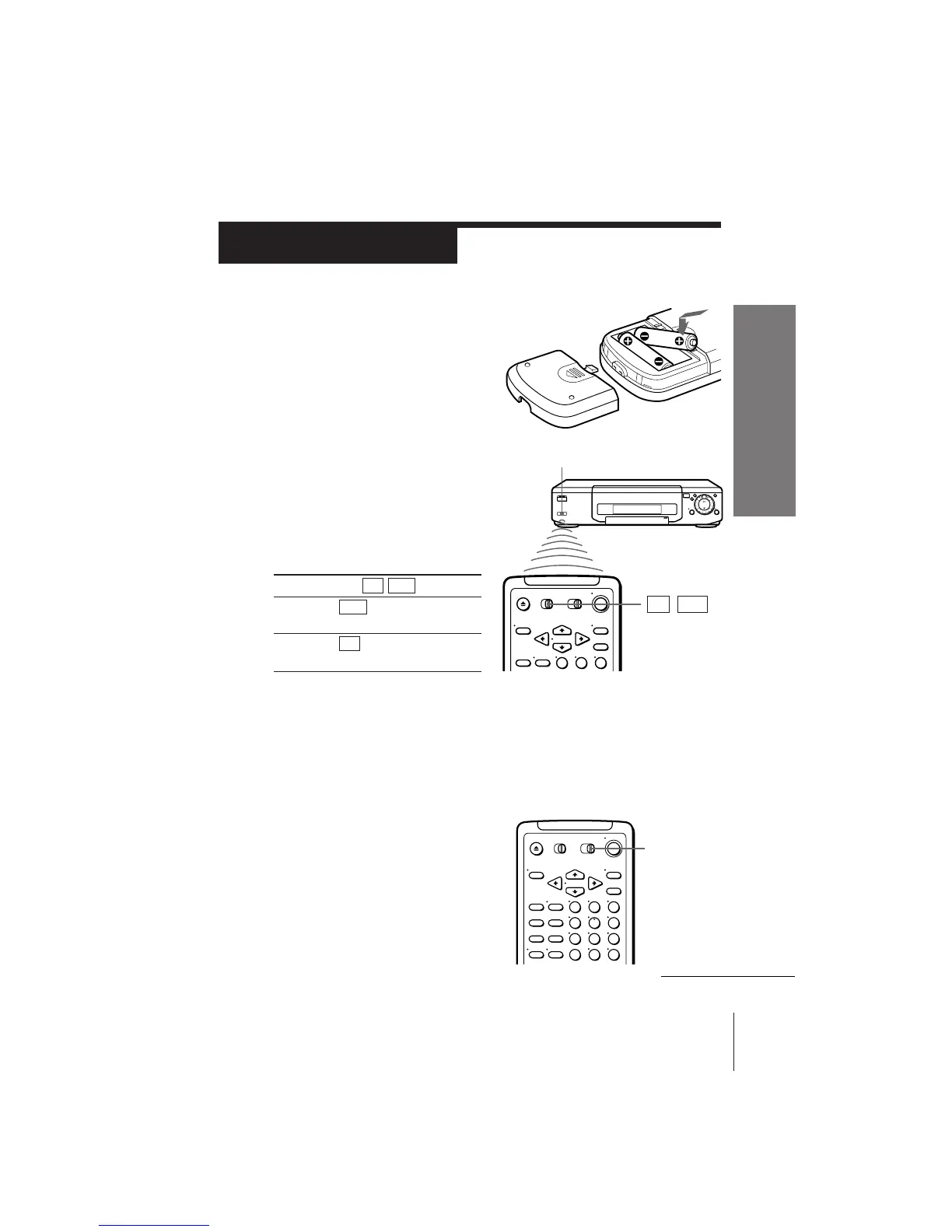
Inserting the batteries
Insert two size AA (R6) batteries by
matching the + and – on the batteries
to the diagram inside the battery
compartment.
Using the remote commander
You can use this remote
commander to operate this VCR
and a Sony TV. The buttons on
the remote commander marked
with a dot (•) can be used to
operate your Sony TV.
To operate
the VCR
a Sony TV
continued
Notes
• With normal use, the batteries should last for approximately three to six months.
• If you do not use the remote commander for an extended period of time, remove
the batteries to avoid possible damage from battery leakage.
• Do not use a new battery with an old one.
• Do not use different types of batteries.
Setting the COMMAND MODE switch
To remotely control the VCR with the
commander, set COMMAND MODE on
the remote commander to the same
position as that on the VCR. Usually set
to VTR 3. Change the position as shown
below to control other Sony VCRs:
VTR 1: For Sony Betamax format VCRs
VTR 2: For Sony 8mm format VCRs
VTR 3: For Sony VHS format VCRs
Set TV / VTR to
VTR and point at the
remote sensor on the VCR
TV and point at the
remote sensor on the TV
Step 2
Setting up the remote commander
123
Remote sensor
TV / VTR
COMMAND
MODE



 To Next Page