EasyManua.ls Logo

Sony SLV-975HF - Manual Clock Set Procedure

Sony SLV-975HF
90 pages
Print Icon
To Next Page IconTo Next Page
To Previous Page IconTo Previous Page
Loading...
Getting Started36
SLV-975HF 3-858-120-11 (1)
Setting the clock (continued)
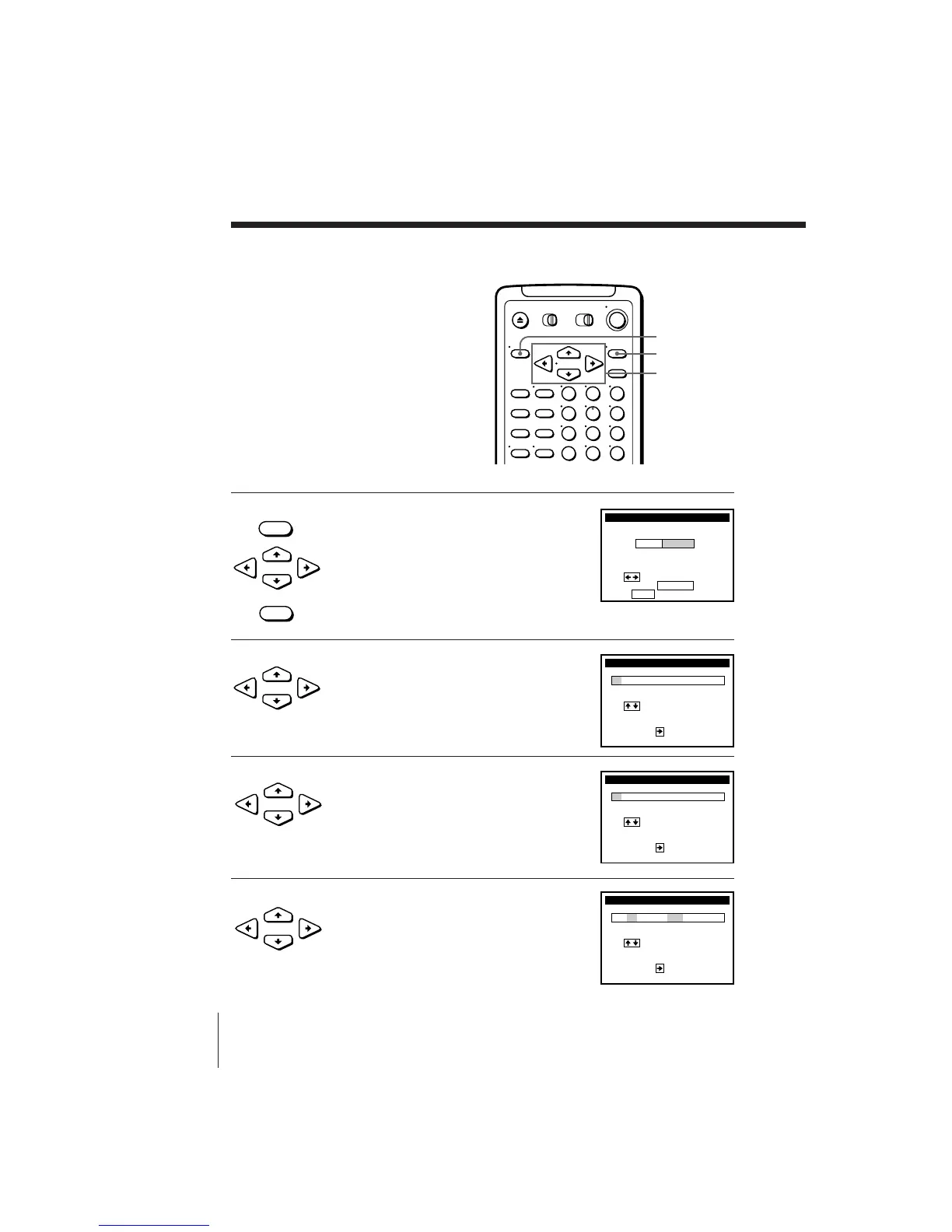
1 Press MENU, then press CURSOR >/. to
move the cursor to CLOCK SET and press
EXECUTE.
When using the EASY SET UP procedure,
skip this step.
2 Press CURSOR ?// to select
MANUAL, then press EXECUTE.
3 Press CURSOR >/. to set the month.
4 Press CURSOR / to highlight the day
and press CURSOR >/. to set the day.
The day of the week is set automatically.
Using Manual Clock Set
123
456
789
0
MENU
EXECUTE
CURSOR
• MENU

CLOCK SET
Use t o se l ec t
Then p us h EXECUTE
Push
MENU
to quit
AUTO
MANUAL
•
CURSOR
• EXECUTE
•
CURSOR
•
CURSOR
•
CURSOR
CLOCK SET
1
Use t o se l ec t
Then, push
to
curr ent
/ 1 /1996 MON 2
:
00
DAY
MONTH
1
AM
set
CLOCK SET
7
Use t o se l ec t
Then, push
to
curr ent
/ 1 /1996 MON 2
:
00
DAY
MONTH
1
AM
set
CLOCK SET
7
Use t o se l ec t
Then, push
to
curr ent
/ 4 /1996 THU 2
:
00
YEAR
DAY
1
AM
set