30
US
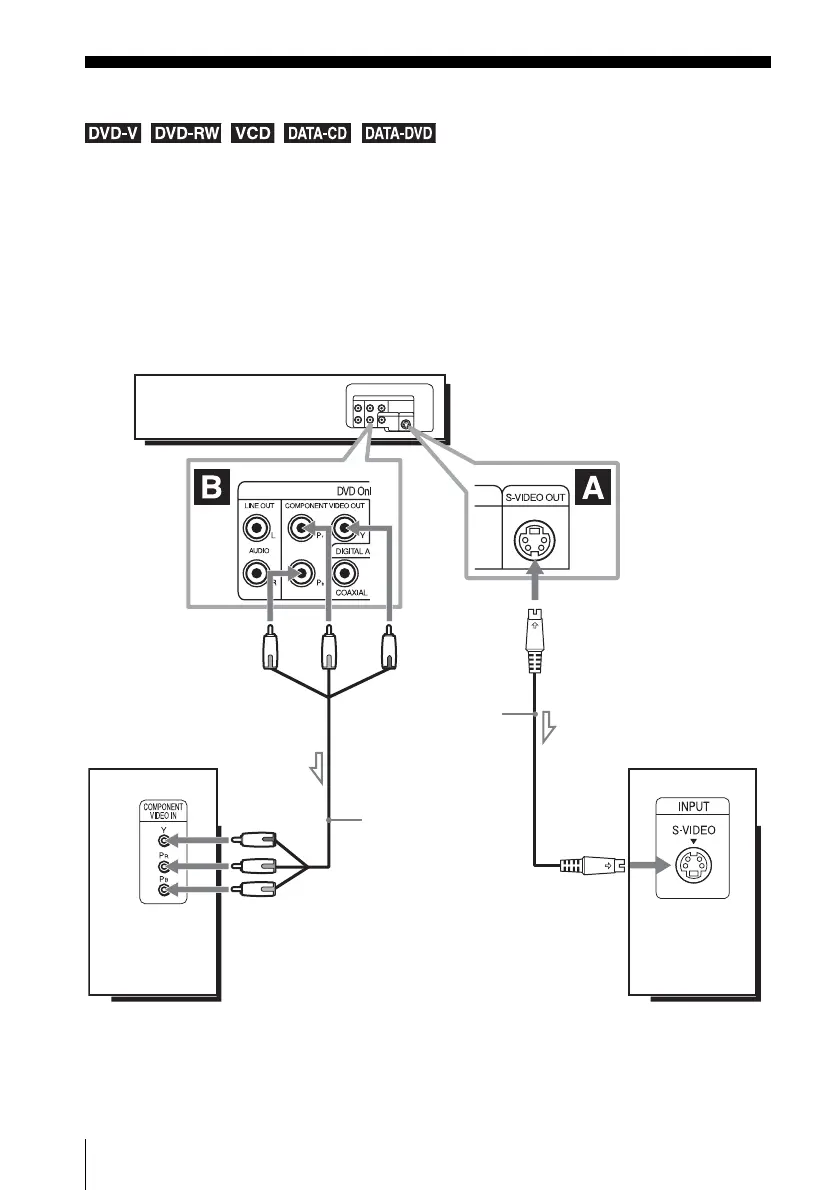
S-Video/Component Video hookup
Advanced Hookups
S-Video/Component Video hookup
Select one of the following patterns A or B, according to the input jack on your TV monitor,
projector, or AV amplifier (receiver). You can enjoy higher quality images when playing DVDs.
Make audio connections using the LINE OUT AUDIO L/R jacks or DIGITAL AUDIO OUT
(COAXIAL) jacks on the right side of the DVD-VCR when you use S-VIDEO/Component
Video hookup. See page 32 for audio connections.
If your TV accepts progressive (480p) format signals, you must use the connection B.
l : Signal flow
(DVD only)
TV
S-VIDEO cord
(not supplied)
DVD-VCR
to S-VIDEO OUT
Component video cord
(not supplied)
(green)
(blue)
(green)
(blue) (red)
(red)
TV
to COMPONENT
VIDEO OUT














 To Next Page