78
US
Playing an MP3 audio track
Playing an MP3 audio track
You can play back DATA CDs (CD-ROMs/
CD-Rs/CD-RWs) or DATA DVDs (DVD-
ROMs/DVD+RWs/DVD+Rs/DVD-RWs/
DVD-Rs) recorded in MP3 (MPEG1 Audio
Layer 3) format.
Before you start…
•Set TV
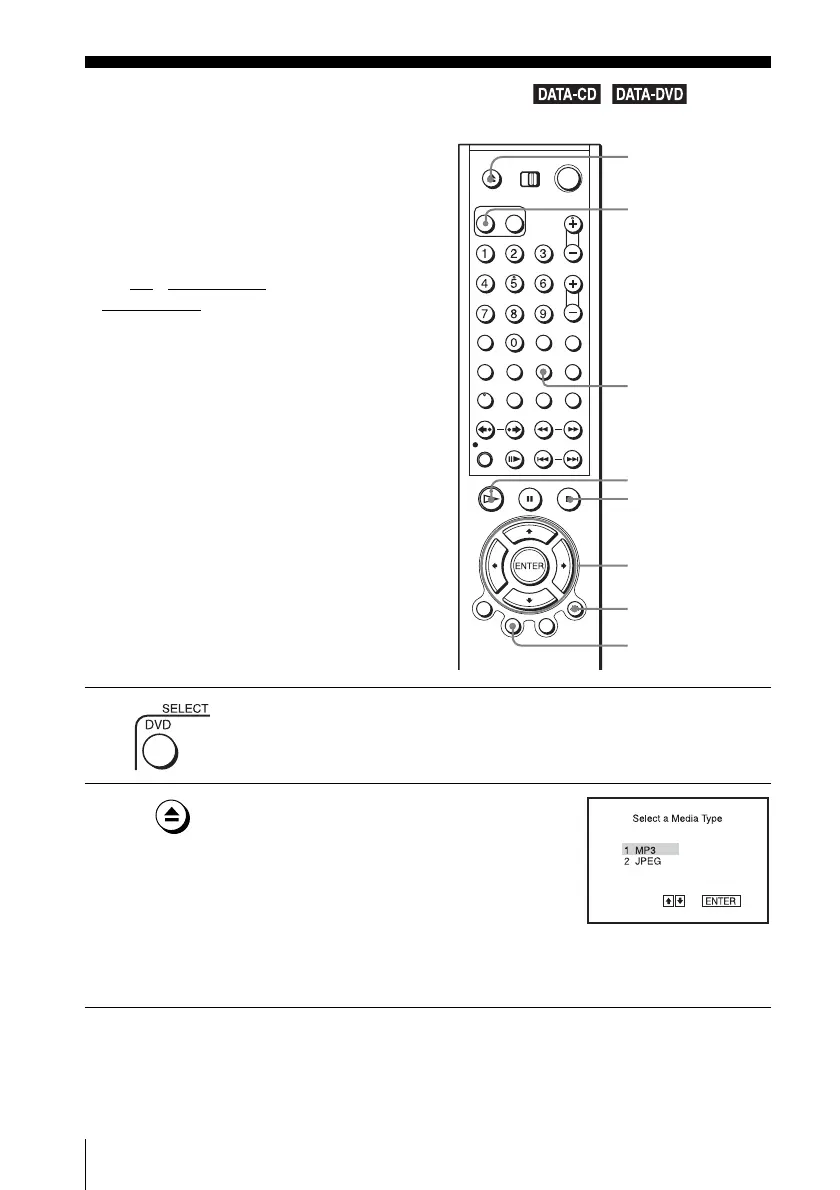
/ DVD·VIDEO switch to
DVD·VIDEO
on the remote.
1
Press SELECT DVD to control the DVD player.
2
Press Z and place a DATA CD or DATA DVD
on the disc tray, then press Z to close the tray.
When you load a DATA CD or DATA DVD
which contains MP3 audio tracks and JPEG
image files, “Select a Media Type” menu
appears.
If you load a DATA CD or DATA DVD which
contains only MP3 audio files, the MP3 display appears. Then you can skip
step 3.
V/v/B/b
ENTER
H PLAY
O RETURN
Z
REPEAT
x STOP
TOP MENU
SELECT DVD



 To Next Page