EasyManua.ls Logo

Sony SLV-E170EE - Page 103

Sony SLV-E170EE
116 pages
Print Icon
To Next Page IconTo Next Page
To Previous Page IconTo Previous Page
Loading...
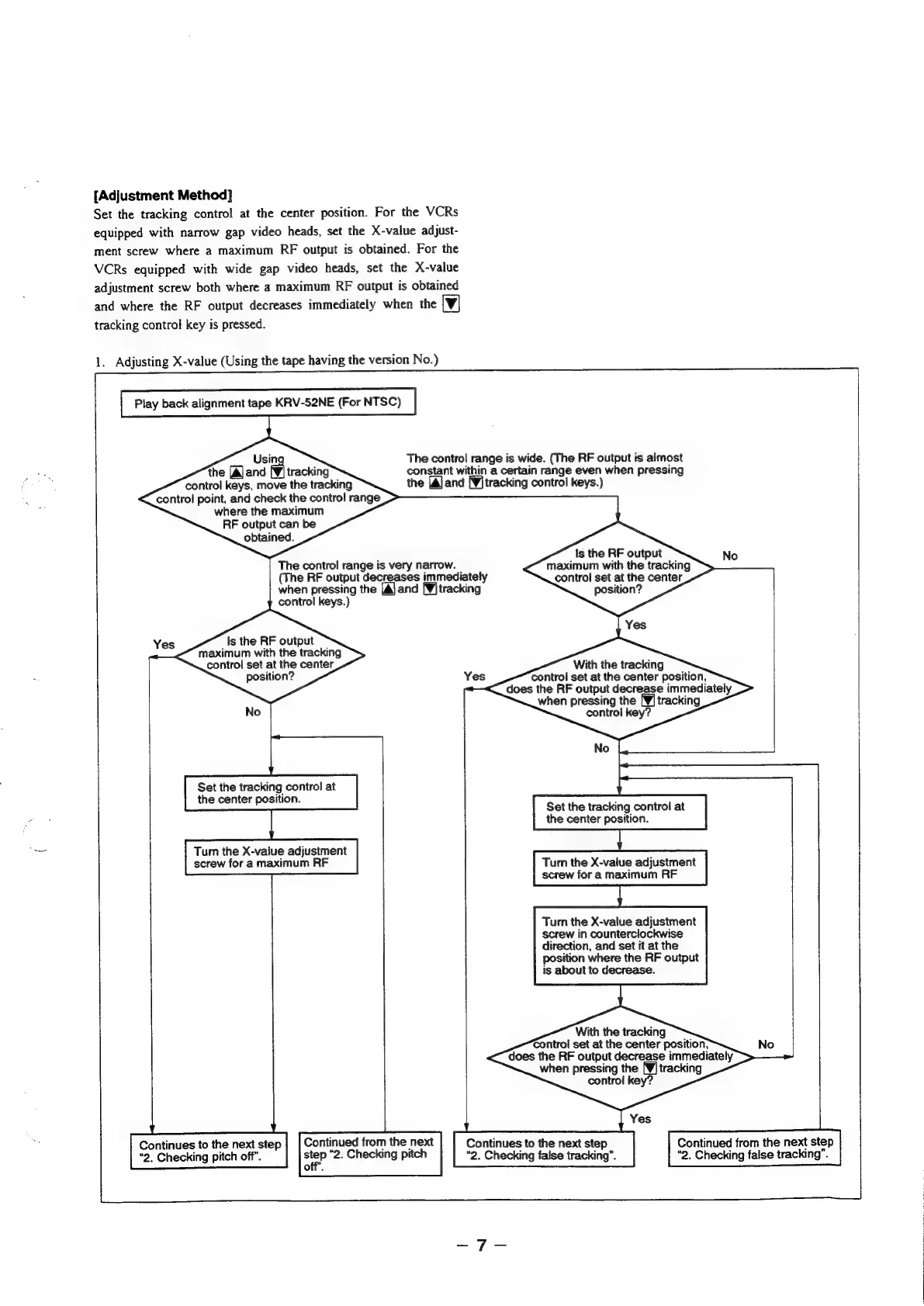
{Adjustment
Method]
Set
the
tracking
control
at
the
center
position.
For
the
VCRs
equipped
with
narrow
gap
video
heads,
set
the
X-value
adjust-
ment
screw
where
a
maximum
RF
output
is
obtained.
For
the
VCRs
equipped
with
wide
gap
video
heads,
set
the
X-value
adjustment
screw
both
where
a
maximum
RF
output
is
obtained
and
where
the
RF
output
decreases
immediately
when
the
[Vv]
tracking
control
key
is
pressed.
1.
Adjusting
X-value
(Using
the
tape
having
the
version
No.)
Play
back
alignment
tape
KRV-52NE
(For
NTSC)
Usin
the
[Ajand
[¥]
tracking
control
keys,
move
the
tracking
control
point,
and
check
the
control
range
where
the
maximum
RF
output
can
be
obtained.
The
contro!
range
is
very
narrow.
control
keys.)
Is
the
RF
output
maximum
with
the
tracking
control
set
at
the
center
position?
Yes
Tum
the
X-vaiue
adjustment
screw
for
a
maximum
RF
No
Set
the
tracking
contro!
at
the
center
position.
(The
RF
output
decreases
immediately
when
pressing
the
[A] and [¥]
tracking
Continues
to
the
next
step
|
|
Continued
from
the
next
Continues
to
the
next
step
“9.
Checking
pitch
off”.
2.
Checking
pitch
“2.
Checking
false
tracking”.
off”.
The
control
range
is
wide.
(The
RF
output
is
almost
constant
within
a
certain
range
even
when
pressing
the
[A]and
[¥]tracking
control
keys.)
ts
the
RF
output
maximum
with
the
tracking
control
set
at
the
center
position?
No
With
the
tracking
control
set
at
the
center
position,
does
the
RF
output
decrease
immediately
when
pressing
the
[¥]
tracking
control
key?
Yes
Set
the
tracking
control
at
the
center
position.
Turn
the
X-value
adjustment
screw
for
a
maximum
|
nN
Turn
the
X-value
adjustment
screw
in
counterclockwise
direction,
and
set
it
at
the
position
where
the
RF
output
is
about
to
decrease.
With
the
tracking
Control
set
at
the
center
position,
does
the
RF
output
decrease
immediately
when
pressing
the
[¥]
tracking
control
key?
Yes
Continued
from
the
next
step
“2.
Checking
false
tracking”.

Table of Contents

Related product manuals