EasyManua.ls Logo

Sony SLV-E170EE - Page 104

Sony SLV-E170EE
116 pages
Print Icon
To Next Page IconTo Next Page
To Previous Page IconTo Previous Page
Loading...
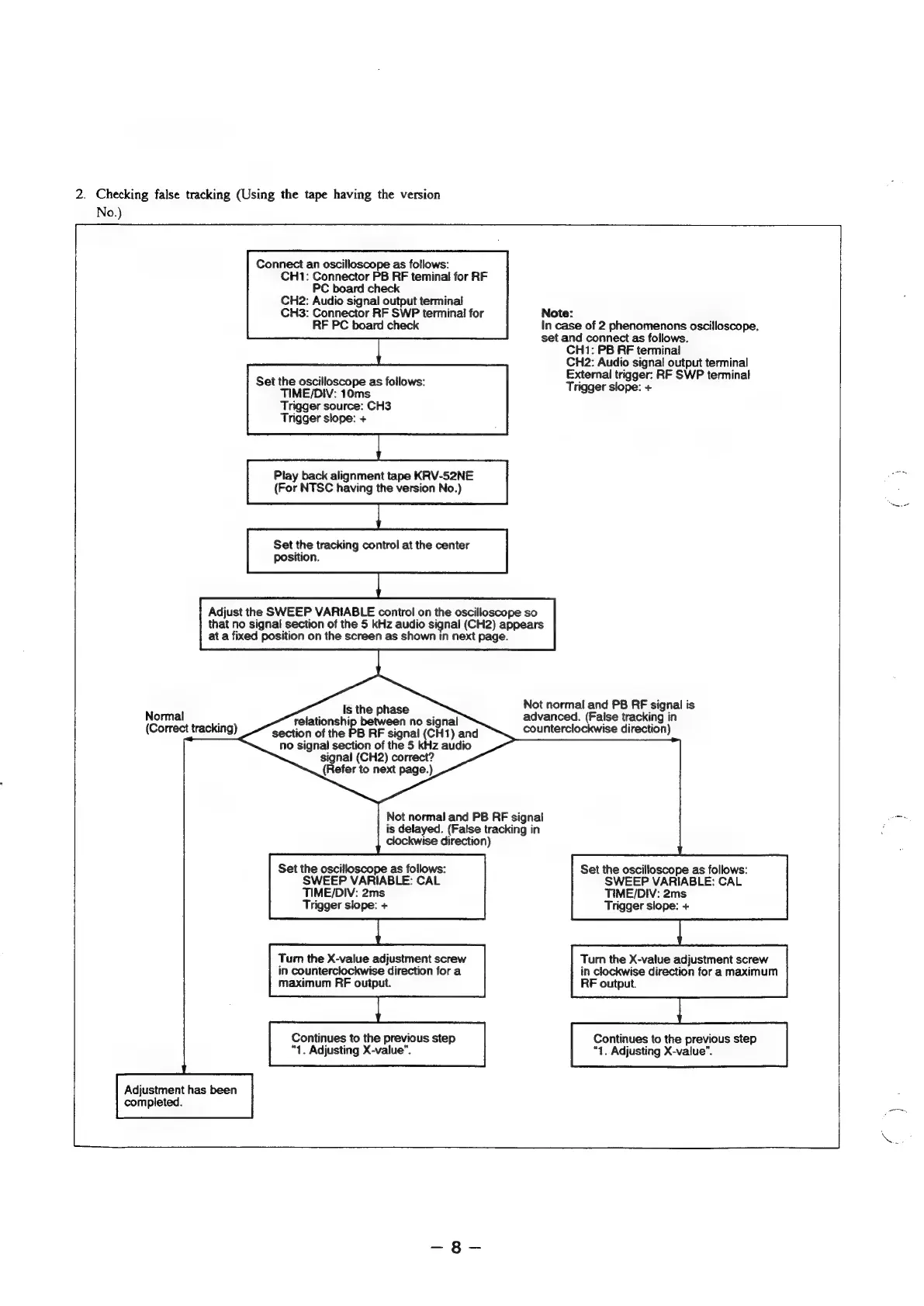
2.
Checking
false
tracking
(Using
the
tape
having
the
version
No.)
Connect
an
oscilloscope
as
follows:
CH1:
Connector
PB
RF
teminal
for
RF
PC
board
check
CH2:
Audio
signal
output
terminal
CH3:
Connector
RF
SWP
terminal
for
RF
PC
board
check
Note:
In
case
of
2
phenomenons
oscilloscope,
set
and
connect
as
follows.
CH1:
PB
FF
terminal
CH2:
Audio
signal
output
terminal
External
trigger:
RF
SWP
terminal
Trigger
slope:
+
Set
the
oscilloscope
as
follows:
TIME/DIV:
10ms
Trigger
source:
CH3
Trigger
slope:
+
Adjust
the
SWEEP
VARIABLE
control
on
the
oscilloscope
so
Play
back
alignment
tape
KRV-52NE
(For
NTSC
having
the
version
No.)
Set
the
tracking
control
at
the
center
position.
that
no
signal
section
of
the
5
kHz
audio
signal
(CH2)
appears
at
a
fixed
position
on
the
screen
as
shown
in
next
page.
Not
normal
and
PB RF
signal
is
advanced.
(False
tracking
in
counterclockwise
direction)
Is
the
phase
relationship
between
no
signal
section
of
the
PB
RF
signal
(CH1)
and
no
signal
section
of
the
5
kHz
audio
signal
(CH2)
correct?
{Refer
to
next
page.)
Normal
(Correct
tracking)
Not
normal
and
PB FF
signal
Bee
is
delayed.
(False
tracking
in
clockwise
direction)
Set
the
oscilloscope
as
follows:
SWEEP
VARIABLE:
CAL
TIME/DIV:
2ms
Trigger
slope:
+
Tum
the
X-value
adjustment
screw
in
counterclockwise
direction
for
a
maximum
RF
output.
Continues
to
the
previous
step
“1.
Adjusting
X-value”.
Adjustment
has
been
completed.
Set
the
oscilloscope
as
follows:
SWEEP
VARIABLE:
CAL
TIME/DIV:
2ms
Trigger
slope:
+
Tum
the
X-value
adjustment
screw
in
clockwise
direction
fora
maximum
RF
output.
Continues
to
the
previous
step
“1.
Adjusting
X-value”.

Table of Contents

Related product manuals