EasyManua.ls Logo

Sony SLV-E170EE - Page 5

Sony SLV-E170EE
116 pages
Print Icon
To Next Page IconTo Next Page
To Previous Page IconTo Previous Page
Loading...
SECTION
1
SLV-E170EE/E170EG/E320EE/E470EE/E470EG
This
section
is
extracted
GENERAL
from
instruction
manual.
Getting
Started
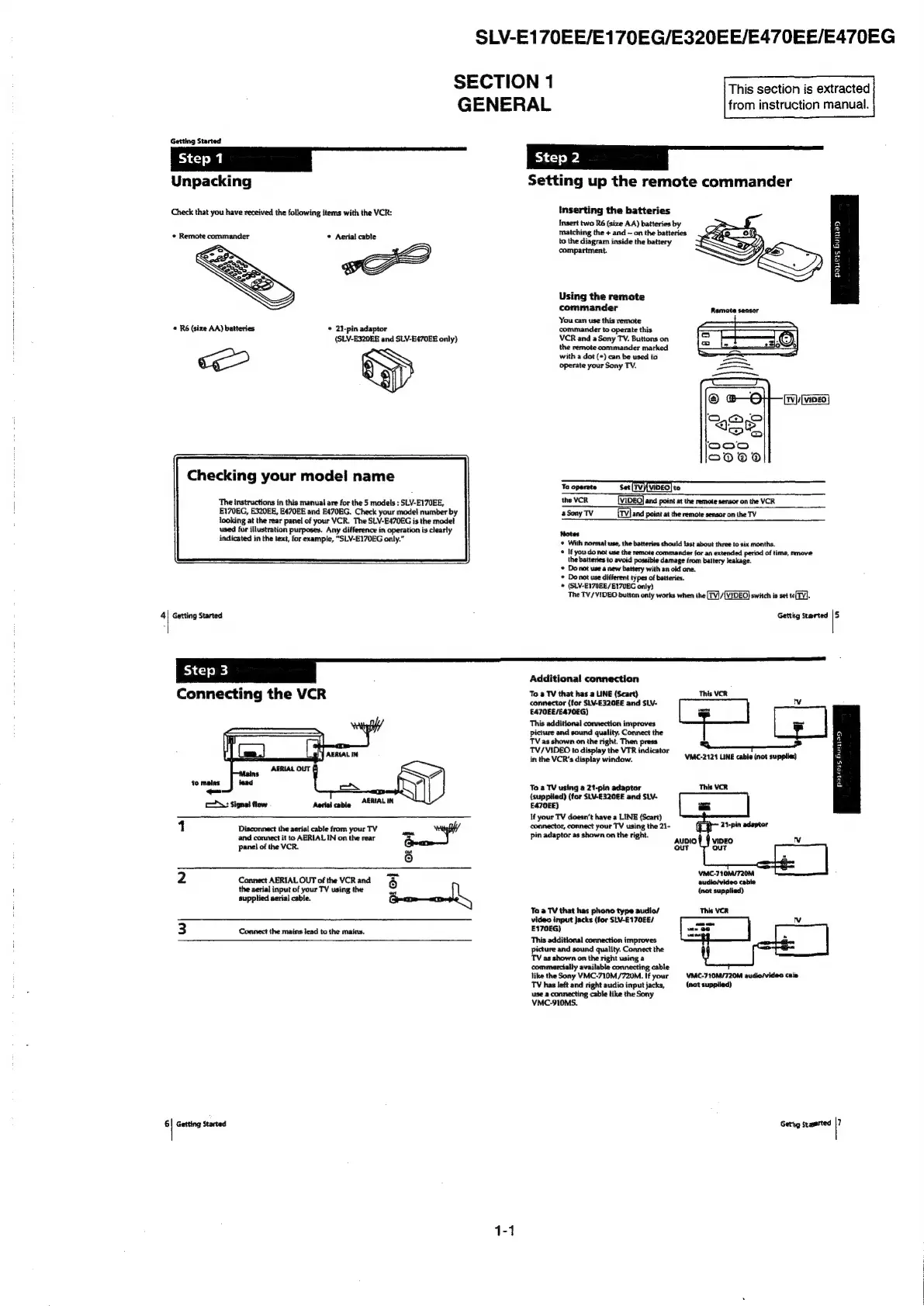
Unpacking
Check
that
you
have
received
the
following
items
with
the
VCR:
¢
Remote
commander
¢
Aerial
cable
«
R6
(size
AA)
batteries
*
21-pin
adaptor
(SLV-E320E8
and
SLV-E470EE
only)
<—
Checking
your
model
name
The
instructions
in
this
manual
are for
the
5
models
:
SLV-E170EE,
E170EG,
E320EE,
E470EE
and
E470EG.
Check
your
model
number
by
looking
at
the
rear
panel
of
your
VCR.
The
SLV-E470EG
is
the
model
used
for
illustration
purposes.
Any
difference
in
operation
is
clearly
indicated
in
the
text,
for
example,
“SLV-E170EG
only.”
‘|
Getting
Started
=k
_
@#&7&
Setting
up
the
remote
commander
Inserting
the
batteries
Insert
two
R6
(size
AA)
batteries
by
matching
the
+
and
~
on
the
batteries
to
the
diagram
inside
the
battery
compartment.
payers
Buiay
Using
the
remote
commander
You
can
use
this
remote
commander
to
operate
this
VCR
and
a
Sony
TV.
Buttons
on
the
remote
commander
marked
with
a
dot
(*)
can
be
used
to
operate
your
Sony
TV.
the
VCR
[VIDEO]
and
point
at
the
remote sensor
on
the
VCR
aSony
TV
[Tv]
and
point
at
the
remote
sensor
on
the
TV
Notes
¢
With
normal
use,
the
batteries
should
last
about
three
to
six
months.
*
Ifyou
do
not
use the
remote
commander
for
an
extended
period
of
time,
remove
the
batteries
to
avoid
possible
damage
from
battery
leakage.
©
Do
not use
a
new
battery
with
an
old
one.
*
Do
not
use
different
types
of
batteries.
*
(SLV-E170EE/E17VEG
only)
The
TV/VIDEO
button
only
works
when
the
[TV]/{VIDEO)
switch
is
set
to(TV].
Getting
Started
i
[step3
Additional
connection
Connecting
the
VCR
AERIAL
IN
as
s
to
malas
TA:
Signal
flow
Aactal
cable
AERIALIN
1
Disconnect
the
aerial
cable
from
your
TV
iis
and
connect
it
to
AERIAL
IN
on
the
rear
>
panel
of
the
VCR.
ah
10]
2
Connect
AERIAL
OUT
of
the
VCRand
the
aerial
input
of
your
TV
using
the
supplied
aerial cable.
oe
3
Connect
the
mains
lead
to
the
mains.
6|
Getting
started
To
a
TV
that
has
a
LINE
(Scart)
This
VCR
connector
(for
SLV-E320EE
and
SLV-
Iv
E470EE/E470EG)
This
additional
connection
improves
picture
and
sound
quality.
Connect
the
TV
as
shown
on
the
right.
Then
press
RQ
pp
TV/VIDEO
to
display
the
VTR
indicator
in
the
VCR's
display
window.
VMC-2121
LINE
cable
(not
supplies!)
in}
®
3
a
w
a
a
a
To
a
TV
using
a
21-pin
adaptor
(supptied)
(for
SLV-E320€E
and
SLV-
E470EE)
If
your
TV
doesn’t
have
a
LINE
(Scart)
connector,
connect
your
TV
using
the 21-
pin
adaptor
as
shown
on
the
right.
AUDIO
VIDEO
v
out
our
VMC-710M/720M
sudio/video
cable
(not
supplied)
To
a
TV
that
has
phono
type
audio/
This
VCR
video
input
Jacks
(for
SLV-E170EE/
v
E170EG)
This
additional
connection
improves
picture
and
sound
quality.
Connect
the
TV
as
shown
on
the
right
using
2
commercially
available
connecting
cable
like
the
Sony
VMC-710M/720M.
If
your
VMC-710M/720M
audio/video
cals
TV
has
left
and
right
audio
input
jacks,
(not
supplied)
use
a
connecting
cable
like
the
Sony
VMC-910MS.
Gettig
Started
|7

Table of Contents

Related product manuals