EasyManua.ls Logo

Sony SLV-E170EE - Page 6

Sony SLV-E170EE
116 pages
Print Icon
To Next Page IconTo Next Page
To Previous Page IconTo Previous Page
Loading...
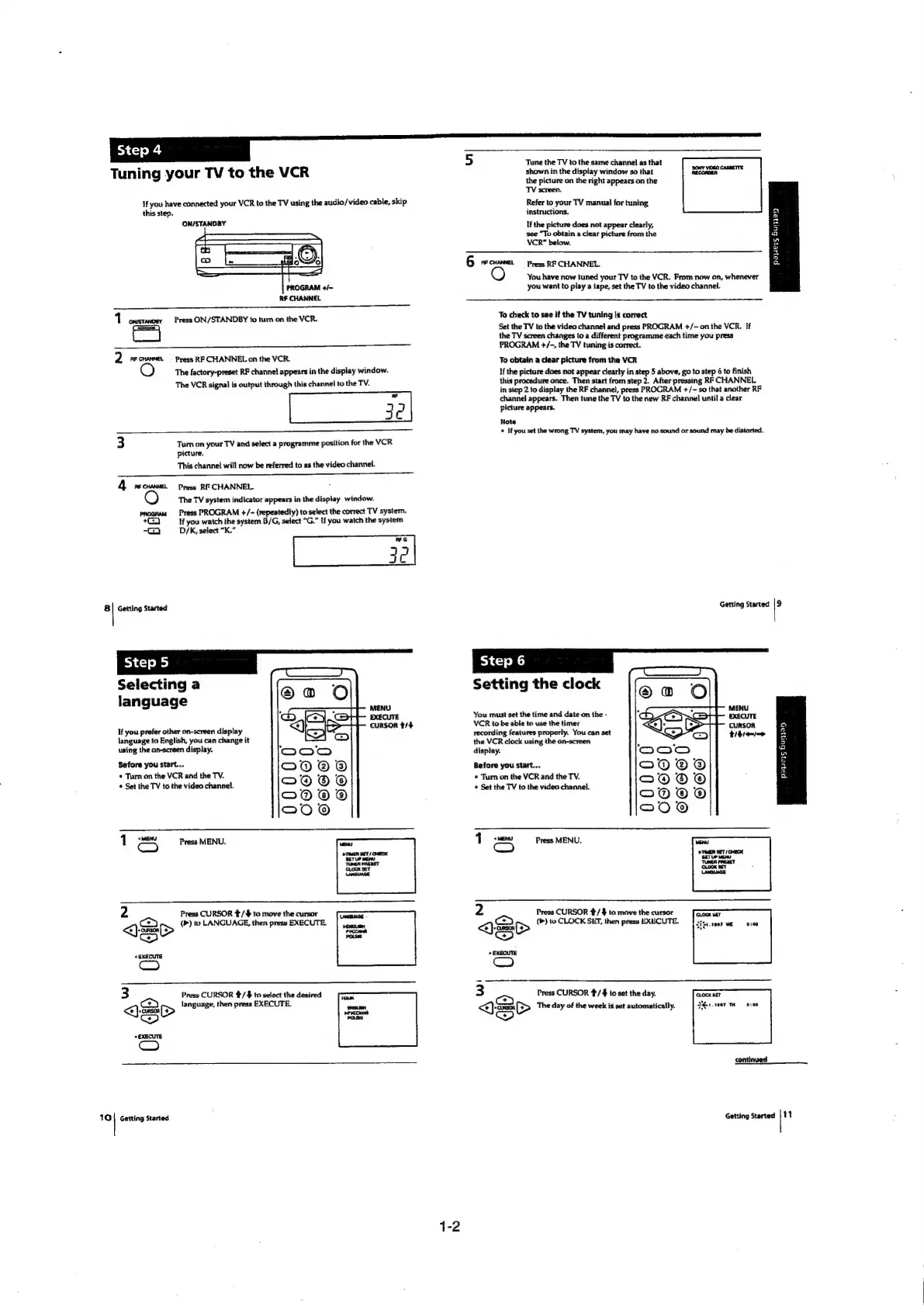
[step4
Tune
the
TV
to
the
same
channel
as
that
Tuning
your
TV
to
the
VCR
If
you
have
connected
your
VCR
to
the
TV
using
the
audio/video
cable,
skip
this
step.
ON/STANDBY
RF
CHANNEL
11
castavosy
Press
ON/STANDBY
to
tum
on
the
VCR.
2
RF
CHANNEL
~—
Press
RF
CHANNEL
on
the
VCR.
The
factory-preset
RF
channet
appears
in
the
display
window.
The
VCR
signal
is
output
through
this
channel
to
the
TV.
nn
3
Tum
on
your
TV
and
select
a
programme
position
for
the
VCR
picture,
This
channel
will
now
be
referred
to
as
the
video
channel.
vn
RC
4
recunnes
Press
RF
CHANNEL
The
TV
system
indicator
appears
in
the
display
window.
Press
PROGRAM
+/-
(repeatedly)
to
select
the
correct
TV
system.
+)
If
you
watch
the
system
B/G,
select
“G.”
If
you
watch
the
system
2
D/K,
select
“K.”
C7
3
o
my
8
|
Getting
Started
Selecting
a
language
MENU
EXECUTE
mR
ti:
If
you
prefer
other
on-screen
display
cursor
#/4
language
to
English,
you
can
change
it
using
the
on-screen
display.
Before
you
start...
*
Tarn
on
the
VCR
and
the
TV.
*
Set
the
TV
to
the
video
channel.
oe
Press
MENU.
(om)
2
Press
CURSOR
t/#
to
move
the
cursor
aaa
(<a)
(>)
to
LANGUAGE,
then
press
EXECUTE.
|
cue
<)>
Pycciaet
Pose
«EXECUTE
(om)
3
Press
CURSOR
/
$
to
select
the
desired
mame
Cc
language,
then
press
EXECUTE.
‘iia
<)>
cn
vos
EXECUTE
(em)
101}
Getting
Started
6
RE
CHANNEL
Press
RF
CHANNEL.
shown
in
the
display
window
so
that
mc
the
picture
on
the
right
appears
on
the
TV
screen.
Refer
to
your
TV
manual
for
tuning
instructions,
If
the
picture
does
not
appear
clearly,
see
“To
obtain
a
clear
picture
from
the
VCR”
below.
payers
Bupay
You
have
now
tuned
your
TV
to
the
VCR.
From
now
on,
whenever
you
want
to
play
a
tape,
set
the
TV
to
the
video
channel.
To
check
to
see
if
the
TV
tuning
js
correct
Set
the
TV
to
the
video
channel
and
press
PROGRAM
+/-
on
the
VCR.
If
the
TV
screen
changes
to
a
different
programme
each time
you
press
PROGRAM
+/-,
the
TV
tuning
is
correct.
To
obtain
a
clear
picture
from
the
VCR
If
the
picture
does
not
appear
clearly
in
step
5
above,
go
to
step
6
to
finish
this
procedure
once.
Then
start
from
step
2.
After
pressing
RF
CHANNEL
in
step
2
to
display
the
RF
channel,
press
PROGRAM
+/-
so
that
another
RF
channel
appears.
Then
tune
the
TV
to
the
new
RF
channel
until
a
clear
picture
appears.
Note
©
If
you
set
the
wrong
TV
system,
you
may
have
no
sound
or
sound
may
be
distorted.
Getting
Started
i
Setting
the
clock
You
must
set
the
time
and
date
on
the
-
ee
VCR
to
be
able
to
use
the
timer
CURSOR
a
recording
features
properly.
You
can
set
tins
the
VCR
clock
using
the
on-screen
=)
display.
a4
Before
you
start...
5
*
Turn
on
the
VCR
and
the
TV.
a
*
Set the
TV
to
the
video
channel.
Press
MENU.
2
Press
CURSOR
#/4
to
move
the
cursor
a
(®)
to
CLOCK
SET,
then
press
EXECUTE.
<)
arse
S>
>)
*
EXECUTE
enn)
3
Press
CURSOR
#/
4
to
set
the
day.
“en
e
The
day
of
the
week
is
set
automatically.
eo
COCK
SET
SGrse07
oven
continued:
a
Getting
Started
|
11

Table of Contents

Related product manuals