EasyManua.ls Logo

Sony SLV-E170EE - Page 7

Sony SLV-E170EE
116 pages
Print Icon
To Next Page IconTo Next Page
To Previous Page IconTo Previous Page
Loading...
aca
ET
LR
ES
Step
6
:
Setting
the
clock
(continued)
ES
7
:
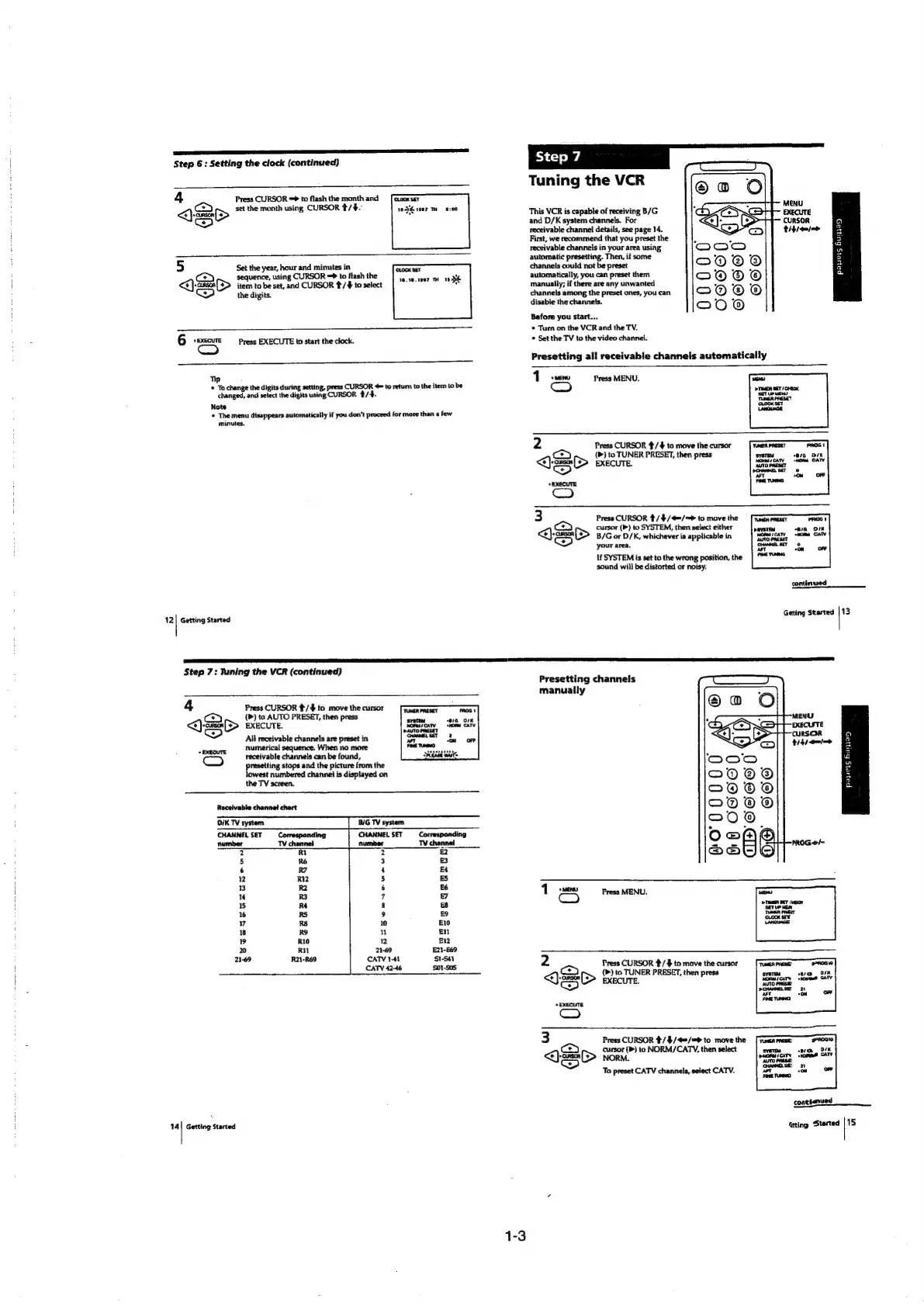
Tuning
the
VCR
:
4
Press
CURSOR
=
to
flash
the
month
and
[eocxser
ican
:
\Sei>
set
the
month
using
CURSOR
#/$.
1H
ser
Mm
o:00
This
VCR
is
capable
of
receiving
B/G
piccine
ix?)
and
D/K
system
channels.
For
CURSOR
Q
F
receivable
channel
details,
see
page
14.
thiemw
BB
i
First,
we
recommend
that
you
preset
the
=
:
receivable
channels
in
your
area
using
8
A
automatic
presetting.
Then,
if
some
a
5
Set
the
year,
hour
and
minutes
in
SLOcK
SEY.
channels
could
not
be
preset
a
sequence,
using
CURSOR
=
to
flash
the
fe)
ve.se.1087
183
automatically,
you
can
preset
them
cS
Qes>
item
to
be
set,
and
CURSOR
/¢#
to
select
manually;
if
there
are
any
unwanted
the
digits.
channels
among
the
preset
ones,
you
can
4
disable
the
channels.
}
Before
you
start...
*
Turn
on
the
VCR
and
the
TV.
e
6
*
EXECUTE
Press
EXECUTE
to
start
the
clock.
¢
Set
the
TV
to
the
video
channel.
Cc
Presetting
all
receivable
channels
automatically
Tip
1
ew
Press
MENU.
©
Ta
change
the
digits
during
setting,
press
CURSOR
4
to
return
to
the
item
to
be
changed,
and
select
the
digits
using
CURSOR
/4.
Note
*
The
menu
disappears
automatically
if
you
don’t
proceed
for
more
than
a
few
minutes.
2
Press
CURSOR
¢/4
to
move
the
cursor
PROG!
ce
(>)
to
TUNER
PRESET,
then
press
sverou
ara
OK
<Qj-cesn
(D>
EXECUTE.
cay
‘naa
Baty
<P)
Raters
oe
¥
*EXECUTE
3
Press
CURSOR
4/$/4=/=
to
move
the
[Faanmrasdr
ca
cursor
(>)
to
SYSTEM,
then
select
either
<{}-s#8
(D>
B/G
or
D/K,
whichever
ia
applicable
in
<>)
your
area.
If
SYSTEM
is
set
to
the
wrong
position,
the
sound
will
be
distorted
or
noisy.
continued
12|
Getting
Started
Geting
Started
fi
Step
7:
Tuning
the
VCR
(continued)
P
Presetting
channels
manually
4
Press
CURSOR
¢/$
to
move
the
cursor
Tmost
(<>)
(>)
to
AUTO
PRESET,
then
press
intel
alaoin
aS)
&
ee
sanopacses
AN
All
receivable
channels
are
preset
in
an
on
9
plenute
numerical
sequence.
When
no
more
Ea
om)
receivable
channels
can
be
found,
DOD
a
presetting
stops
and
the
picture
from
the
ae
2
lowest
numbered
channel
is
displayed
on
fone
O)
a
the
TV
screen.
oO
®@
®
&
Receivable
channel
chart
—)
@
DIK
TV
system
B/G
TV
system
200
‘é
5
CHANNEL
SET
Corresponding
CHANNEL
SET
Corresponding
oO
@
(+)
number
TV
channel
number
TV
channel
=
4
om
PROG-o/—
2
Rt
2
f]
eae)
5
RE
3
B
6
R?
4
£4
i
2
R12
5
ES
'
13
R2
6
56
MENU
RB
7
7
1
Cc
Press
MENU.
1s
R4
8
8
16
RS
9
£9
7
R8
1
El
8
RS
n
—n
9
R10
rR
El2
Pp)
RH
2-69
E21-£69
i
sd
ALR
Can
us
poles
2
Press
CURSOR
#/
4%
to
move
the
cursor
i
rt
(>)
to
TUNER
PRESET,
then
press
QO
(>
execute.
é
rd
+
EXECUTE
om)
cursor
(P)
to
NORM/CATY,
then
select
<)>
Norm.
To
preset
CATV
channels,
select
CATV.
conesanued
i
14]
Getting
Started
Gtting
Started
[15
1-3

Table of Contents

Related product manuals