EasyManua.ls Logo

Sony SLV-E170EE - Page 8

Sony SLV-E170EE
116 pages
Print Icon
To Next Page IconTo Next Page
To Previous Page IconTo Previous Page
Loading...
a
ES
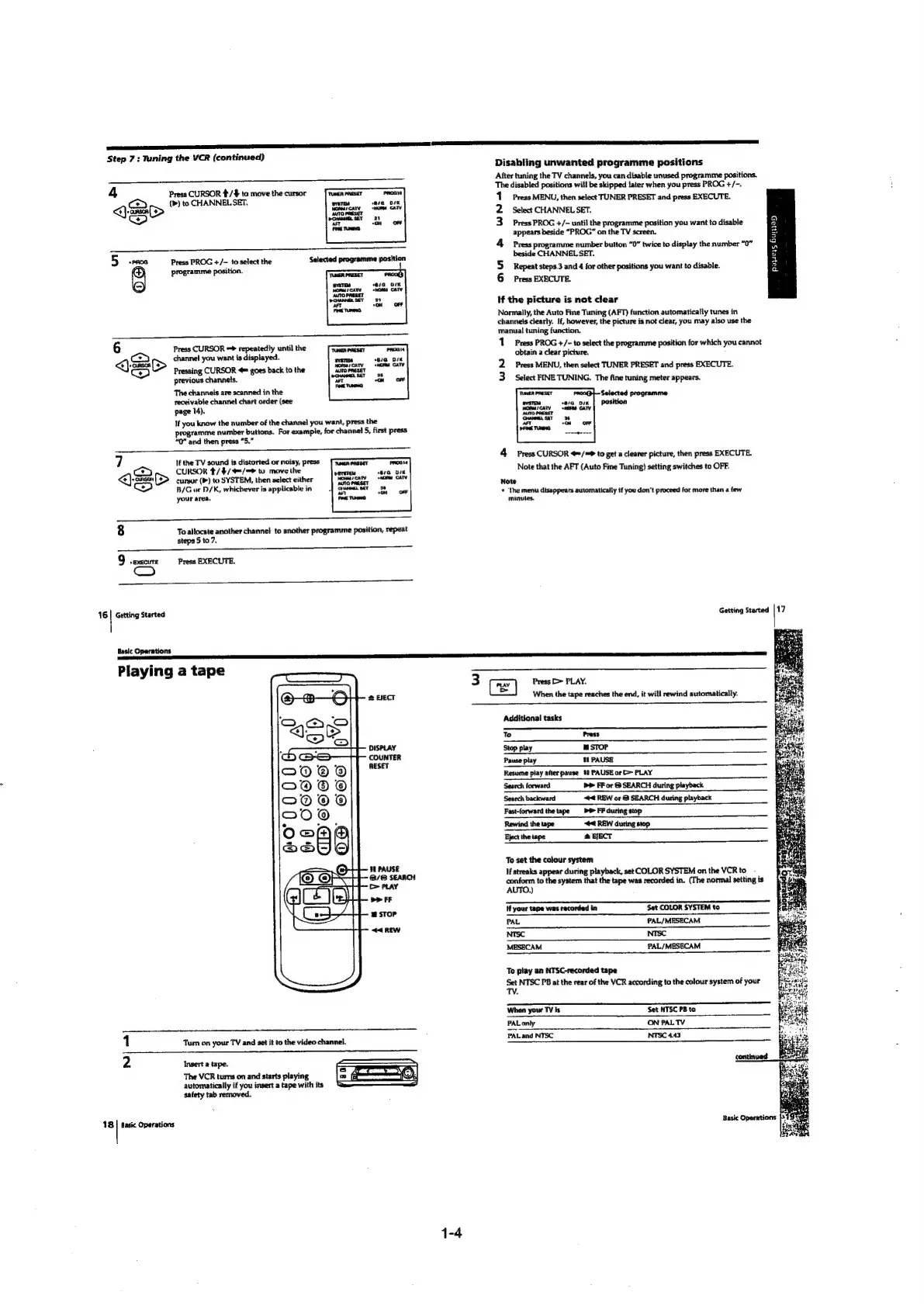
Step
7:
Tuning
the
VCR
(continued)
4
Press
CURSOR
/$
to
move
the
cursor
PROGIO
Q
cS
>
(>)
to
CHANNEL
SET.
‘wate
a,
ove
OO
Lota
a
Press
PROG
+/-
to
select
the
programme
position.
e/a
OK
enon
CATV
2
°ON
oF
6
Press
CURSOR
=>
repeatedly
until
the
Proate
Ce
>
channel
you
want
is
displayed.
ssa,
<>)
Pressing
CURSOR
4
goes
back
to
the
.
previous
channels.
at
wn
one
The
channels
are
scanned
in
the
receivable
channe!
chart
order
(see
page
14).
If
you
know
the
number
of
the
channel
you
want,
press
the
programme
number
buttons.
For
example,
for
channel
5,
first
press
“OQ”
and
then
press
“5.”
7
If
the
TV
sound
is
distorted
or
noisy,
press
Tan
enaseT
PROG
[ay
CURSOR
$/$/4=/=>
to
move
the
evista
sia.
wii
<<)
(>
curyor
(>)
to
SYSTEM,
then
select
either
snares
CAT
OC
B/G
or
D/K,
whichever
is
applicable
in
oe
your
area,
8
To
allocate
another channel
to
another
programme
position,
repeat
steps
5
to
7.
*
EXECUTE
Press
EXECUTE.
16
|
Getting
Started
Basic
Operations
pal
th
Playing
a
tape
@
BECT
DISPLAY
COUNTER
RESET
48
PAUSE
3/63
SEARCH
c
PLAY
>>
FF
m
STOP
<4
REW
1
Tum
on
your
TV
and
set
it
to
the
video
channel.
Insert
a
tape.
The
VCR
turns
on
and
starts
playing
automatically
if
you
insert
a
tape
with
its
safety
tab
removed.
———
Ta
———
18
|
Basic
Operations
3
(Ce)
Press
>>
PLAY.
=
When
the
tape
reaches
the
end,
it
will
rewind
automatically.
Disabling
unwanted
programme
positions
After
tuning
the
TV
channels,
you
can
disable
unused
programme
positions.
The
disabled
positions
will
be
skipped
tater
when
you
press
PROG
+/-.
Press
MENU,
then
select
TUNER
PRESET
and
press
EXECUTE.
Select
CHANNEL
SET.
Press
PROG
+/-
until
the
programme
position
you
want
to
disable
appears
beside
“PROG”
on
the
TV
screen.
Press
programme
number
button
“0”
twice
to
display
the
number
“0”
beside
CHANNEL
SET.
Repeat
steps.3
and
4
for
other
positions
you
want
to
disable.
Press
EXECUTE.
in}
®
2
3
oa
at
a
a
2
a
ou
&
WN
If
the
picture
is
not
clear
Normally,
the
Auto
Fine
Tuning
(AFT)
function
automatically
tunes
in
channels
clearly.
If,
however,
the
picture
is
not
clear,
you
may
also
use
the
manual
tuning
function.
1
Press
PROG
+/-
to
select
the
programme
position
for
which
you
cannot
obtain
a
clear
picture,
2
Press
MENU,
then
select
TUNER
PRESET
and
press
EXECUTE.
3
Select
FINE
TUNING.
The
fine
tuning
meter
appears.
ara
DIK
nora
CATV
+ON
OF
aeweenne,
4
Press
CURSOR
4=/=
to
get
a
clearer
picture,
then
press
EXECUTE.
Note
that
the
AFT
(Auto
Fine
Tuning)
setting
switches
to
OFF.
Note
©
‘The
menu
disappears
automatically
if
you
don’t
proceed
for
more
than
a
few
minutes.
Getting
Started
|
17
Additional
tasks
To
Press
Stop
play
mw
STOP
Pause
play
11
PAUSE
Resume
play
after
pause
#8
PAUSE
or
>
PLAY
Search
forward
D>
FF
or
&
SEARCH
during
playback
Search
backward
#4
REW
or
@
SEARCH
during
playback
Fast-forward
thetape
>
FF
during
stop
Rewind
the
tape
#4
REW
during
stop
Eject
the
tape
@
EJECT
To
sat
the
colour
system
If
streaks
appear
during
playback,
set
COLOR
SYSTEM
on
the
VCR
to
conform
to
the
system
that
the
tape
was
recorded
in.
(The
normal
setting
is
AUTO.)
Hf
your
tape
was
recorded
in
Set
COLOR
SYSTEM
to
PAL
PAL/MESECAM
NTSC
NTSC
MESECAM
PAL/MESECAM
To
play
an
NTSC-recorded
tape
Set
NTSC
PB
at
the
rear
of
the
VCR
according
to
the
colour
system
of
your
TV.
ee
When
your
TV
is
Set
NTSC
PB
to
PALonly
ON
PALTV
PALand
NTSC
NTSC
4.43

Table of Contents

Related product manuals