EasyManua.ls Logo

Sony SPP-A250 - Page 11

Sony SPP-A250
86 pages
Print Icon
To Next Page IconTo Next Page
To Previous Page IconTo Previous Page
Loading...
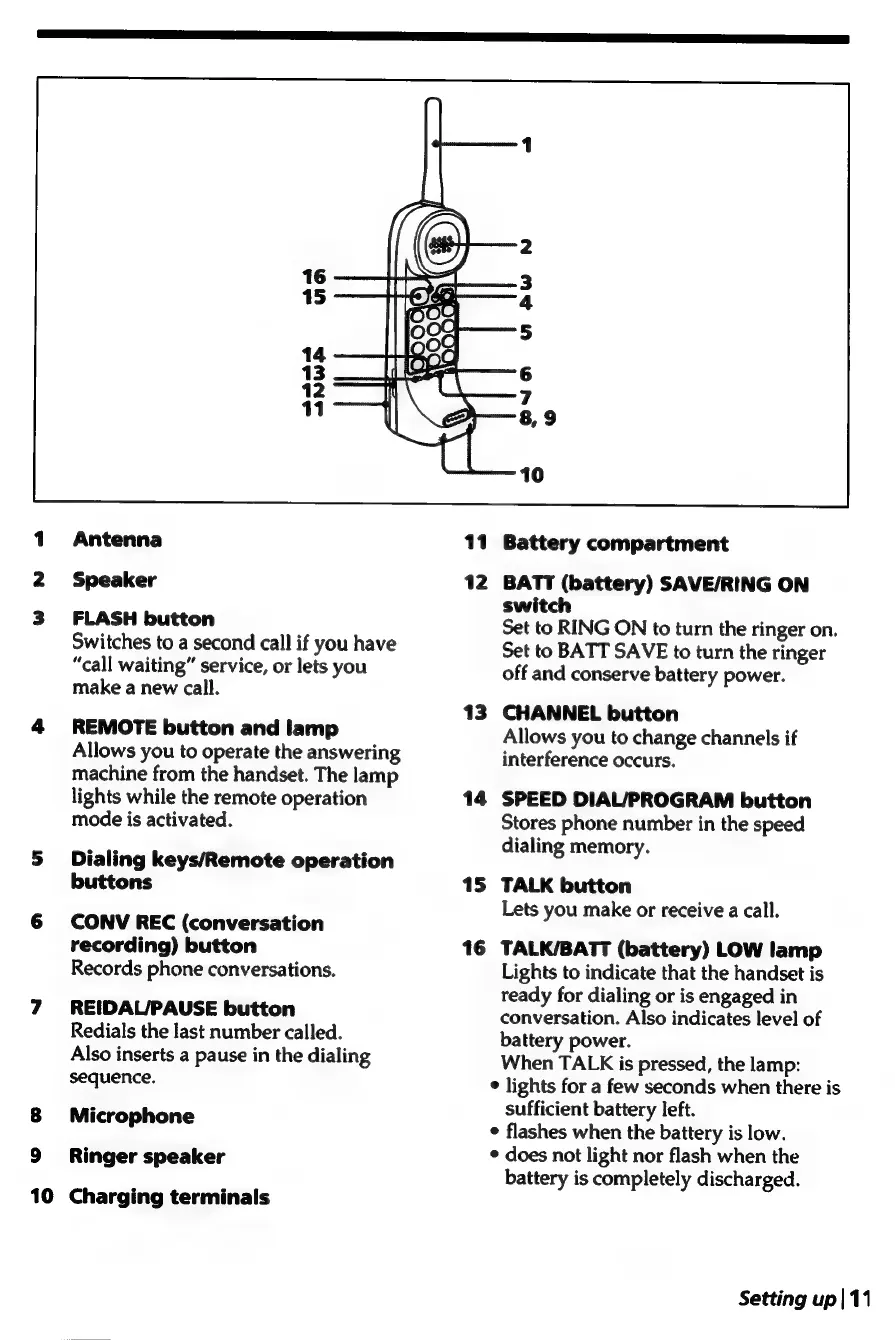
Antenna
Speaker
FLASH
button
Switches
to
a
second
call
if
you
have
“call
waiting”
service,
or
lets
you
make
a
new
call.
REMOTE
button
and
lamp
Allows
you
to
operate
the
answering
machine
from
the
handset.
The
lamp
lights
while
the
remote
operation
mode
is
activated.
Dialing
keys/Remote
operation
buttons
CONV
REC
(conversation
recording)
button
Records
phone
conversations.
REIDAL/PAUSE
button
Redials
the
last
number
called.
Also
inserts
a
pause
in
the
dialing
sequence.
Microphone
Ringer
speaker
10
Charging
terminals
13
14
15
16
Battery
compartment
BATT
(battery)
SAVE/RING
ON
switch
Set
to
RING
ON
to
turn
the
ringer
on.
Set
to
BATT
SAVE
to
turn
the
ringer
off
and
conserve
battery
power.
CHANNEL
button
Allows
you
to
change
channels
if
interference
occurs.
SPEED
DIAL/PROGRAM
button
Stores
phone
number
in
the
speed
dialing
memory.
TALK
button
Lets
you
make
or
receive
a
call.
TALK/BATT
(battery)
LOW
lamp
Lights
to
indicate
that
the
handset
is
ready
for
dialing
or
is
engaged
in
conversation.
Also
indicates
level
of
battery
power.
When
TALK
is
pressed,
the
lamp:
¢
lights
for
a
few
seconds
when
there
is
sufficient
battery
left.
¢
flashes
when
the
battery
is
low.
¢
does
not
light
nor
flash
when
the
battery
is
completely
discharged.
Setting
up|
11

Table of Contents

Related product manuals