EasyManua.ls Logo

Sony SPP-A250 - Operating the Answering Machine from the Handset

Sony SPP-A250
86 pages
Print Icon
To Next Page IconTo Next Page
To Previous Page IconTo Previous Page
Loading...
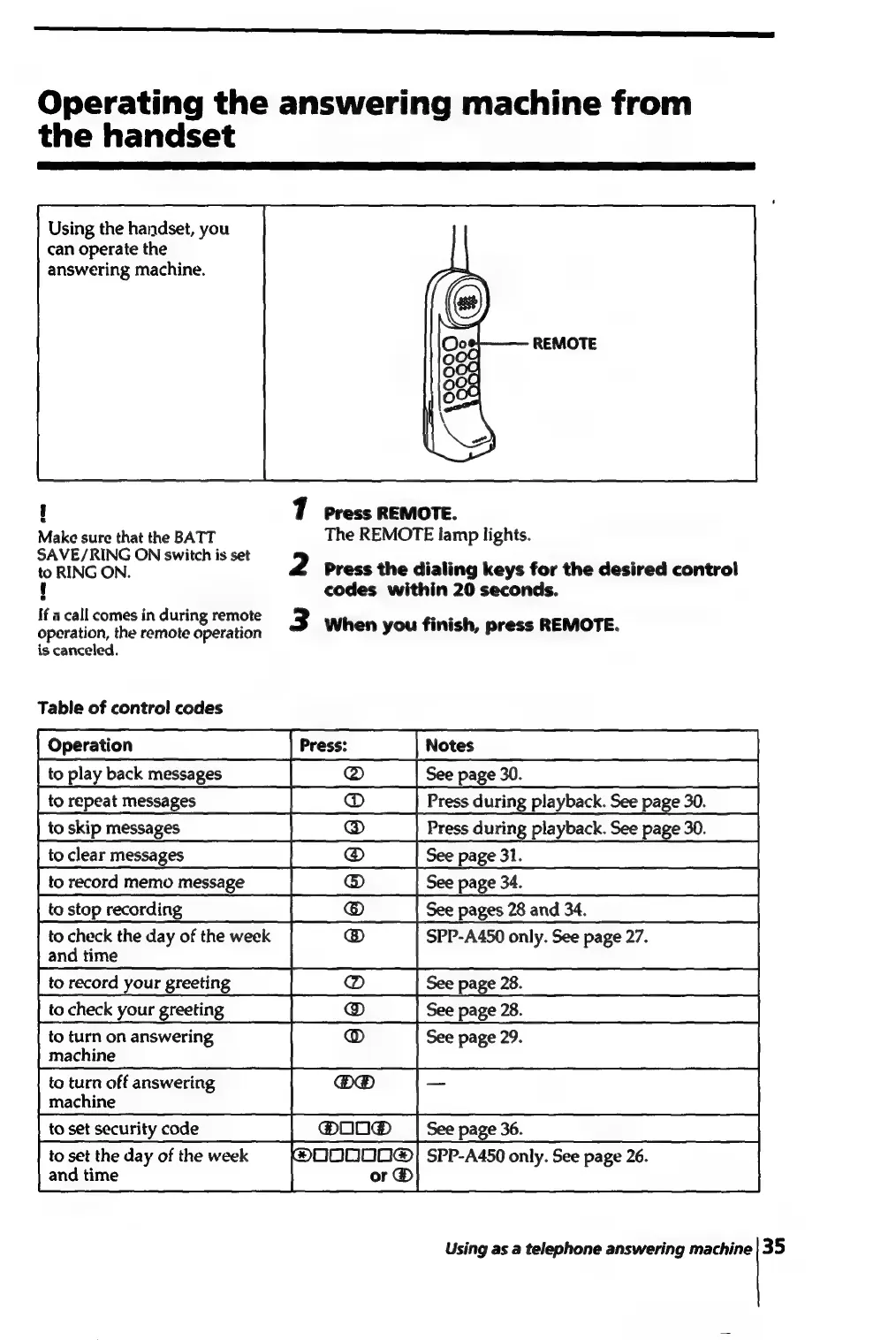
Operating
the
answering
machine
from
the
handset
Using
the
handset,
you
can
operate
the
answering
machine.
!
7
press
REMOTE.
Make
sure
that
the
BATT
The
REMOTE
lamp
lights.
SAVE/RING
ON
switch
is
set
to
RING
ON.
eee
pe
2
press
the
dialing
keys
for
the
desired
control
{
codes
within
20
seconds.
If
a
call
comes
in
during
remote
3
When
you
finish,
press
REMOTE
operation,
the
remote
operation
is
canceled.
Table
of
control
codes
[Operation
__——~i(Press——=i[notee
SSCS
to
play
back
messages
|
@
|Seepage3.
Cid
|torepeatmessages
||
=
DC
Press
during
playback.
Seepage
30.
saapmanage
|
co]
Pres
during
playback
See
page
30.
to
clear
messages
|
@
|Seepage31.
sd
io
record
memo
messnge
|
@)
|
Seepage
to
stop
recording
|
__—({Seepages2and34.
|
@
to
check
the
day
of
the
week
SPP-A450
only.
See
page
27.
@
and
time
to
record
your
greeting
to
check
your
greeting
to
turn
on
answering
La
See
page
29.
machine
machine
to
set
security
code
@®OO@®
_|
See
page
36.
to
set
the
day
of
the
week
@®D0000@|
SPP-A450
only.
See
page
26.
and
time
or
®
Using
as
a
telephone
answering
machine|35

Table of Contents

Related product manuals