EasyManua.ls Logo

Sony SPP-A250 - Page 37

Sony SPP-A250
86 pages
Print Icon
To Next Page IconTo Next Page
To Previous Page IconTo Previous Page
Loading...
__
SSS
a
aa
a
ee
ry
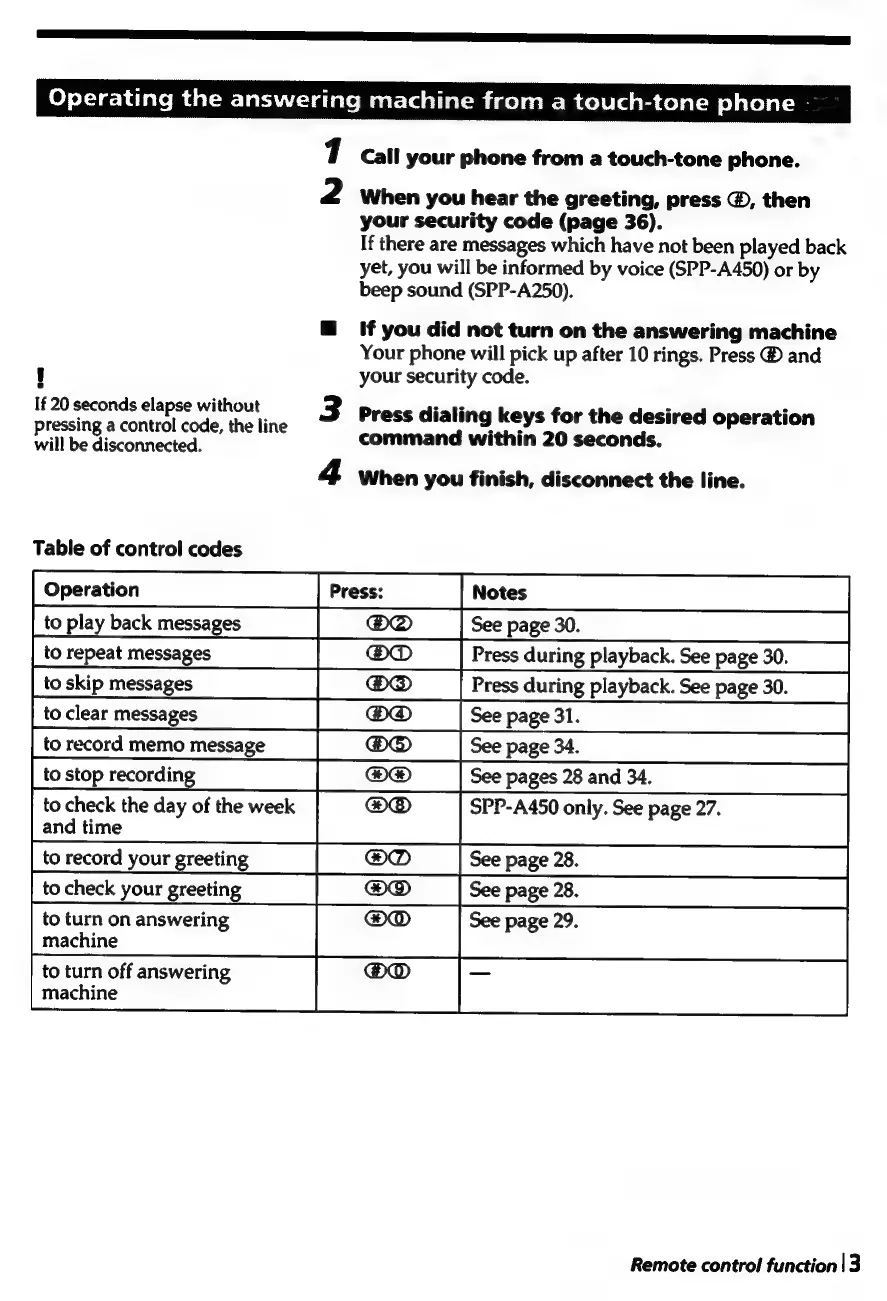
Operating
the
answering
machine
from
a
touch-tone
phone
7
Call
your
phone
from
a
touch-tone
phone.
2
When
you
hear
the
greeting,
press
@,
then
your
security
code
(page
36).
If
there
are
messages
which
have
not
been
played
back
yet,
you
will
be
informed
by
voice
(SPP-A450)
or
by
beep
sound
(SPP-A250).
@
if
you
did
not
turn
on
the
answering
machine
Your
phone
will
pick
up
after
10
rings.
Press
®
and
i]
your
security
code.
If
20
seconds
elapse
without
Press
dialing
keys
for
the
desired
operation
Pressing
a
control
code,
the
line
willbe
disconnected.
command
within
20
seconds.
4
When
you
finish,
disconnect
the
line.
Table
of
control
codes
to
play
back
messages
See
page
30.
@O®
:
to
repeat
messages
|
®D_|
Press
during
playback.
See
page30.__|
to
skip
messages
[D@__|
Press
during
playback.
See
page
30.
|
to
clear
messages
[GO
|Seepages.
CS
torecord
memo
message
|
@®®
|
Scepages.
—=SS~S~S
to
stop
recording
iD
ee
:
to
check
the
day
of
the
week
@O®D
SPP-A450
only.
See
page
27.
and
time
to
record
your
greeting
|
OD
|
See
page
28.
to
check
your
greeting
|
GD
|
See
page
28.
to
turn
on
answering
@O@D
See
page
29
machine
to
turn
off
answering
machine
:
é
é
Remote
control
function
|
3

Table of Contents

Related product manuals