EasyManua.ls Logo

Sony SPP-A250 - Page 9

Sony SPP-A250
86 pages
Print Icon
To Next Page IconTo Next Page
To Previous Page IconTo Previous Page
Loading...
Identifying
the
parts
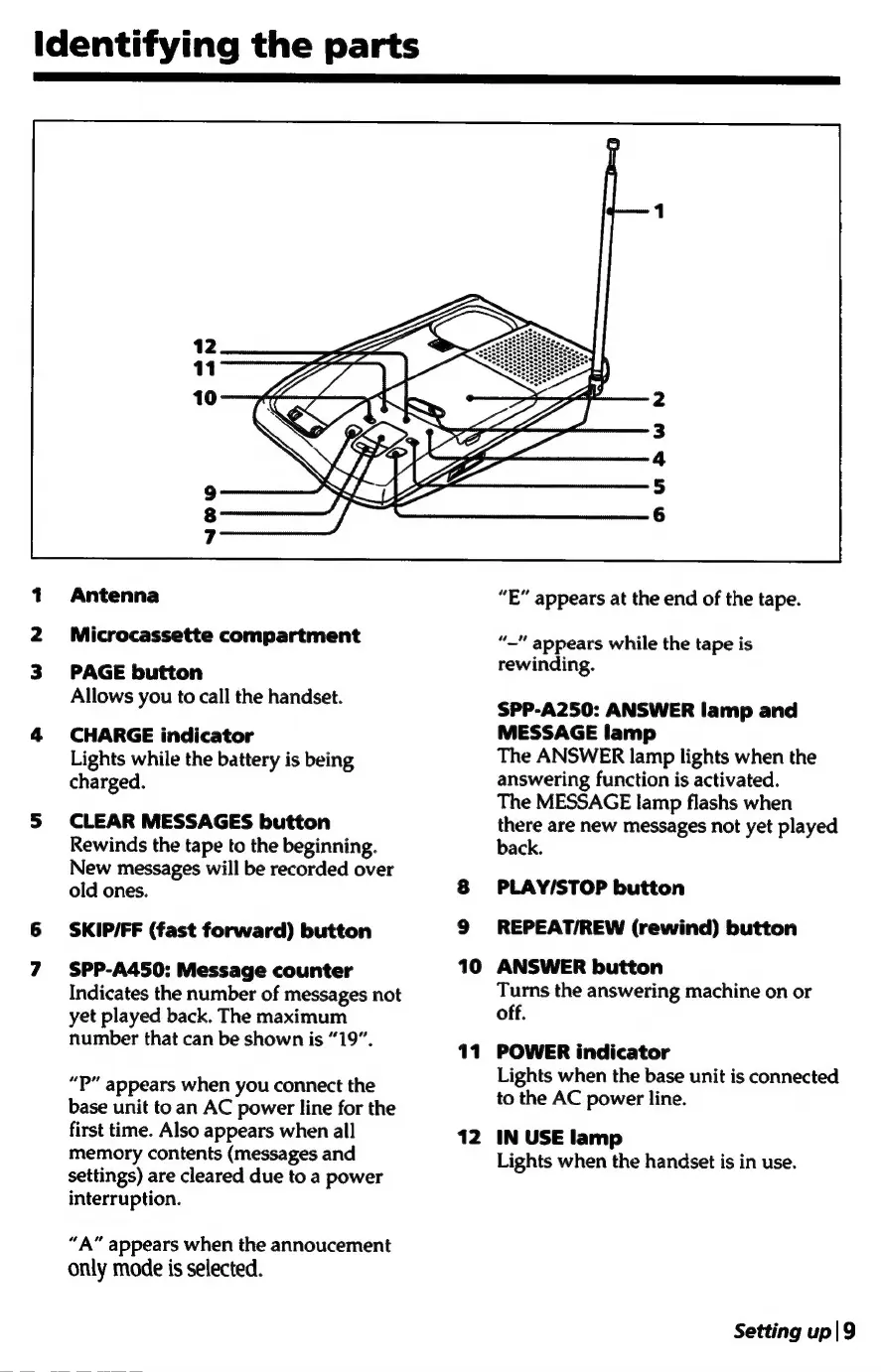
Antenna
Microcassette
compartment
PAGE
button
Allows
you
to
call
the
handset.
4
CHARGE
indicator
Lights
while
the
battery
is
being
charged.
S
CLEAR
MESSAGES
button
Rewinds
the
tape
to
the
beginning.
New
messages
will
be
recorded
over
old
ones.
6
SKIP/FF
(fast
forward)
button
7
SPP-A450:
Message
counter
Indicates
the
number
of
messages
not
yet
played
back.
The
maximum
number
that
can
be
shown
is
“19”.
“P”
appears
when
you
connect
the
base
unit
to
an
AC
power
line
for
the
first
time.
Also
appears
when
all
memory
contents
(messages
and
settings)
are
cleared
due
to
a
power
interruption.
“A”
appears
when
the
annoucement
only
mode
is
selected.
10
11
“E”
appears
at
the
end
of
the
tape.
“Mt
appears
while
the
tape
is
rewinding.
SPP-A250:
ANSWER
lamp
and
MESSAGE
lamp
The
ANSWER
lamp
lights
when
the
answering
function
is
activated.
The
MESSAGE
lamp
flashs
when
there
are
new
messages
not
yet
played
back.
PLAY/STOP
button
REPEAT/REW
(rewind)
button
ANSWER
button
Turns
the
answering
machine
on
or
off.
POWER
indicator
Lights
when
the
base
unit
is
connected
to
the
AC
power
line.
IN
USE
lamp
Lights
when
the
handset
is
in
use.
Setting
up|9

Table of Contents

Related product manuals