76
4-3 TC Menu
Chapter 4 Menu Settings
When time data or user bits are not read correctly, a “*”
will be displayed in this block so that the symbols become
“T*R”, “U*R”, “T*R.”, “U*R.”, etc.
b Drop frame mark of the time code reader
“ • ”: drop frame mode
“ : ”: non-drop frame mode
c Drop frame mark of the time code generator
“ • ”: drop frame mode
“ : ”: non-drop frame mode
d Field mark of the VITC data
“ ”: (blank space) fields 1 and 3
“ * ”: fields 2 and 4
e Operation mode
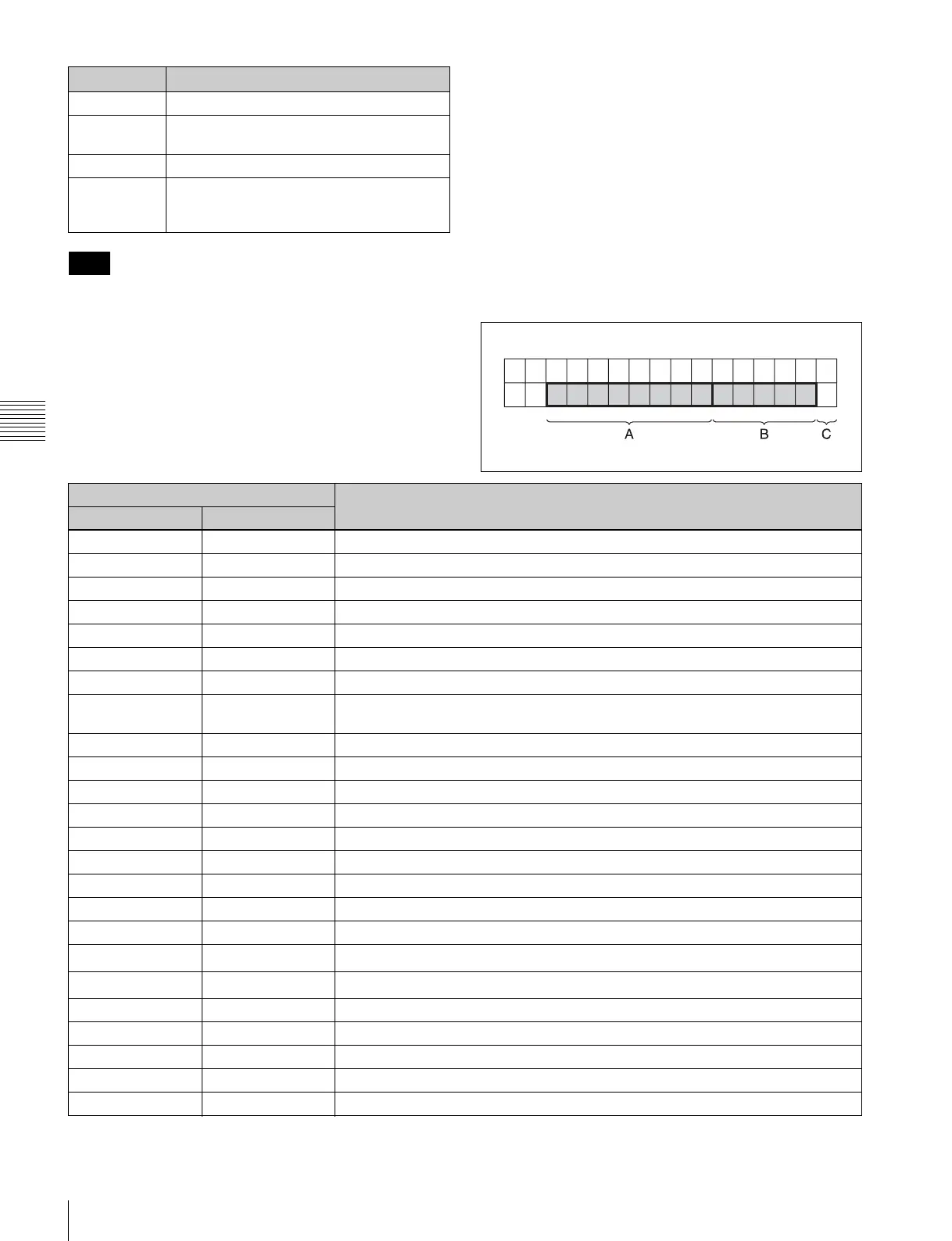
The contents are divided into blocks A and B as shown
below.
Block A: Indicates the operation mode.
Block B: Indicates the tape speed or servo lock status.
Block C: A x mark here indicates an edit section for
automatic editing.
a) Initial speed or memorized speed
UBR. VITC reader user bit data
TCG Time code data from the time code
generator
UBG User bit data from the time code generator
DUR The duration between any two of the four
edit points (IN, OUT, AUDIO IN, and AUDIO
OUT)
Note
Symbol
Meaning
Display
Operation mode
A block B block
TAPE UNTHREAD Cassette not inserted
STANDBY OFF Standby off mode
T.RELEASE Tension release mode
STOP Stop mode
PREROLL Preroll mode
PLAY Playback mode (servo unlocked)
PLAY LOCK Playback mode (servo locked)
PLY-SPD Speed shift from
normal speed (%)
Capstan override mode
REC Record mode (servo unlocked)
REC LOCK Record mode (servo locked)
EDIT Edit mode (servo unlocked)
EDIT LOCK Edit mode (servo locked)
JOG STILL Still-picture jog mode
JOG FWD Forward jog (B is lit)
JOG REV Reverse jog (b is lit)
SHUTTLE (speed) Shuttle mode
VAR (speed) Variable mode
DMC
(speed
a)
)
DMC memorize mode
D-PREV
(speed
a)
)
DMC edit preview mode
DMC EDIT DMC edit mode
DMC-SPD (speed) DMC initial speed setting
PREVIEW Preview mode
AUTO EDIT Auto edit mode
REVIEW Review mode



 To Next Page