Help Guide
Multi Channel AV Receiver
STR-AZ1000ES
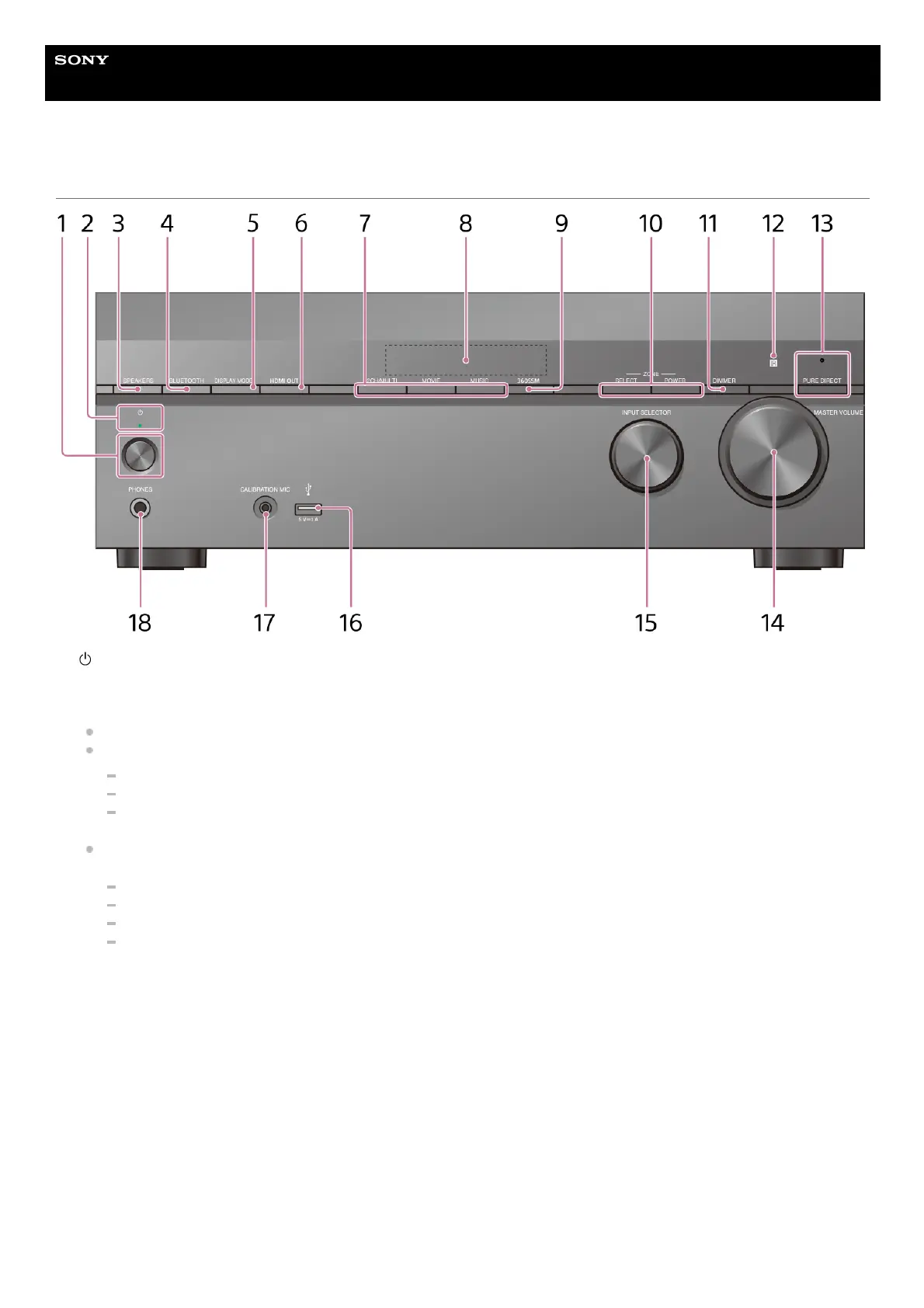
Front panel
(power)1.
Power indicator
Green: The unit is turned on.
Amber: The unit is in standby mode, and you have set one of the following:
[Control for HDMI] or [Network/Bluetooth Standby] is set to [On].
[Standby Through] is set to [On] or [Auto].
[Power] is set to [On] for [Zone2] or [Zone3].
The indicator goes off: The unit is in standby mode and you have set all of the following:
[Control for HDMI] is set to [Off]
[Standby Through] is set to [Off]
[Network/Bluetooth Standby] is set to [Off]
[Power] for [Zone2] and [Zone3] is set to [Off]
2.
SPEAKERS3.
BLUETOOTH
Switches the unit to the BLUETOOTH
®
function by pressing the button when [Bluetooth Mode] is set to [Receiver].
When the button is pressed and held for more than 2 seconds, the unit enters the pairing mode.
4.
DISPLAY MODE
Switches information on the display panel.
5.
HDMI OUT6.
2CH/MULTI, MOVIE, MUSIC7.
Display panel8.
360SSM9.











 To Next Page