Help Guide
Multi Channel AV Receiver
STR-AZ1000ES
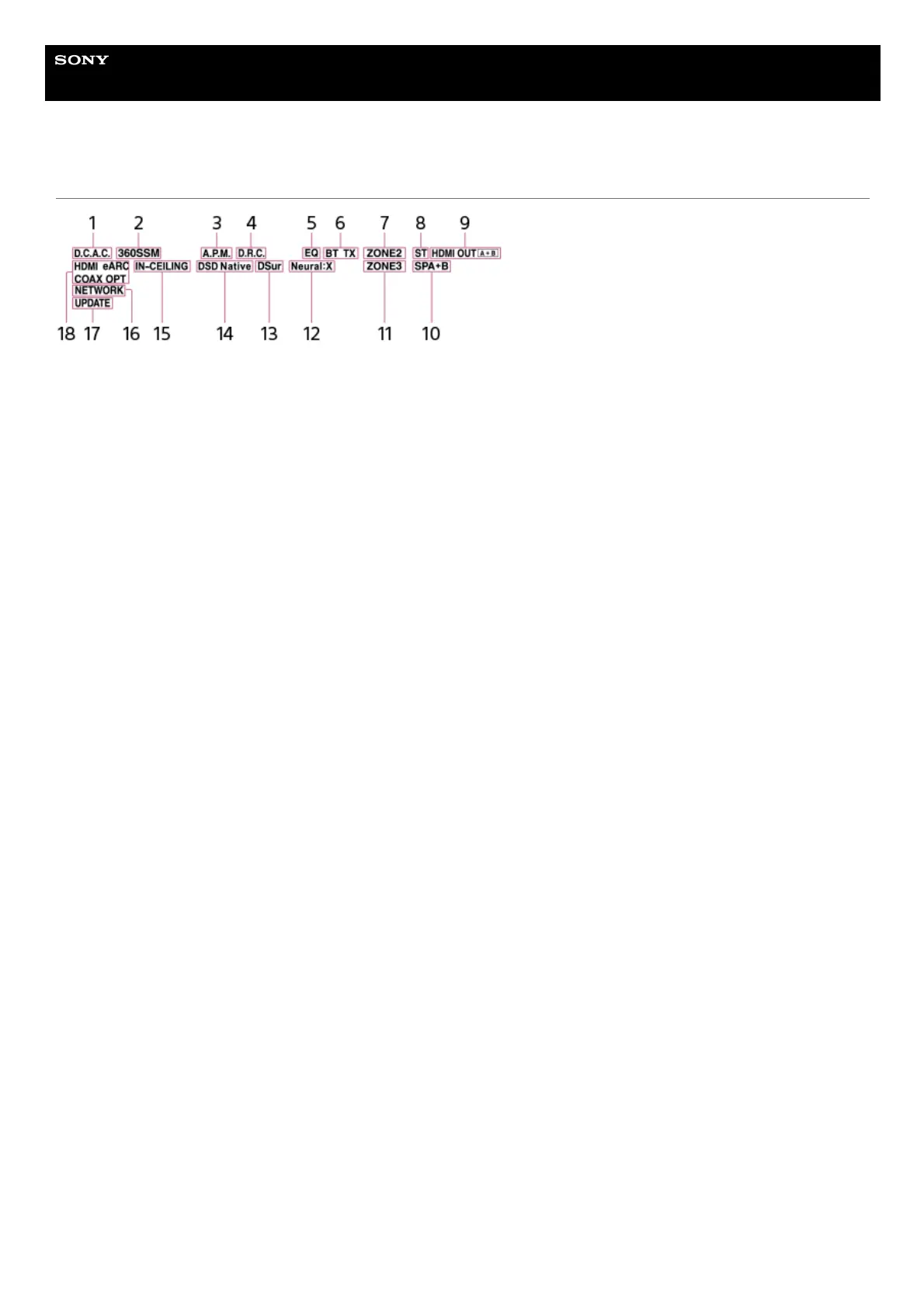
Indicators on the display panel
D.C.A.C.
Lights up when the measurement results of the D.C.A.C. IX (Digital Cinema Auto Calibration) function are applied.
1.
360SSM
Lights up when the 360 Spatial Sound Mapping function is activated.
2.
A.P.M.
Lights up when the A.P.M. (Automatic Phase Matching) function is activated. You can only set the A.P.M. function in the D.C.A.C. IX
(Digital Cinema Auto Calibration) function.
3.
D.R.C.
Lights up when dynamic range compression is activated.
4.
EQ
Lights up when the equalizer is activated.
5.
BLUETOOTH indicator
[BT] lights up when a BLUETOOTH device is connected. Flashes while connecting.
[BT TX] lights up when [Bluetooth Mode] is set to [Transmitter].
6.
ZONE2
Lights up when the power for Zone 2 is on.
7.
ST
Lights up when the unit tunes to an FM stereo broadcast.
8.
HDMI OUT A + B
Indicates the HDMI OUT jacks that currently output the audio/video signals.
9.
Speaker system indicator10.
ZONE3
Lights up when the power for Zone 3 is on.
11.
Neural:X
Lights up when DTS Neural:X decoding is activated.
12.
DSur
Lights up when Dolby Surround decoding is activated.
This indicator may not light up depending on the speaker pattern setting.
13.
DSD Native
Lights up when the DSD Native function is activated.
14.
IN-CEILING
Lights up when the In-Ceiling Speaker Mode is activated.
15.
NETWORK
Lights up when the unit is connected to a wireless LAN or wired LAN.
16.




 To Next Page