Help Guide
Multi Channel AV Receiver
STR-AZ1000ES
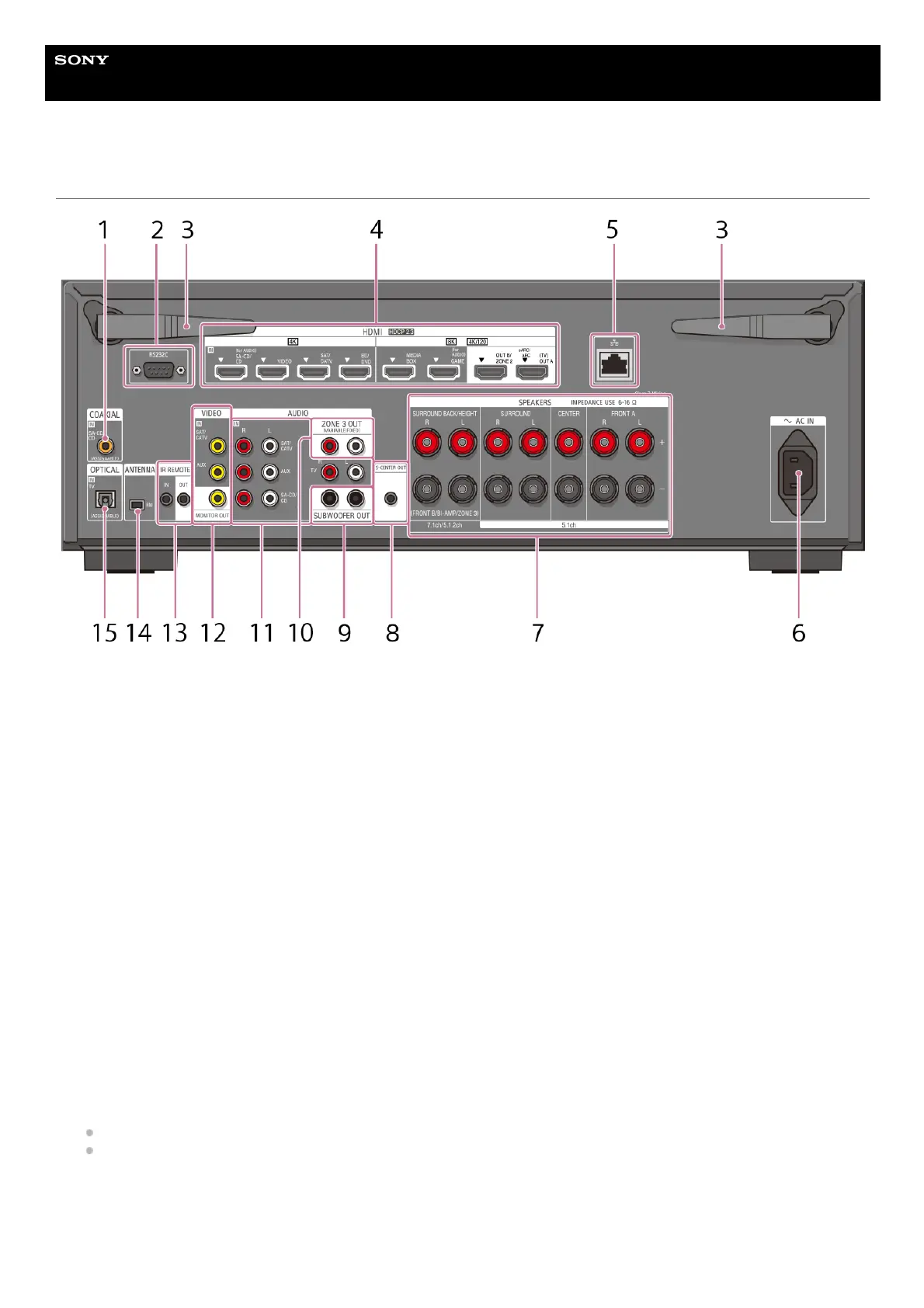
Rear panel
COAXIAL IN SA-CD/CD jack1.
RS232C port (*1)2.
Wireless LAN antenna3.
HDMI IN/OUT jacks4.
LAN port5.
AC IN terminal
Connect the supplied AC power cord (mains lead).
6.
SPEAKERS terminals7.
S-CENTER OUT jack8.
SUBWOOFER OUT jacks9.
ZONE 3 OUT jacks10.
AUDIO IN jacks11.
VIDEO IN/MONITOR OUT jacks12.
IR REMOTE IN/OUT jacks
You can control the unit from a distance by connecting an IR repeater (not supplied) to the IR REMOTE IN jack.
You can start or stop playback of devices such as a CD player connected to the unit by connecting an IR Blaster (not supplied) to
the IR REMOTE OUT jack.
13.
FM ANTENNA terminal14.
OPTICAL IN TV jacks15.











 To Next Page