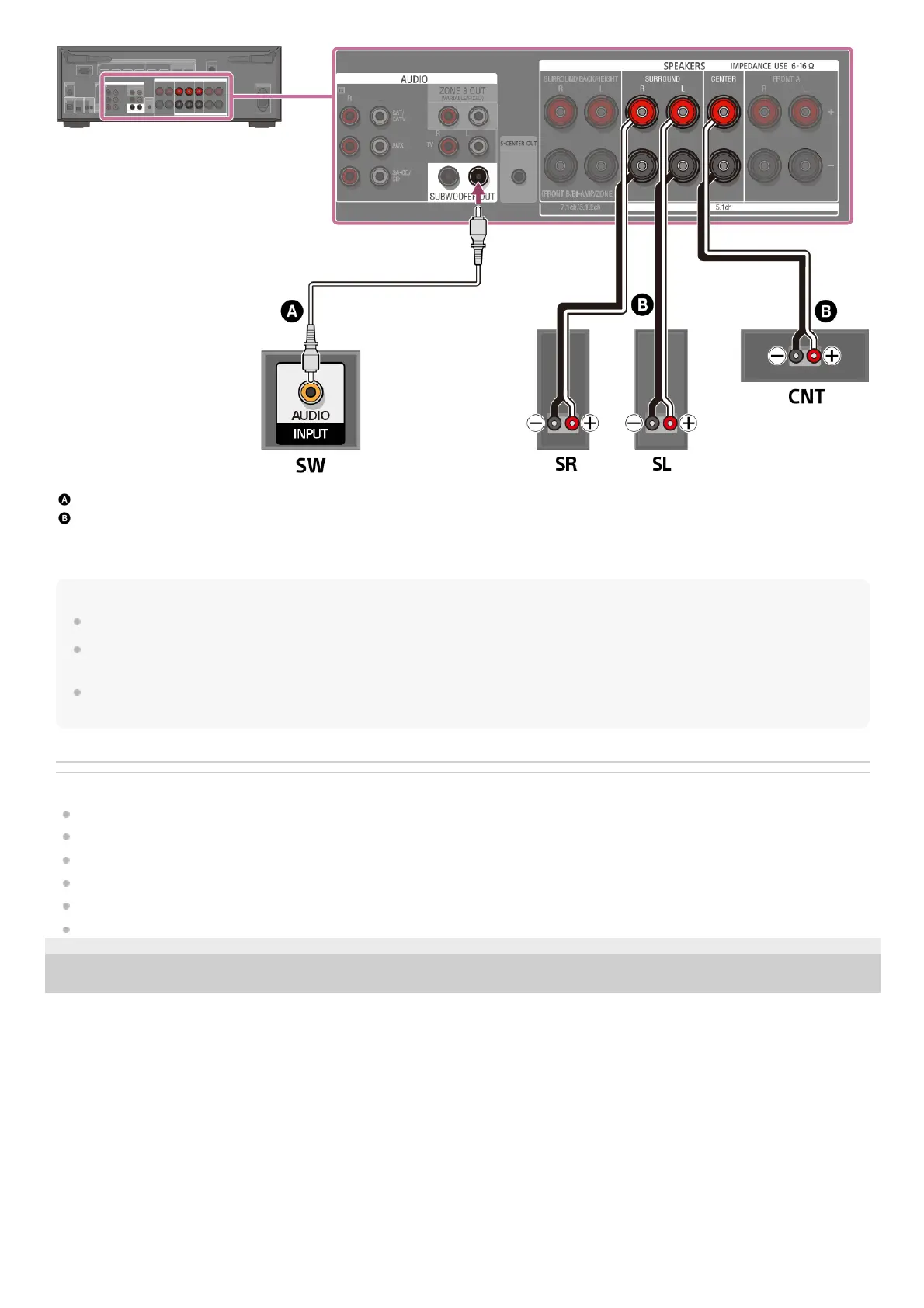
Monaural audio cable (not supplied)
Speaker cable (not supplied)
Make sure that metal fittings of Hi/Lo attached to the speakers have been removed from the speakers to avoid unit malfunction. After you
have made the connection, set [Surround Back Speaker Assign] in [Manual Speaker Settings] under [Speaker Settings] to [BI-AMP].
Note
Connect speakers with a nominal impedance of 6 ohms to 16 ohms.
After you have installed and connected your speakers, be sure to select the speaker pattern you want using [Speaker Pattern] in [Manual Speaker
Settings] under [Speaker Settings].
You can only set [Surround Back Speaker Assign] if the speaker pattern is set to a setting that does not have surround back and height/overhead
speakers.
Related Topic
Speaker installation example
Installing 5.1-channel speaker system with bi-amplifier connection
Selecting the speaker pattern (Speaker Pattern)
Assigning the surround back speaker terminals (Surround Back Speaker Assign)
Notes on connecting cables
How to connect speaker cables
5-037-020-11(1) Copyright 2022 Sony Corporation











 To Next Page