140
GB
To operate the TV, select ( ) on
Common tab.
To operate the projector, select
( ) on Common tab.
Operating the TV, projector or
lighting
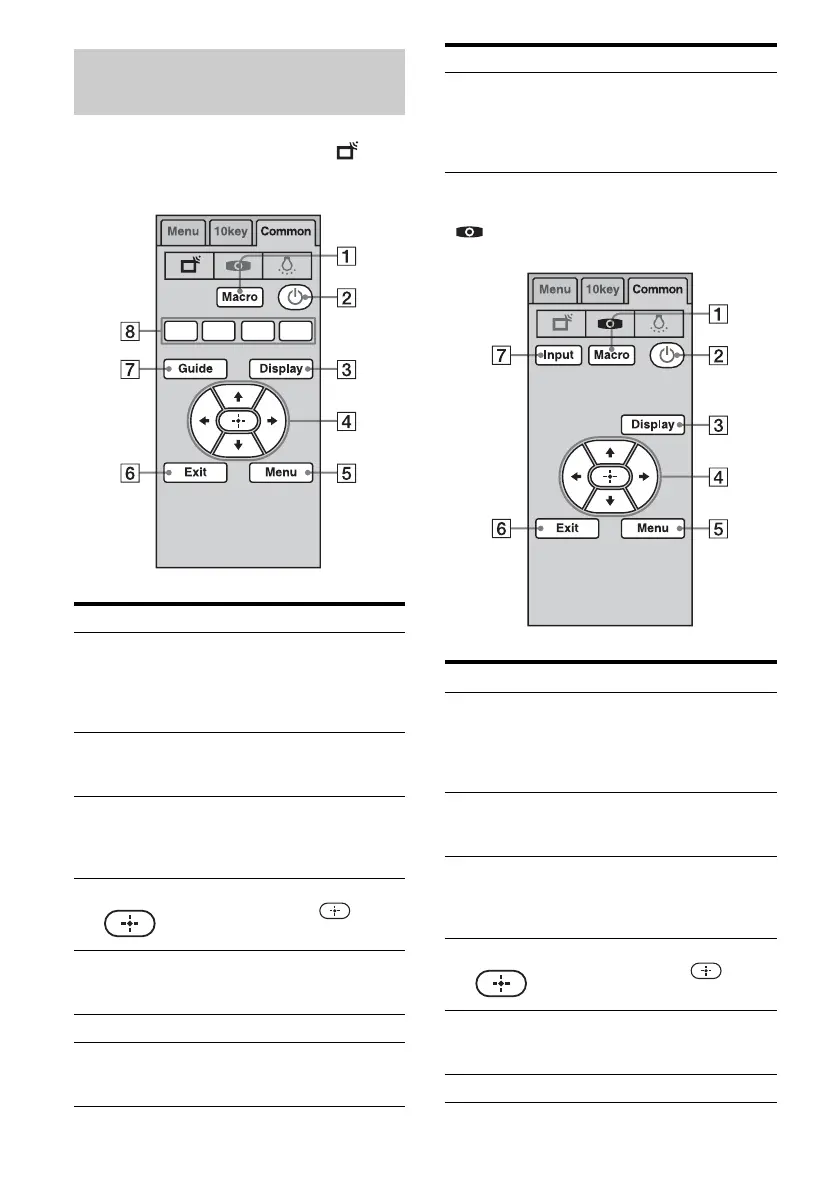
Button Function
A Macro Select to start a macro
programmed with Quick Click.
When there are no programmed
macros, this button does not
appear.
B 1 Select to turn components
connected to the receiver on or
off.
C Display
(Info)
Select to display the current
status of or information on
components connected to the
receiver.
D V/v/B/b, Select V/v/B/b to select menu
items. Then press to enter
the selection.
E Menu Select to display the menu of
the components connected to
the receiver.
F Exit Select to exit the menu.
G Guide Select to display the program
guide of a TV, satellite tuner,
hard disk recorder, etc.
H Color
buttons
(Red/Blue/
Green/
Yellow)
Select when you operate a DVD
player/recoder, Blu-ray Disc
Player, or cable box.
Button
Function
A Macro Select to start a macro
programmed with Quick Click.
When there are no programmed
macros, this button does not
appear.
B 1 Select to turn components
connected to the receiver on or
off.
C Display
(Info)
Select to display the current
status of or information on
components connected to the
receiver.
D V/v/B/b, Select V/v/B/b to select menu
items. Then press to enter
the selection.
E Menu Select to display the menu of
components connected to the
receiver.
F Exit Select to exit the menu.
Button Function















 To Next Page