12
GB
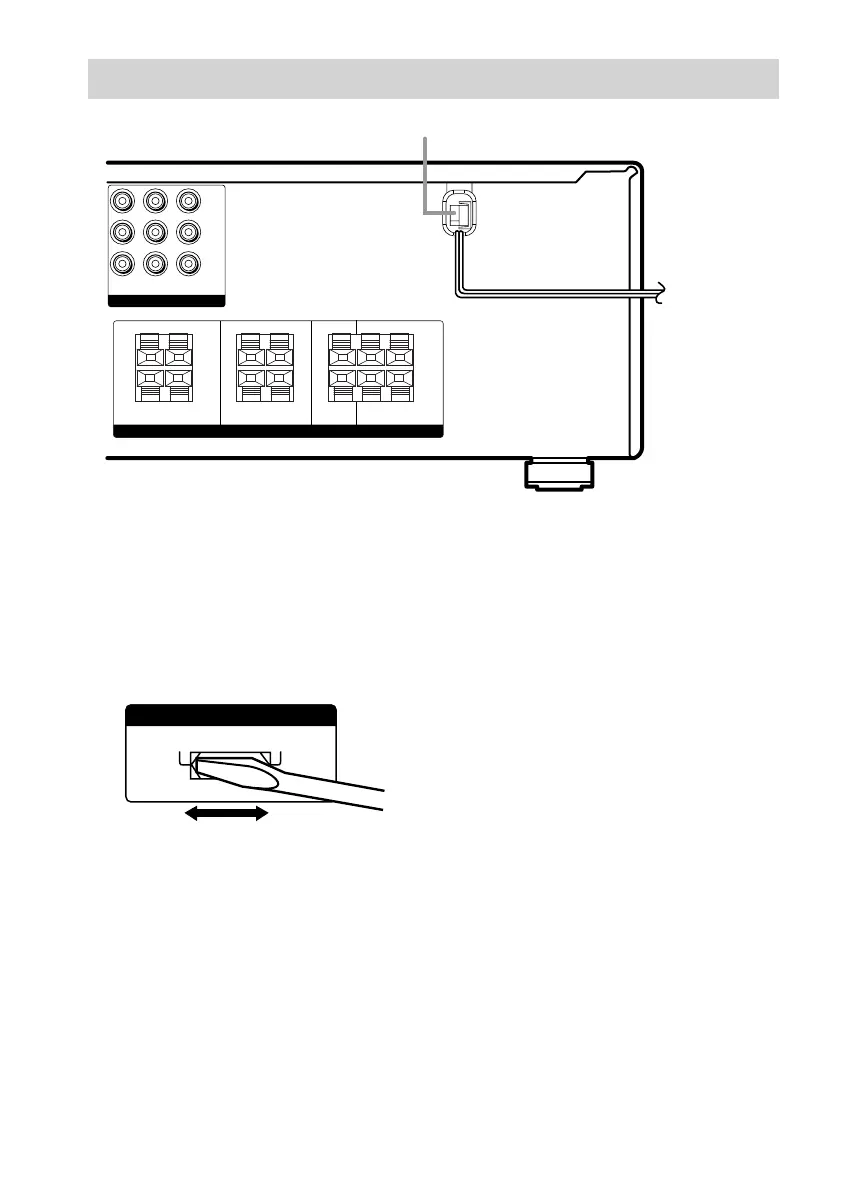
Connecting the AC power
cord
Before connecting the AC power cord of this
receiver to a wall outlet, connect the speaker
system to the receiver (page 13).
Connect the AC power cord(s) of your audio/
video components to a wall outlet.
Other hookups
Setting the voltage selector
If your receiver has a voltage selector on the
rear panel, check that the voltage selector is set
to the local power supply voltage. If not, use a
screwdriver to set the selector to the correct
position before connecting the AC power cord
to a wall outlet.
120V
220V 240V
VOLTAGE SELECTORVOLTAGE SELECTOR
Y
P
B/B–Y
P
R/R–Y
IMPEDANCE USE 8-16Ω
COMPONENT VIDEO
SPEAKERS
FRONT B FRONT A CENTER SURROUND
DVD IN VIDEO 2
IN
MONITOR
OUT
R
R
L
L
R
R
L
L
R
R
L
L
+
–
+
–
+
–
+
–
+
–
+
–
b
AC power cord
To a wall outlet








 To Next Page