Additional Information
47
GB
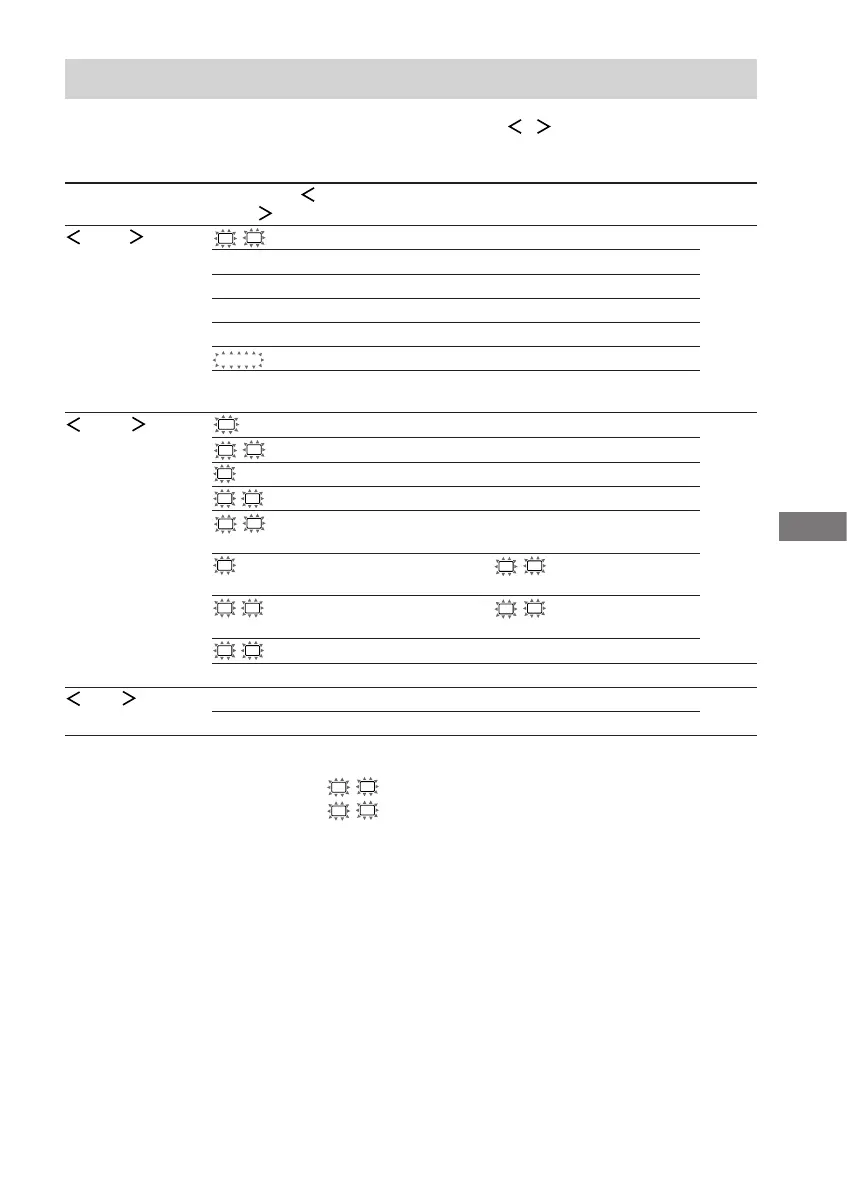
Tables of settings using the MAIN MENU button
You can make various settings using the MAIN MENU, MENU
/ and MENU +/– buttons. The
tables below show each of the settings that these buttons can make.
Press MAIN MENU Press MENU or Press MENU + or Page
repeatedly to select MENU
to select MENU – to select
LEVEL
L
R
BAL. L/R XX L +8 to R +8 (1 steps) 27
CTR XXX dB –10 dB to +10 dB (1 dB steps)
SUR.L. XXX dB –10 dB to +10 dB (1 dB steps)
SUR.R. XXX dB –10 dB to +10 dB (1 dB steps)
S.W. XXX dB –10 dB to +10 dB (1 dB steps)
D. RANGE
COMP. XXX OFF, STD, MAX
EFCT. XXX depends on the sound field
(MIN, STD, MAX)
SET UP
SW
(SUB WOOFER) S.W. XXX YES, NO 16
L
R
(FRONT) XXXXX LARGE, SMALL
C
(CENTER) XXXXX LARGE, SMALL, NO
SL
SR
(SURROUND) XXXXX LARGE, SMALL, NO
L
R
DIST. X.X m (XX ft.) between 1.0 meters and 7.0 meters
(0.1 meters steps)
1)
C
DIST. X.X m (XX ft.) between
L
R
DIST. and 1.5 meters
(0.1 meters steps)
2)
SL
SR
DIST. X.X m (XX ft.) between
L
R
DIST. and 4.5 meters
(0.1 meters steps)
3)
SL
SR
PL. XXXX LOW, HIGH
DEC. XXXX AUTO, PCM 35
TONE BASS XX dB –6 dB to +6 dB (1 dB steps) 28
TREB. XX dB –6 dB to +6 dB (1 dB steps)
1)
For models of area code U, CA: 3 feet to 23 feet (1 foot steps)
2)
For models of area code U, CA: between
L
R
DIST. and 5 feet (1 foot steps)
3)
For models of area code U, CA: between
L
R
DIST. and 15 feet (1 foot steps)








 To Next Page