Operations Using the Remote RM-U306A
37
GB
You can use the remote RM-U306A to operate
the components in your system.
Before you use your
remote
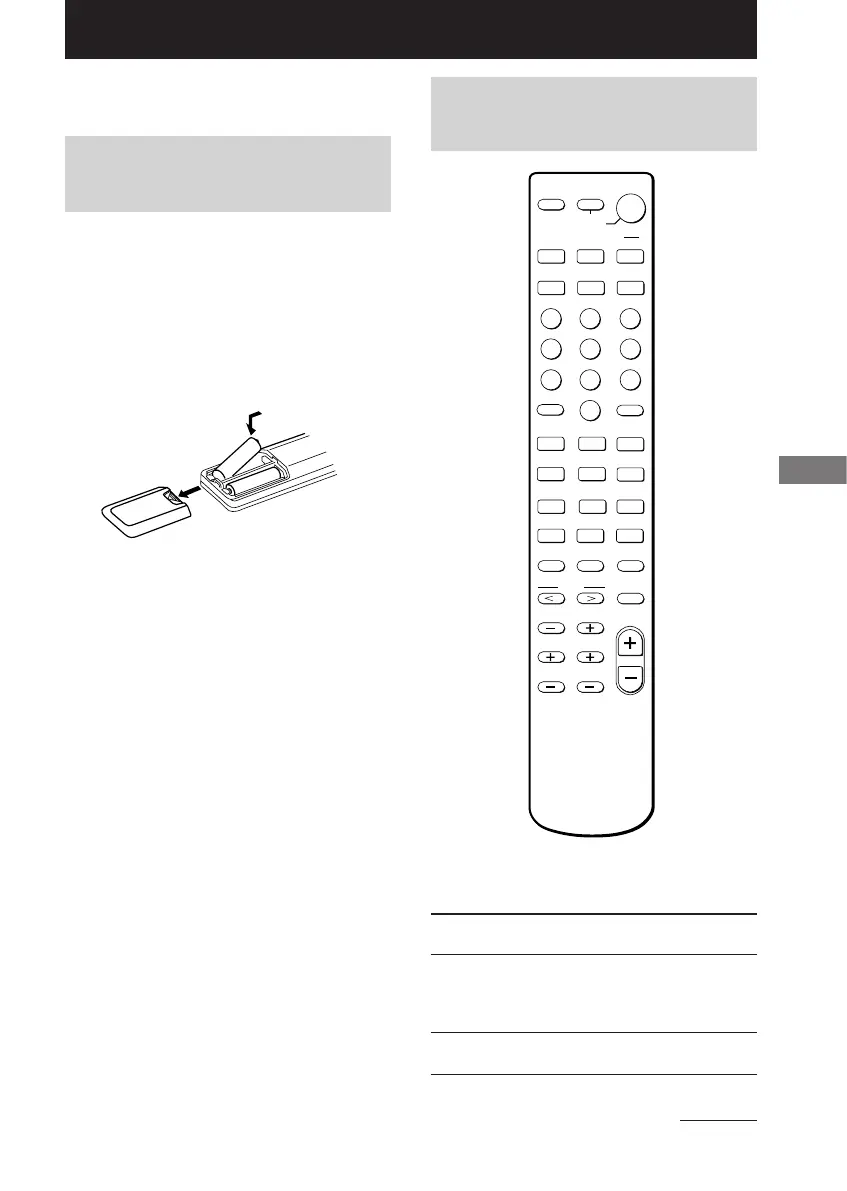
Inserting batteries into the
remote
Insert R6 (size-AA) batteries with the + and –
properly oriented in the battery compartment.
When using the remote, point it at the remote
sensor g on the receiver.
Tip
Under normal conditions, the batteries should last for
about 6 months. When the remote no longer operates
the receiver, replace all batteries with new ones.
Notes
• Do not leave the remote in an extremely hot or
humid place.
• Do not use a new battery with an old one.
• Do not expose the remote sensor to direct sunlight
or lighting apparatuses. Doing so may cause a
malfunction.
• If you don’t use the remote for an extended period
of time, remove the batteries to avoid possible
damage from battery leakage and corrosion.
Remote button
description
N
X
m
M
.
>
123
456
78
0
9
MD/TAPE CD TUNER
TV/VIDEO
VIDEO 2
VIDEO 1
DVD
SYSTEM
STANDBY
>10
SHIFT
CH/PRESET
-
ANT
TV/VTR
–
+
MASTER
VOL
TEST TONE MAIN MENU MULTI CH
2CH A.F.D.
MOVIE/
MUSIC
ENTER
D.SKIP
D.TUNING
TOP MENU DVD MENU
ENTER
RETURN
f
F
G
g
SLEEP
AV
?/1
?/1
MENU
TV VOL TV CH
MUTING
O
x
]
]
}
}
Operations Using the Remote RM-U306A
The tables below show the settings of each
button.
Remote Operations Function
Button
SLEEP Receiver Activates the sleep
function and the duration
which the receiver turns
off automatically.
?/1 Receiver Turns the receiver on or
off.
continued








 To Next Page