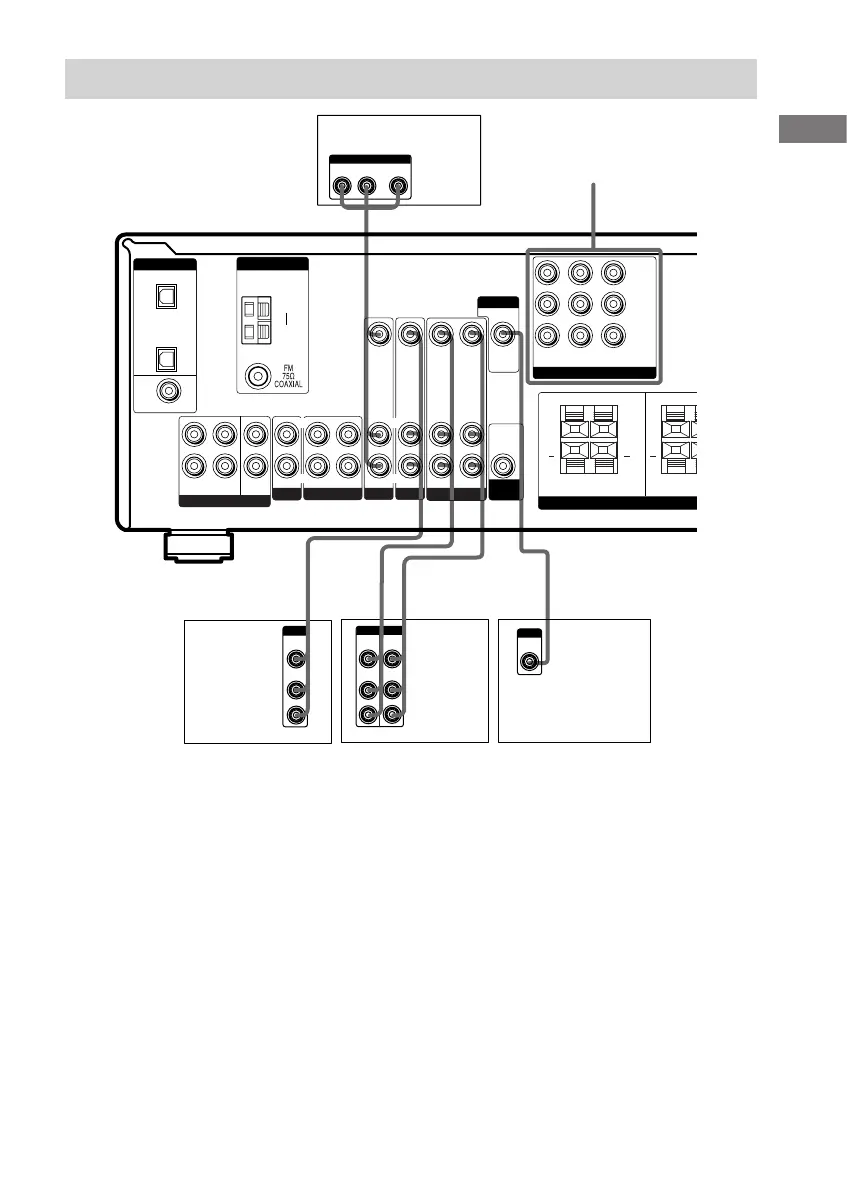
DVD IN VIDEO 2
IN
MONITOR
OUT
R
R
L
L
R
R
+ + +
Video component hookups
TV monitor
DVD player
Note on video component
hookups
You can connect your TV’s audio output jacks
to the VIDEO 2 AUDIO IN jacks on the
receiver and apply sound effects to the audio
from the TV. In this case, do not connect the
TV’s video output jack to the VIDEO 2
VIDEO IN jack on the receiver. If you are
connecting a separate satellite tuner, connect
both the audio and video output jacks to the
receiver as shown above.
Satellite
tuner or
VCR
VCR
* STR-DE595 only, except for models of area code CEL, CEK.
STR-DE595 only, except for models
of area code CEL, CEK
If you have a DVD player, TV or satellite tuner
with COMPONENT VIDEO (Y, B–Y, R–Y)
output jacks and a monitor with COMPONENT
VIDEO input jacks, use a component video
cord (not supplied) to connect to the receiver.
COMPONENT VIDEO*








 To Next Page