28
GB
D:\NORM'S JOB\SONY HA\SO0109\STR-DH520\4263361111_GB\GB04CON_STR-DH520-
U2.fm
masterpage: Left
STR-DH520
4-263-361-11(1)
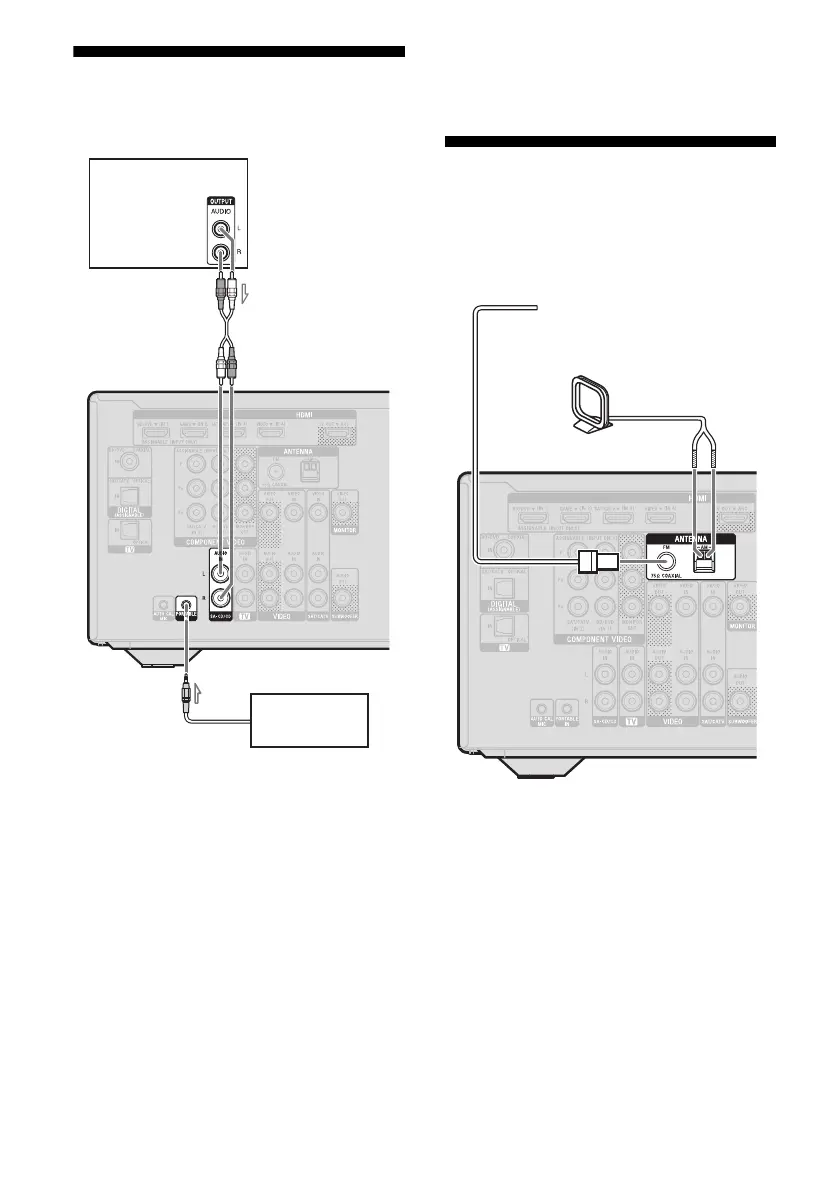
4b: Connecting the audio
equipment
Notes
• Before connecting cords, be sure to disconnect the
AC power cord (mains lead).
• When listening to a equipment connected to the
PORTABLE IN jack, sound may be distorted or
interrupted. This is not a malfunction and will
depend on the connected equipment.
• If the sound from the equipment connected to the
PORTABLE IN jack is very soft, you may increase
the volume level. However, before you switch to
other input, be sure to reduce the volume level to
avoid damaging your speaker.
Tip
We recommend you to use “P. AUDIO” sound field
if the source is MP3 or other compressed source.
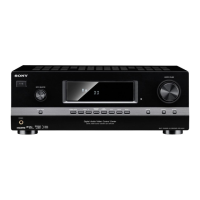
5: Connecting the
antennas (aerials)
Before connecting antennas (aerials), be sure
to disconnect the AC power cord (mains lead).
Notes
• To prevent noise pickup, keep the AM loop
antenna (aerial) away from the receiver and other
equipment.
• Be sure to fully extend the FM wire antenna
(aerial).
• After connecting the FM wire antenna (aerial),
keep it as horizontal as possible.
Super Audio
CD player,
CD player
A Audio cord (not supplied)
B Phono cord with stereo headphone
jack (not supplied)
A
Portable audio
B
FM wire antenna (aerial) (supplied)
AM loop antenna (aerial)
(supplied)



 To Next Page