62
GB
D:\NORM'S JOB\SONY HA\SO0109\STR-DH520\4263361111_GB\GB09REM_STR-DH520-
U2.fm
masterpage: Left
STR-DH520
4-263-361-11(1)
3 Referring to the following table,
press the corresponding
button for the category you
want, then release AV ?/1.
Example: Press 1, then release AV ?/1.
Now you can use the SAT/CATV button
to control the Blu-ray Disc player.
a)
For details on the BD1 or BD3 setting, refer
to the operating instructions supplied with
the Blu-ray Disc player or Blu-ray Disc
recorder.
b)
Sony DVD recorders are operated with a
DVD1 or DVD3 setting. For details, refer to
the operating instructions supplied with the
DVD recorders.
c)
Sony VCRs are operated with a VTR 3
setting which corresponds to VHS.
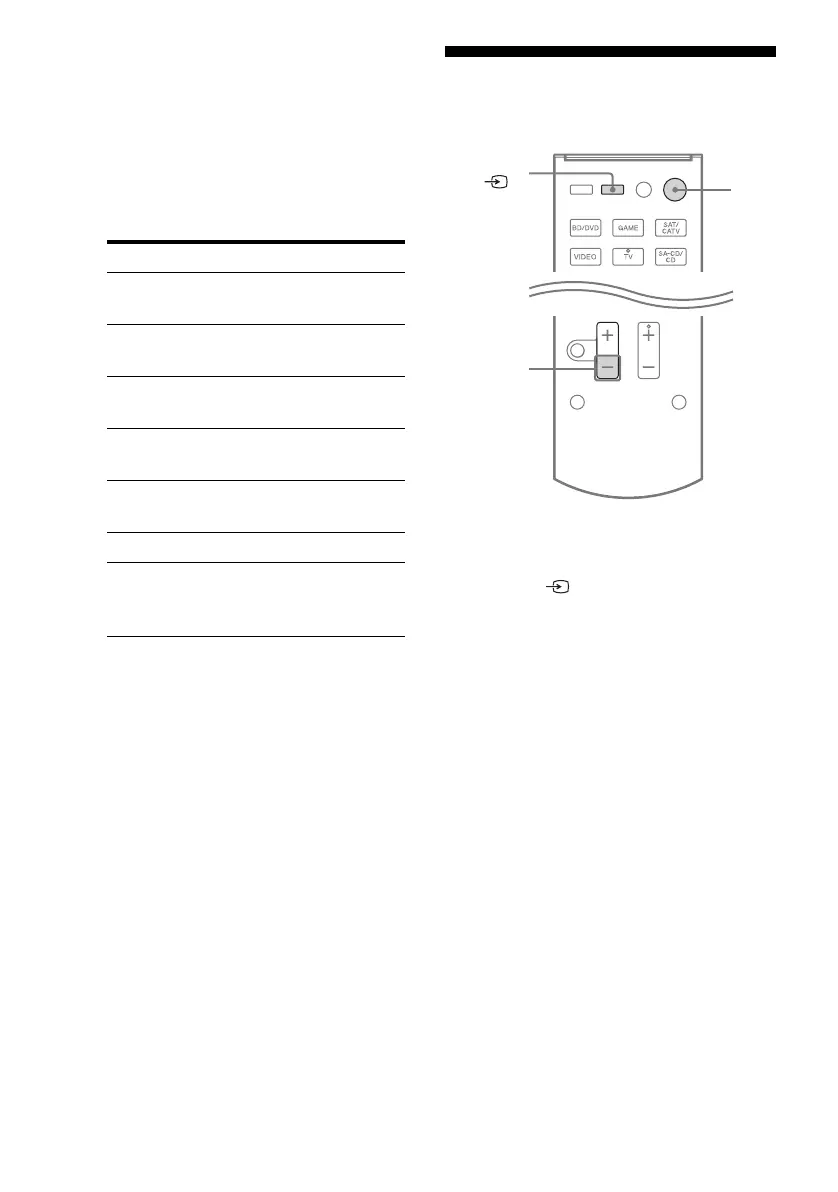
Resetting the input
buttons
1
While holding down MASTER
VOL –/
2 –, press ?/1 and
INPUT/ .
2 Release all buttons.
The input buttons are reset to the default
setting.
Categories Press
Blu-ray Disc player
(command mode BD1)
a)
1
Blu-ray Disc recorder
(command mode BD3)
a)
2
DVD player
(command mode DVD1)
3
DVD recorder
(command mode DVD3)
b)
4
VCR (command mode
VTR3)
c)
5
CD player 6
DSS (Digital Satellite
Receiver)/Euro Digital
Satellite Receiver
7
MASTER
VOL –/
2 –
?/1
INPUT/



 To Next Page