52
GB
D:\NORM'S JOB\SONY HA\SO0109\STR-DH520\4263361111_GB\GB08ADV_STR-DH520-
U2.fm
masterpage: Left
STR-DH520
4-263-361-11(1)
3 Press V/v repeatedly to select
“A. ASSIGN”, “V. ASSIGN” or
“H. ASSIGN”, then press or
b.
4 Press V/v repeatedly to select
the following setting, then
press or b.
For “A. ASSIGN” and “V. ASSIGN”:
Select input name you want to assign to.
For “H. ASSIGN”: Select input jack you
want to reassign.
5 Press V/v repeatedly to select
the following setting, then
press .
For “A. ASSIGN” and “V. ASSIGN”:
Select input jack you want to reassign.
For “H. ASSIGN”: Select input name you
want to assign to.
To return to the previous display
Press B or RETURN/EXIT O.
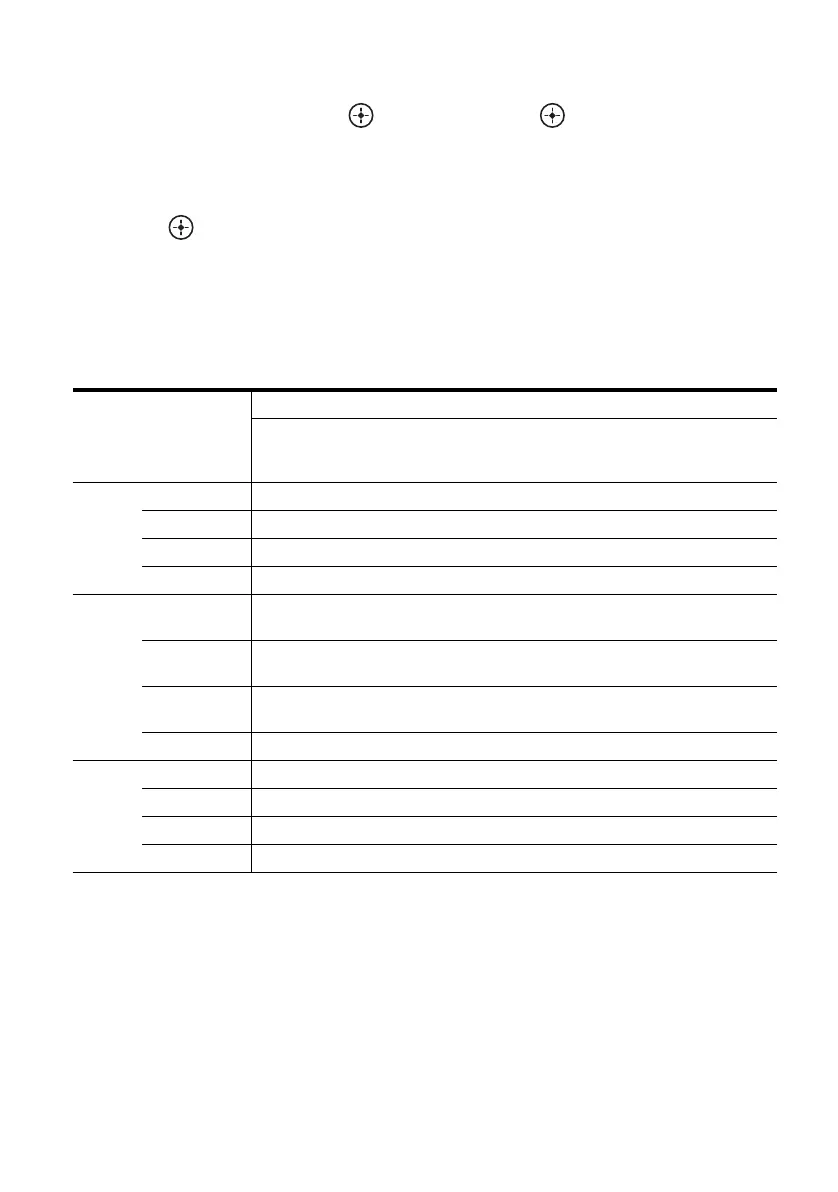
Assigning input jacks
* Default setting
Notes
• When you reassign the HDMI or DIGITAL audio
input jacks, the INPUT MODE setting may change
automatically (page 51).
• One reassignment is allowed for each input.
Assignable input
jacks
Input name
BD/DVD GAME SAT
(SAT/
CATV)
VIDEO SA-CD
(SA-CD/
CD)
PORT
(PORTA-
BLE)
NONE
HDMI HDMI 1 a* aaaaaa
HDMI 2 aa* aaaaa
HDMI 3 aaa* aaaa
HDMI 4 aaaa* aaa
Video CMPNT 1
(Component 1)
a* aaaaa –
CMPNT 2
(Component 2)
aaa* aaa –
COMP
(Composite)
––aa*–––
NONE aa*– – a* a*–
Audio SAT OPT aaa* aaa –
BD COAX a* aaaaa –
ANALOG – – aa* a* a*–
NONE – a*–––––



 To Next Page