EasyManua.ls Logo

Sony STR-DH700 - Rear Panel Connections; Input;Output Jacks

Sony STR-DH700
114 pages
Print Icon
To Next Page IconTo Next Page
To Previous Page IconTo Previous Page
Loading...
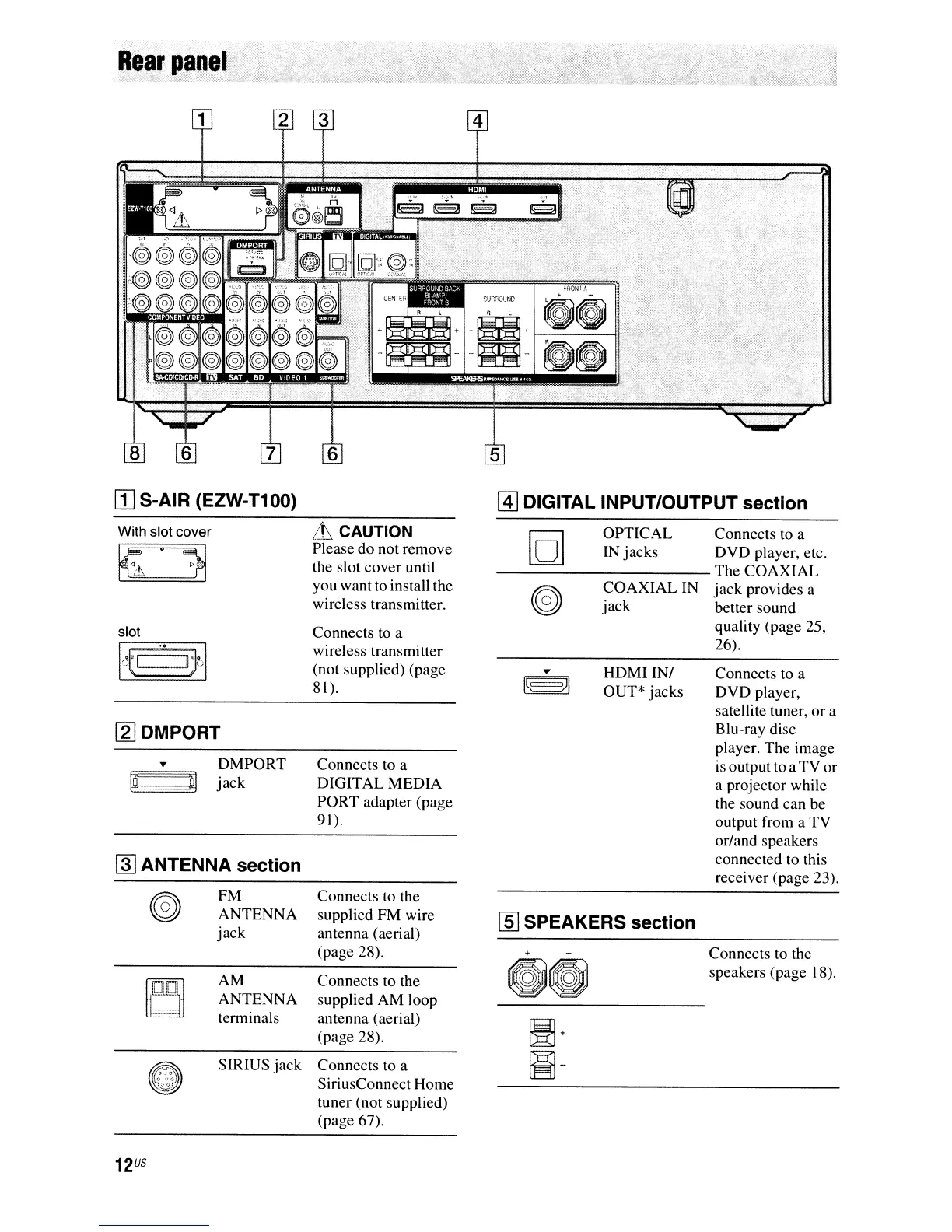
Rear
p~nel'
[I]
S-AIR (EZW-T100)
@]
DIGITAL INPUT/OUTPUT section
R OPTICAL Connects to a
o IN jacks DVD player, etc.
-----------
The
COAXIAL
~
COAXIAL
IN
jack
provides a
'.g
jack
better sound
quality (page 25,
26).
With slot cover
slot
l1J
DMPORT
...
DMPORT
@ m
jack
~
ANTENNA section
FM
ANTENNA
jack
AM
ANTENNA
terminals
SIRIUS
jack
!.t CAUTION
Please do not remove
the slot cover until
you want to install the
wireless transmitter.
Connects to a
wireless transmitter
(not supplied) (page
81).
Connects to a
DIGITAL
MEDIA
PORT adapter (page
91
).
Connects to the
supplied FM wire
antenna (aerial)
(page 28).
Connects to the
supplied AM loop
antenna (aerial)
(page 28).
Connects to a
SiriusConnect Home
tuner (not supplied)
(page 67).
HDMIINI
OUT* jacks
[ID
SPEAKERS section
Connects to a
DVD player,
satellite tuner, or a
Blu-ray disc
player. The image
is output to a
TV
or
a projector while
the sound can be
output from a TV
orland speakers
connected to this
receiver (page
23).
Connects to the
speakers (page 18).

Table of Contents

Other manuals for Sony STR-DH700

Related product manuals