~onnecting
a,
~teIlJtetu,nerl'
$et-top
bOI,:jl\
".
,._.c····;_·
_._..,
•.
-,_>:._}','"
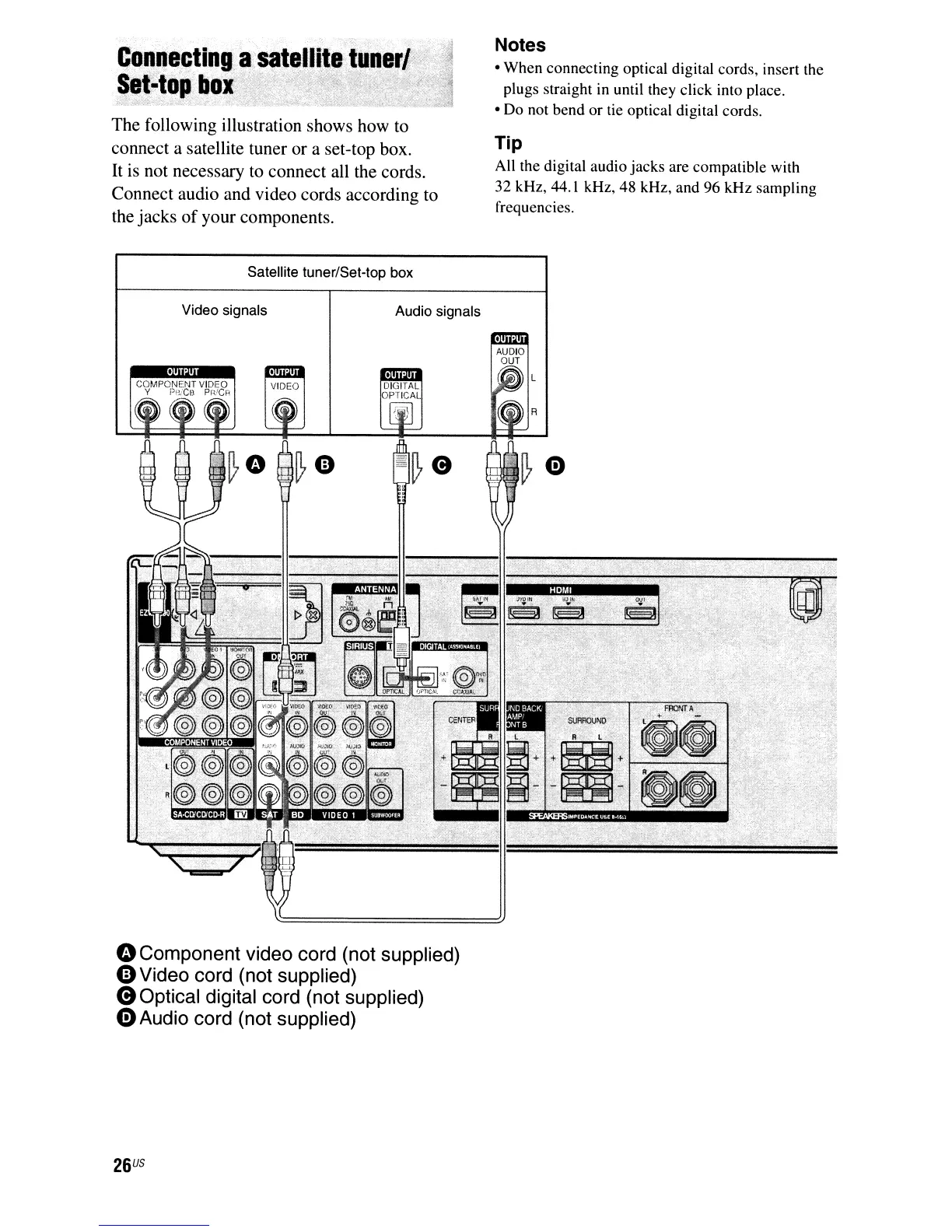
The following illustration shows how to
connect a satellite tuner or a set-top box.
It
is not necessary to connect all the cords.
Connect audio and video cords according to
the jacks
of
your components.
Satellite tuner/Set-top box
Notes
• When connecting optical digital cords, insert the
plugs straight in until they click into place.
• Do not bend or tie optical digital cords.
Tip
All the digital audio jacks are compatible with
32 kHz, 44.1 kHz, 48 kHz, and 96 kHz sampling
frequencies.
Video signals
Audio signals
oComponent video cord (not supplied)
0Video
cord (not supplied)
eOptical digital cord (not supplied)
oAudio cord (not supplied)
26
US



 To Next Page