Recording
onto
ar,cording
,
media
1 Press one of the input buttons
to select the playback
component.
You can also use INPUT SELECTOR on
the receiver.
2 Prepare the playback
component for playing.
For example, insert the video tape you
want
to
copy into the VCR.
3 Prepare the recording
component.
Insert a blank video tape, etc. into the
recording component (VIDEO I) for
recording.
4 Start recording
on
the
recording component, then
start playback
on
the playback
component.
Note
Some sources contain copy guards to prevent
recording.
In
this case, you may not be able to record
from the source.
Using
a
bi-amplifier
connection
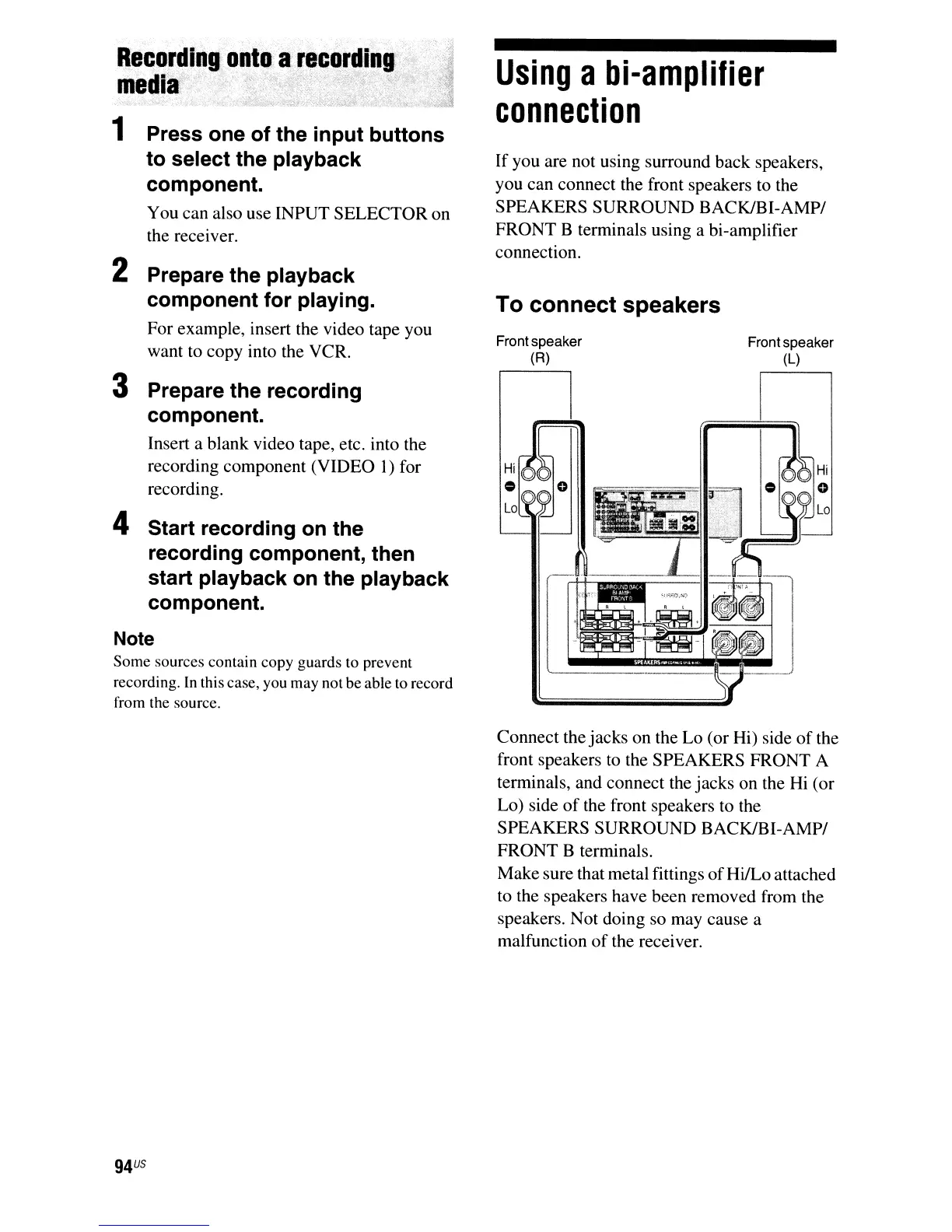
If you are not using surround back speakers,
you can connect the front speakers
to
the
SPEAKERS SURROUND BACK/SI-AMP/
FRONT B terminals using a bi-amplifier
connection.
To connect speakers
Front speaker Front speaker
(R) (L)
Connect the jacks on the Lo (or Hi) side
of
the
front speakers
to the SPEAKERS FRONT A
terminals, and connect the jacks on the
Hi
(or
Lo) side
of
the front speakers to the
SPEAKERS SURROUND BACK/BI-AMP/
FRONT B terminals.
Make sure that metal fittings
of
HilLo attached
to the speakers have been removed from the
speakers. Not doing so may cause a
malfunction
of
the receiver.



 To Next Page