Other Hookups
-e
o
o
5'
c
"D
e_
o
3
"a
o
If you have a S LINK CONTROL S compatible Sony TV,
satellite tuner, monitor, DVD player or VCR, use an
audio/video/control S connecting cord (supt)lied) or a
control S cotmecting cord (supplied) to cotmect the CTRL
S (STATUS) IN (for TV, satellite tunei; or monitor) or OUT
(for VCR, etc.) jack on the receiver to the appropriate S-
LINK jack on the respective component. Refer to the
operating instructions supplied with your TV. satellite
tuner; monitor, VCR, etc., tor details.
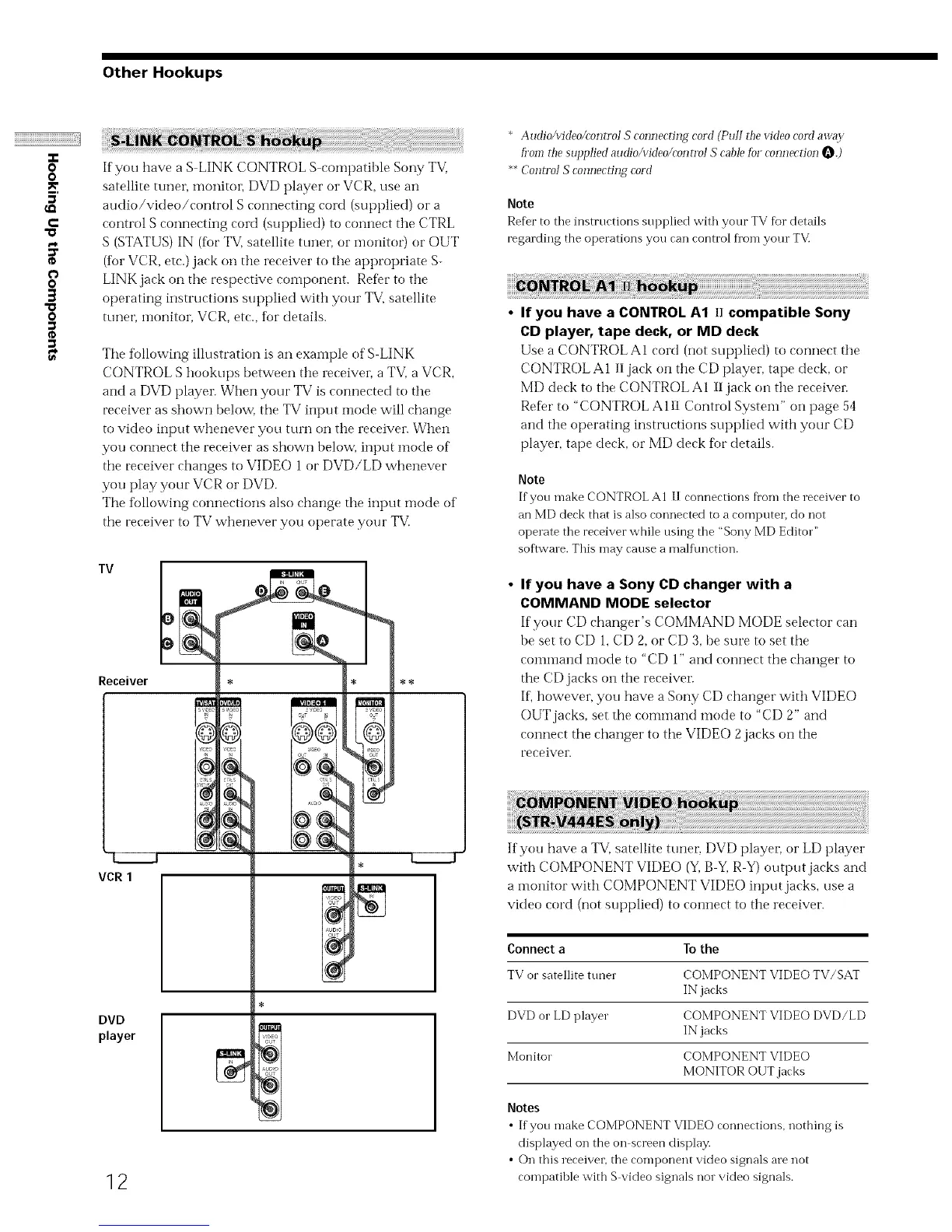
The following illustration is an exainple of S-LINK
CONTROL S hookups between the receiver, a TV, a VCR,
and a DVD player. When your TV is connected to the
receiver as shown below, the TV input mode will change
to video input whenever you turn on the receiver. When
you connect the receiver as shown below, input mode of
the receiver changes to VIDEO 1 or DVD/LD whenever
you play your VCR or DVD.
The following connections also change the input ntode of
the receiver to TV whenever you operate your TV.
TV
Receiver
DVD
player
12
* AudioAddeo/controI S connecting cord (Pull the video coM away
fi_omthe supplied audio/video/control S cable [bl connection O.)
**Control S connecting cord
Note
Refer to the instructions supplied with your TV for details
regarding the operations you can control fi'om your TV.
• If you have a CONTROL A1 II compatible Sony
CD player, tape deck, or MD deck
Use a CONTROL A1 cord (not supplied) to cormect the
CONTROL A1 II jack on the CD player, tape deck, or
MD deck to the CONTROL AI 11jack on the receiven
ReDr to "CONTROL A 111Control System" on page 54
and the operating instructions supplied with your CD
player, tape deck, or MD deck for details.
Note
If you make CONTROL A1 II connections Dora the receiver to
an MD deck that is also connected to a compute_; do not
operate the receiver while using the "Sony MD Editor"
soflwm e. This may cause a malt\ruction.
• If you have a Sony CD changer with a
COMMAND MODE selector
If'your CD changer's COMMAND MODE selector can
be set to CD 1, CD 2, or CD 3, be sure to set the
comi-nand i'node to "CD 1" and connect the changer to
the CD jacks on the receiven
If; however, you have a Sony CD changer with VIDEO
OUT jacks, set the command mode to "CD 2" and
cotmect the changer to the VIDEO 2jacks on the
receiver.
If you have a TV. satellite tune!'. DVD playen or LD player
with COMPONENT VIDEO ("11,B 51,R-Y) ot_tput jacks and
a monitor with COMPONENT VIDEO input jacks, use a
video cord (not supplied) to connect to the receiver.
Connect a To the
TV or satellite tuner COMPONENT VIDEO TV/SAT
IN jacks
DVD or LD player COMPONENT VIDEO DVD/LD
IN jacks
Monitor COMPONENT VIDEO
MONITOR OUT jacks
Notes
• If you make COMPONENT VIDEO ronnertions, nothing is
displayed on the on screen display.
• On this receiven the component video signals are not
compatible with S video signals nor video signals.



 To Next Page