Other Hookups
Red (R) Red (R)
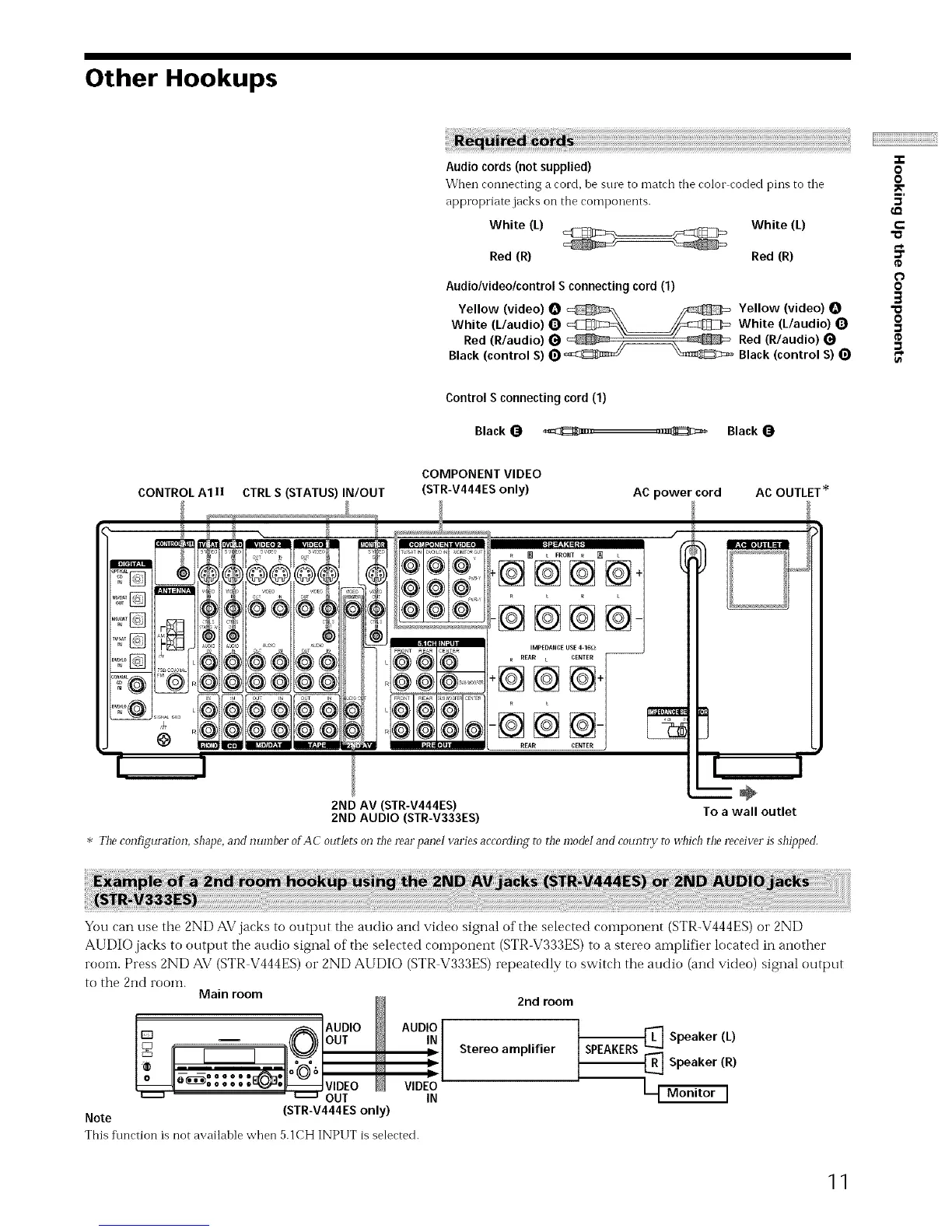
Audio/video/control S connecting cord (1)
Yellow (video) O _\ _ Yellow (video)
White (L/audio) _) _--_\_/_:_mZ_ White (L/audio) 0
Red (R/audio) _ _ )_ _ Red (R/audio)
Black (control S) 0 _ _ Black (control S) (_
-T-
O
0
5'
P
"o
_=
0
0
3
"a
o
¢D
Control S connectingcord(1)
Black_ ._z,... ,._{_c_ Black
CONTROL A1 II CTRL S (STATUS) IN/OUT
COMPONENT VIDEO
(STR-V444ES only)
AC power cord
AC OUTLET _
2ND AV (STR-V444ES)
2ND AUDIO (STR-V333ES)
_ L FRONT R []
-@@@
-@@@@-
IMPEDANCEUSE 4-1Gl_
R REAR t CENTER
+@@@+
--@@@-
REARCENTER
÷
To a wall outlet
* The configuration, shape, and number of AC outlet5 on @e rearpanei varies according to r!_emode! and country to _d_ich the receiver is shipl)ed.
You can use the 2ND AV jacks to output the audio and video signal of the selected component (STR-V444ES) or 2ND
AUDIO jacks to output the audio signal of the selected COlnponent (STR-V333ES) to a stereo amplifier located in another
room. Press 2ND AV (STR V444ES) or 2ND AUDIO (STR V333ES) repeatedly to switch the audio (and video) signal output
to the 2nd rooln.
Main room
N
_, AUDIO /_ AUDIO
oo
' " u.....a OUT IN
Note (STR-V444ES only)
This f\mction is not availahle when 5.1CH INPUT is selected.
2nd room
Stereo amplifier
SPEAKERSq Speaker (L)
{_ Speaker (R)
L_ Monitor I
11


 To Next Page