@,
5'
w
B
e_
PRESETTUNING +/-
DISPLAY
°1
O
i i
FM MODE MEMORY
FM/AM I TUNING +/-
FUNCTION
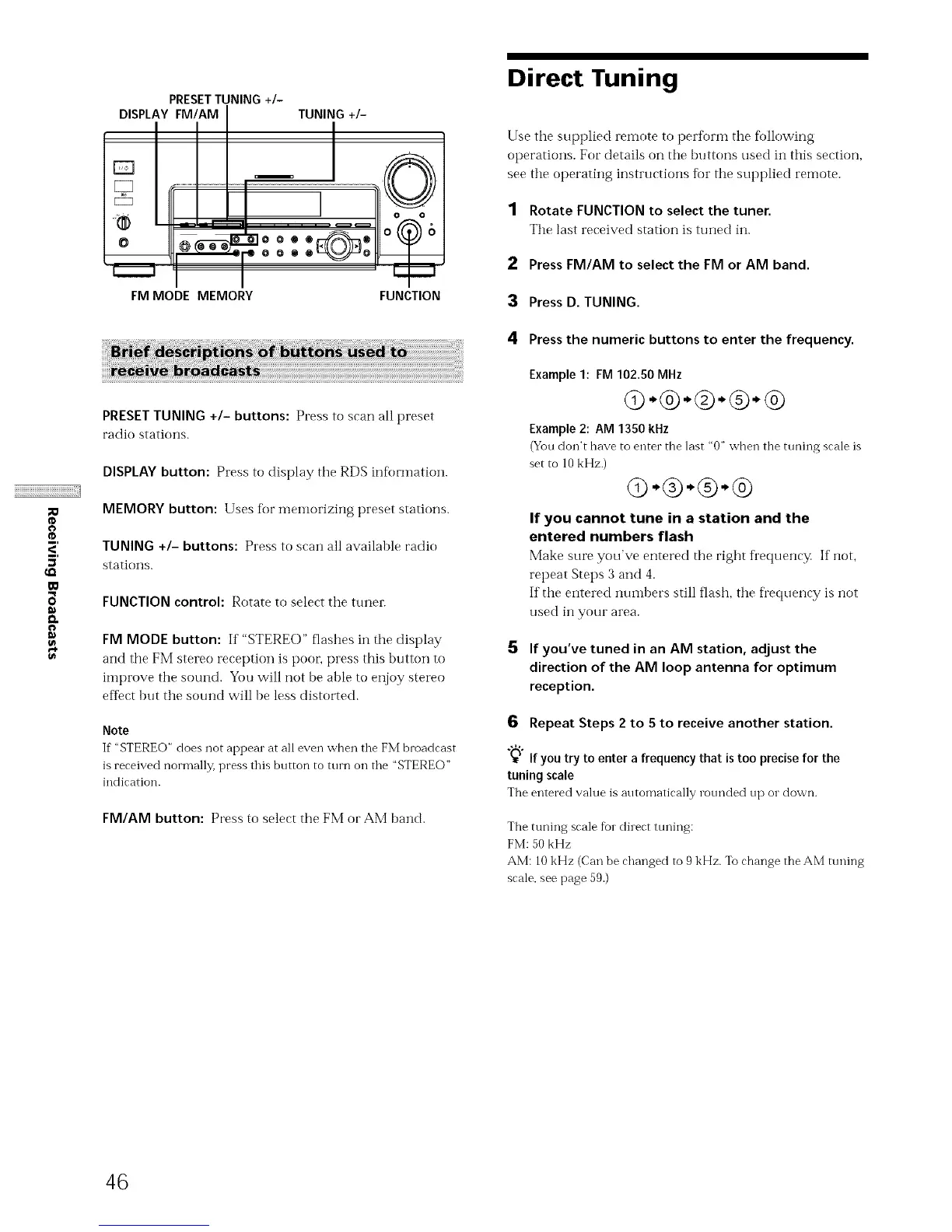
PRESET TUNING +I- buttons: Presstoscanallpreset
radio stations.
DISPLAY button: Press to display the RDS infbrmation.
MEMORY button: Uses for tnemorizing preset stations.
TUNING +I- buttons: Press to scan all available radio
stations.
FUNCTION control: Rotate to select tile tuner.
FM MODE button: If "STERE()" flashes in the display
and tile FM stereo reception is poor; press this button to
improve tile sound. You will not be able to enjoy stereo
efIect but tile sound will be less distorted.
Note
If'STEREO" does not appearatalleven when theFM broadcast
is received normally, press this bt/tton to ttlrn oil the "STEREO"
indication.
FM/AM button: Press to select the FM or AM band.
Direct Tuning
Use the supplied remote to perforln tile following
operations. For details on tile buttons used in this section,
see tile operating instructions for tile sut)plied remote.
1 Rotate FUNCTION to select the tuner.
Tile last received station is tuned ilL.
2 Press FM/AM to select the FM or AM band.
3 Press D. TUNING.
4 Press the numeric buttons to enter the frequency.
Example 1: FM 102.50 MHz
Q-®-®-®-®
Example 2: AM 1350 kHz
(You don't have to enter the last "0" when the tuning scale is
set to 10 kHz.)
G-®-®-®
If you cannot tune in a station and the
entered numbers flash
Make sure you've entered tile right frequen(y. If'not,
repeat Steps 3 and 4.
If tile entered nuiILbers still flash, tile fl'equency is not
used in your area.
5 If you've tuned in an AM station, adjust the
direction of the AM loop antenna for optimum
reception.
6 Repeat Steps 2 to 5 to receive another station.
"_" If you try to enter a frequency that is too precise for the
tuning scale
The entered value is automatically rounded up or down.
The tuning scale for direct ttming:
FM: 50 kHz
AM: l0 kHz (Can be changed to 9 kHz. To change theAM tuning
scale, see page 59.)
46



 To Next Page