Multi Channel Surround Setup
q.
0
0
5'
c
5'
c
3
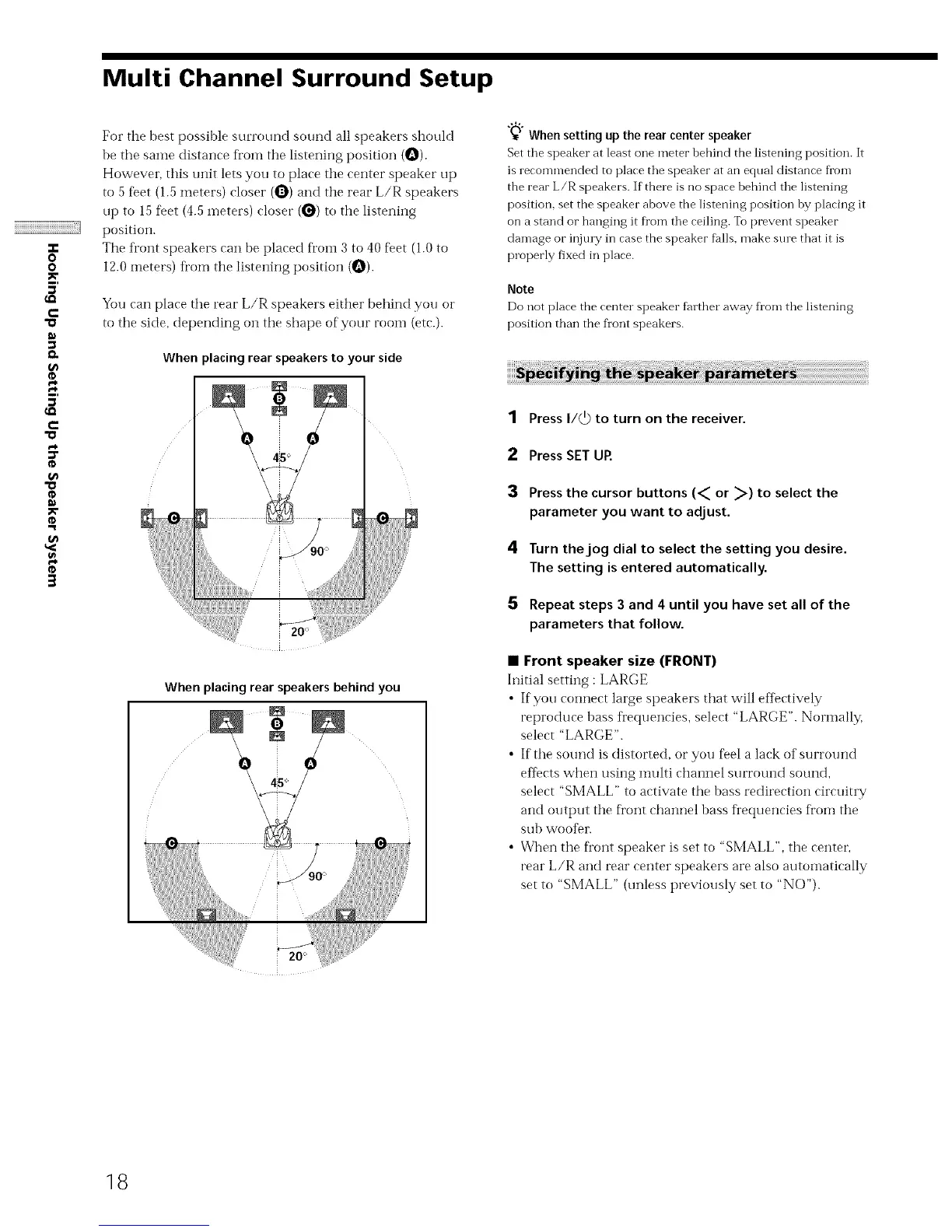
For the best possible surround sound all speakers should
be the same distance Kom the listening position (O).
However, this unit lets you to place the center speaker up
to 5 %et (1.5 meters) closer (O) and the rear L/R speakers
up to 15 %et (4.5 meters) closer (_) to the listening
position.
The front speakers can be placed fl'oin 3 to 40 feet (1.0 to
12.0 meters) fl'om the listening position {O).
You can place the rear L/R speakers either behind you or
to the side, depending on the shape of your room (etc.).
When placing rear speakers to your side
l
ic
When placing rear speakers behind you
0 0
"_"_Whensetting upthe rear centerspeaker
Set the speaker at least one meter bebind the listening position. It
is recommended to place the speaker at an equal distance from
the rear L/R speakers. If there is no space behind the listening
position, set the speaker above the listening position by placing it
on a stand or hanging it fl'om the ceiling. To prevent speaker
damage or injmT in case the speaker falls, make sine that it is
properly fixed in place.
Note
Do not place tbe center speaker farther away fl'om the listening
position than the fl'ont speakers.
1 Press I/_) to turn on the receiver.
2 Press SET UR
3 Press the cursor buttons (_ or _) to select the
parameter you want to adjust.
4 Turn the jog dial to select the setting you desire.
The setting is entered automatically.
5 Repeat steps 3 and 4 until you have set all of the
parameters that follow.
• Front speaker size (FRONT)
Initial setting : LARGE
• If you connect large speakers that will eflk_ctively
reproduce bass frequencies, select "LARGE". Nommlly,
select "LARGE".
• If the sound is distorted, or you %el a lack of surround
efIects when using multi channel surround sound,
select "SMALL" to activate the bass redirection circuitry
and output the fl'ont channel bass frequencies fl'om the
sub wooDr.
• When the Dont speaker is set to "SMALL", the centeL
rear L/R and rear center speakers are also autoinatically
set to "SMALL" (unless previously set to "NO").
18



 To Next Page