4
SECTION 2
ELECTRICAL ADJUSTMENT
Bias Adjustment
NOTE:
1. Perform the adjustment after the unit has warmed up sufficiently.
2. Perform the bias adjustment if the power transistor has been
replaced.
Procedure:
1. Rotate fully the bias adjusting semi-fixed resistors (RV500,
RV600) to the MIN position (counterclockwise).
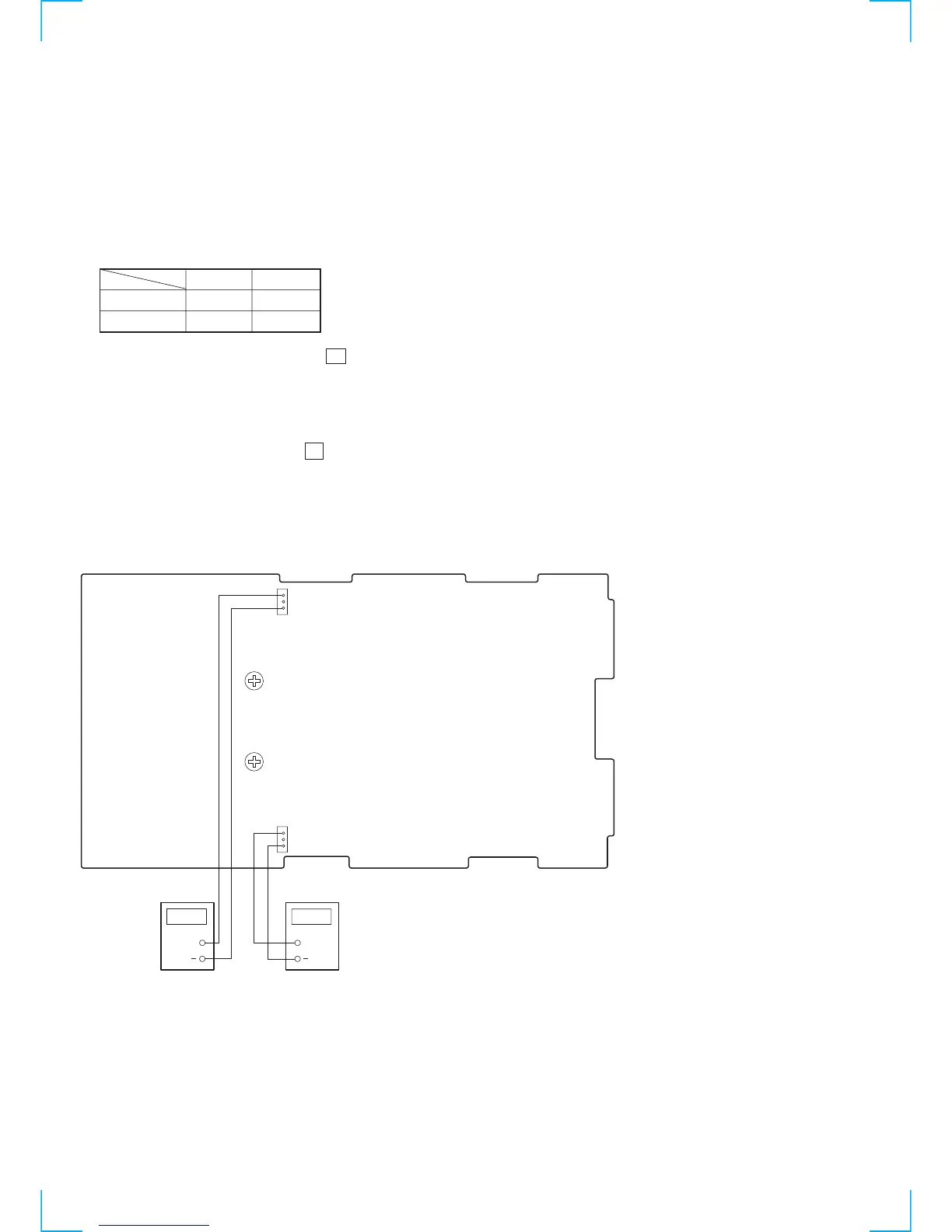
2. Connect a digital voltmeter to the CN500 and CN600.
1 pin 3 pin
–
–
+
+
CN500 (L-CH)
CN600(R-CH)
3. Set the slide regulator to 0V, and press the U button (ON) on
the set.
4. Raise gradually the slide regulator voltage up to the rated voltage.
5. At this time, confirm that the SP relay is turned on (it will click).
6. Adjust the RV500 and RV600 so that a reading of digital
voltmeter is 10 ± 1 mV.
7. Return the slidack to 0 V, and press the U button (OFF) on the
set.
Adjustment Location :
[MAIN BOARD] – COMPONENT SIDE –
+
CN600 (R-CH)
1
3
CN500 (L-CH)
1
3
RV600
Bias (R-CH)
RV500
Bias (L-CH)
DIGITAL
VOLTMETER
DIGITAL
VOLTMETER
+


 To Next Page