1-5.
LOCATION
AND
FUNCTION
OF
CONTROLS
rr=---~--~-~-.
~~~~]
I I
II
I I
I
I
II
L~""""",,
__
~--
~=""""IJ
I
/r-
r
• I
• I
WWW
4
I I
W
SU-536
0
0
~~:
19J
~
~
c ,
[[;l~
~_QJ~
!
.~
A
Ir
~\
I
l~
!
1
I
~
I
[I]
7 []]
1-3.
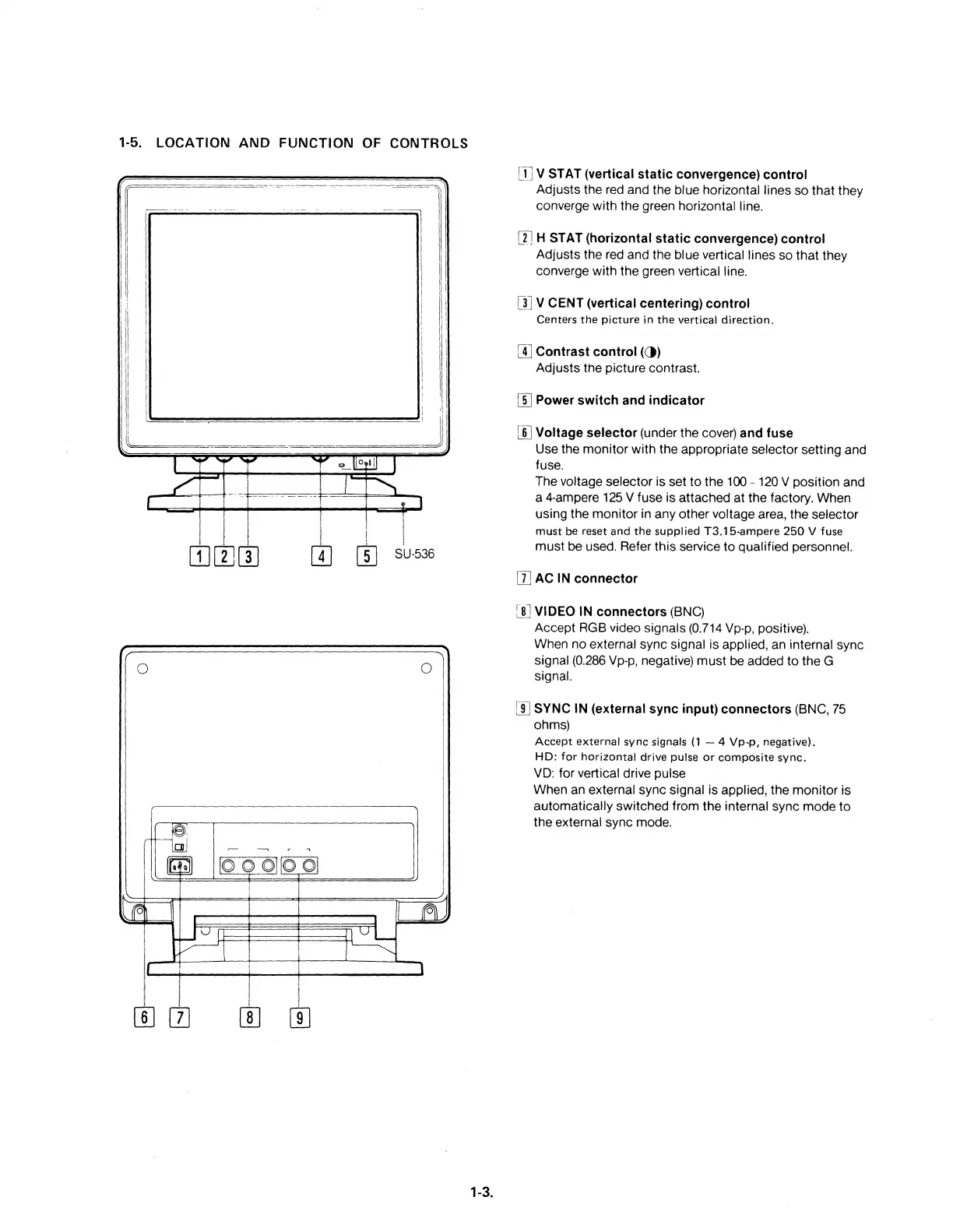
m v STAT (vertical static convergence) control
Adjusts
the red and the blue horizontal lines
so
that
they
converge
with
the
green horizontal line.
m H STAT (horizontal static convergence) control
Adjusts the red and the blue vertical lines so
that
they
converge
with
the green vertical line.
m V CENT (vertical centering) control
Centers
the
picture
in
the
vertical
direction.
W Contrast control (et)
Adjusts
the
picture contrast.
W Power switch and indicator
W Voltage selector (under the cover) and fuse
Use the
monitor
with
the appropriate selector
setting
and
fuse.
The voltage selector
is
set
to
the
100 - 120 V position and
a 4-ampere 125 V fuse is attached
at
the factory. When
using
the
monitor
in
any
other
voltage area,
the
selector
must
be reset
and
the
supplied
T3.15-ampere
250
V fuse
must
be used. Refer
this
service
to
qualified personnel.
II]
AC IN connector
[II] VIDEO IN connectors (BNC)
Accept RGB video signals (0.714 Vp-p, positive).
When
no
external sync signal is applied, an internal sync
signal (0.286 Vp-p, negative)
must
be added
to
the
G
Signal.
[I]
SYNC IN (external sync input) connectors (BNC,
75
ohms)
Accept external sync signals
(1
- 4 Vp-p, negative).
HD: for horizontal drive pulse
or
composite
sync.
VD: for vertical drive pulse
When an external sync signal is applied, the
monitor
is
automatically
switched
from
the
internal sync
mode
to
the
external sync mode.











 To Next Page