KD-27FS170/32FS170/36FS170
KD-27FS170/32FS170/36FS170
39
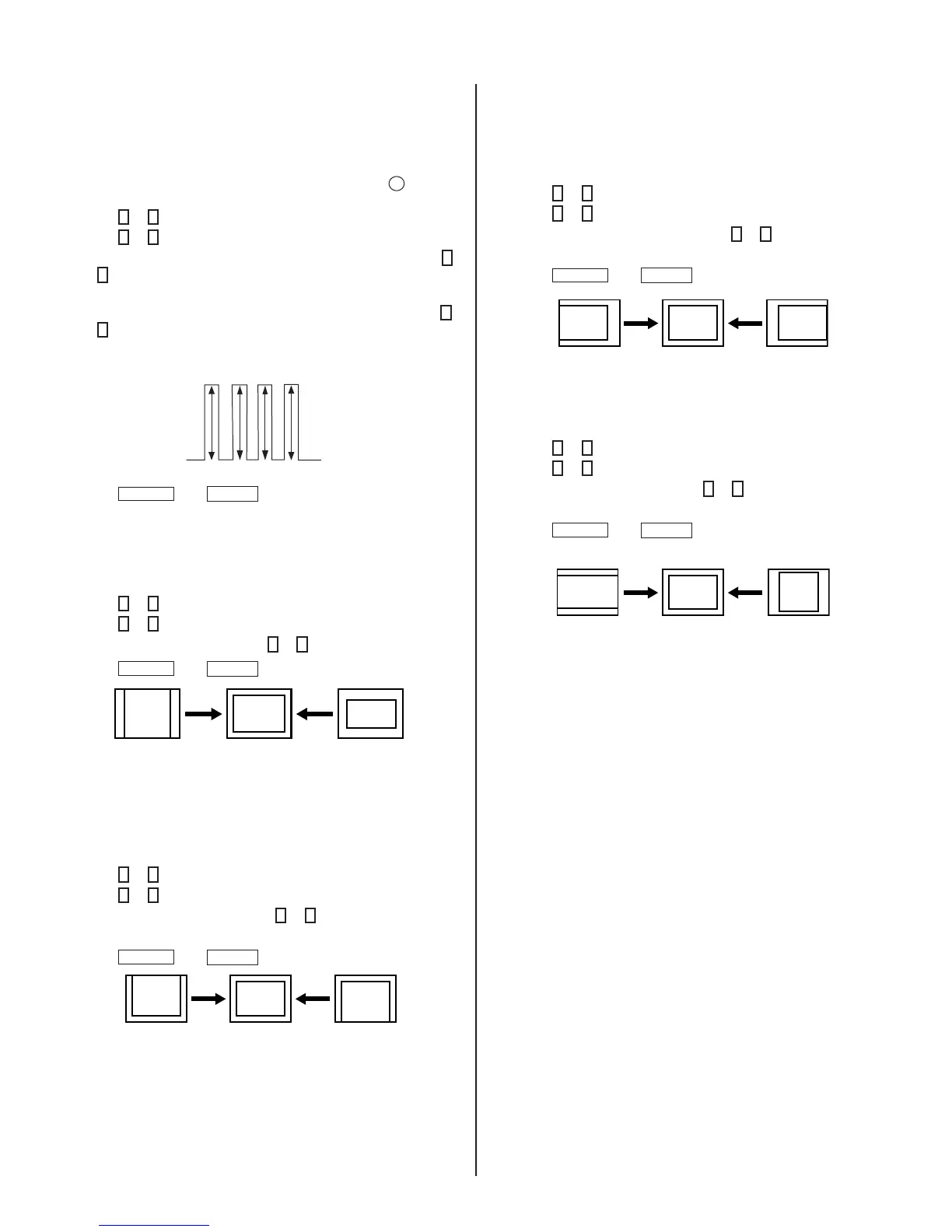
Sub Hue, Sub Color Adjustment (SHUE, SCOL)
1. Input color-bar signal at 75%.
2. Access Service Adjustment Mode.
3. Set (PIC) to Max and (COL) to 50%.
4. Connect an oscilloscope probe to C Board, CN705 pin
4
(Blue
Out).
5. Press
2
or
5
to select the VP1 category.
6. Press
1
or
4
to display the SHUE or SCOL item.
7. While showing the SHUE item, adjust the waveform by pressing
3
or
6
until the second and third bars show the same level
(V2 = V3 < 0.15Vp-p). Set Sub Hue -2 Step.
8. While showing the SCOL item, adjust the waveform by pressing
3
or
6
until the fi rst and fourth bars show the same level
(V1 = V4 < 0.15Vp-p). Set Sub Col + 2 Step.
V1
V2 V3
V4
9. Press
MUTING
then
ENTER
to write into memory.
V. Size Adjustment (VSIZ)
1. Input a crosshatch signal.
2. Access Service Adjustment Mode.
3. Press
2
or
5
to select the DEF category.
4. Press
1
or
4
to display the VSIZ item.
5. Adjust value of VSIZ by pressing
3
or
6
for the best vertical size.
6. Press
MUTING
then
ENTER
to write into memory.
V. Center Adjustment (VPOS)
Perform this adjustment after performing H. Frequency
(Free Run) Check.
1. Input a crosshatch signal.
2. Access Service Adjustment Mode.
3. Press
2
or
5
to select the DEF category.
4. Press
1
or
4
to display the VPOS item.
5. Adjust value of VPOS by pressing
3
or
6
for the best vertical
center.
6. Press
MUTING
then
ENTER
to write into memory.
H. Center Adjustment (HPOS)
Perform this adjustment after performing H. Frequency (Free Run)
Check.
1. Input a crosshatch signal.
2. Access Service Adjustment Mode.
3. Press
2
or
5
to select the DEF category.
4. Press
1
or
4
to display the HPOS item.
5. Adjust the value of HPOS by pressing
3
or
6
for the best horizontal
center.
6. Press
MUTING
then
ENTER
to write into memory.
H. Size Adjustment (HSIZ)
1. Input a monoscope signal.
2. Access Service Adjustment Mode.
3. Press
2
or
5
to select the DEF category.
4. Press
1
or
4
to display the HSIZ item.
5. Adjust value of HSIZ by pressing
3
or
6
for the best horizontal
size.
6. Press
MUTING
then
ENTER
to write into memory.






 To Next Page