TurningtheCableModeOnorOff
All of thecontrolsareon the Remote
Commander.
f
MUTING(_ C_SLEEP
'rVNIDEO
®®®
®®®
®®®
VOL CH
INN
RM-Y116
To return to the normal screen
Press MENU.
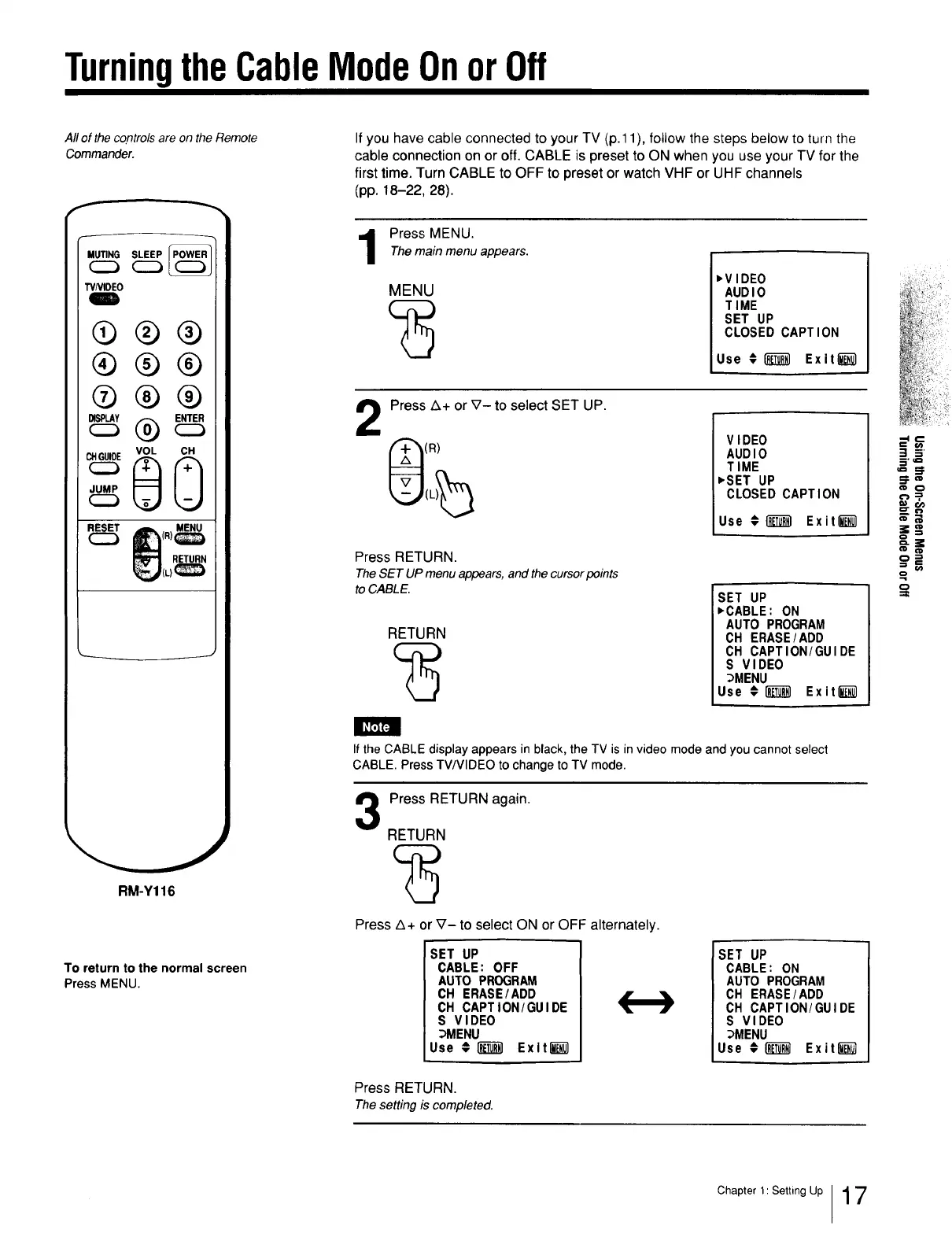
If you have cable connected to your TV (p.11), follow the steps below to turn the
cable connection on or off. CABLE is preset to ON when you use your TV for the
first time. Turn CABLE to OFF to preset or watch VHF or UHF channels
(pp. 18-22, 28).
Press MENU.The main menu appears.
MENU
,VIDEO
AUDIO
TIME
SET UP
CLOSED CAPTION
Use #r__ Exit l_
2
Press A+ or V- to select SET UP.
(R)
Press RETURN.
The SET UP menu appears, and the cursor points
to CABLE.
RETURN
VIDEO
AUDIO
TIME
,SET UP
CLOSED CAPTION
Use # _ Exit_
SET UP
,CABLE: ON
AUTO PROGRAM
OH ERASE/ADD
OH CAPTION/GUIDE
S VIDEO
_MENU
Use ¢i_ Exit_)
If the CABLE display appears in black, the TV is in video mode and you cannot select
CABLE. Press TV/VIDEO to change to TV mode.
3
Press RETURN again.
RETURN
Press Z_+or V- to select ON or OFF alternately.
SET UP
CABLE: OFF
AUTO PROGRAM
CH ERASE/ADD
CH CAPTION/GUIDE
S VIDEO
_MENU
Use €1_ Exiti_
[SET UP
CABLE: ON
AUTO PROGRAM
CH ERASE/ADD
CH CAPTION/GUIDE
S VIDEO
_MENU
Use #1]_ Exit_
m
==
o
Press RETURN.
Thesetting is completed.
Chapter 1: Setting Up 17







 To Next Page