ConnectingOtherEquipment
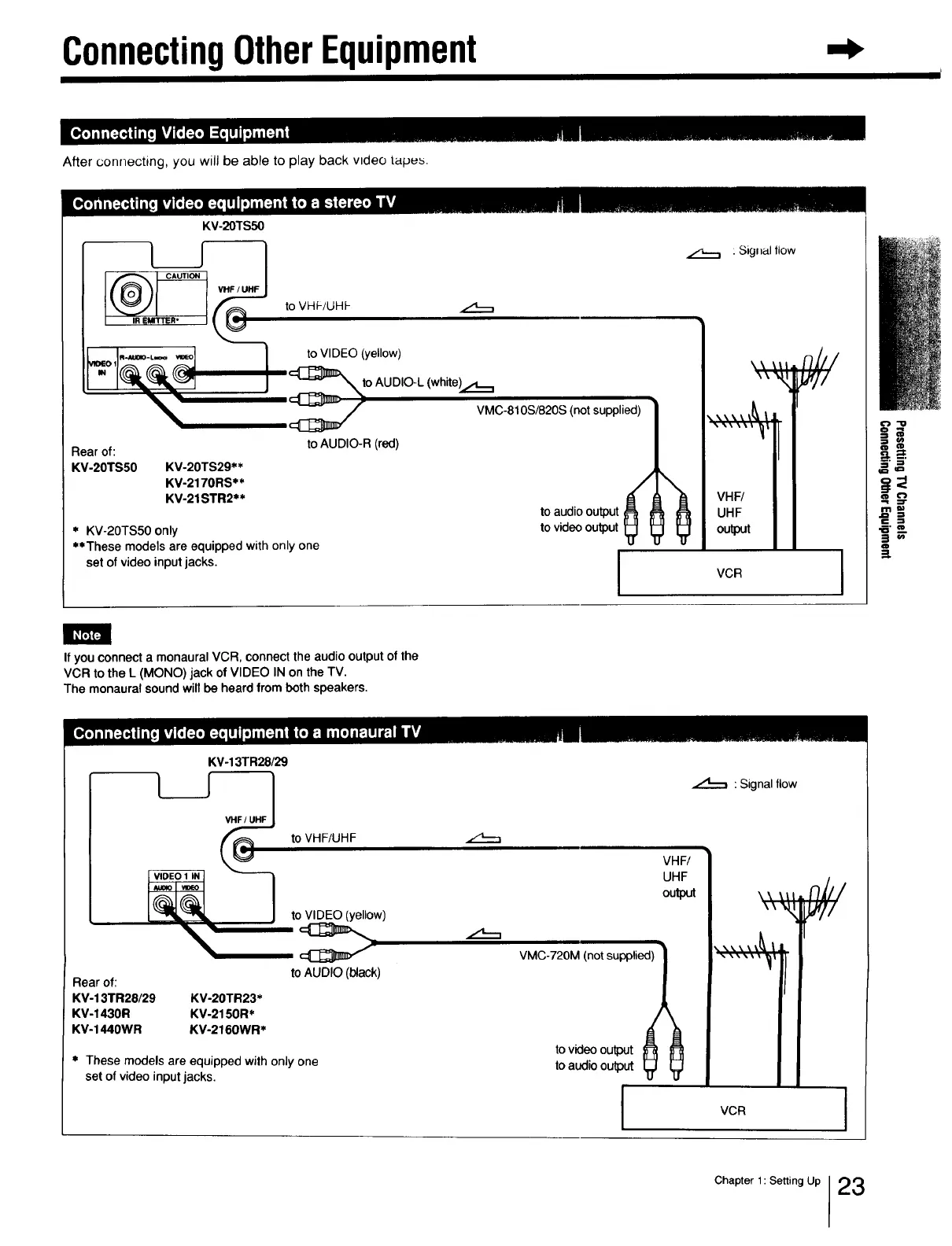
After connecting, you will be able to play back video tapu_.
KV-20TS50
I IREMITTER*
@
to VHF/UHF
to VIDEO (yellow)
to AUDIO-L (white_
VMC-810S/820S (not supplied)
Rear of:
KV-20TS50 KV-20TS29**
KV-2170RS**
KV-21STR2**
to AUDIO-R (red)
" KV-20TS50 only
**These models are equipped with only one
set of video input jacks.
to audio output
to video output
Signal flow
F
"_ VHF/
UHF
output
VCR
€'} "1_
"i
.=
i"
=!
If you connect a monaural VCR, connect the audio output of the
VCR to the L (MONO) jack of VIDEO IN on the TV.
The monaural sound will be heard from both speakers.
KV-13TR28/29
Rear of:
KV-13TR28/29 KV-20TR23*
KV-1430R KV-2150R*
KV-1440WR KV-2160WR*
* These models are equipped with only one
set of video input jacks•
: Signal flow
to VHF/UHF
to VIDEO (yellow)
to AUDIO (black)
VHF/
UHF
output
tl--,
VMC-720M (not supplied)
\\ \It
T
to video output
to audio output
I
VCR
Chapter 1: Setting Up 23







 To Next Page