UsingClosedCaption(U.S.A.modelsonly)
f
MUTING(_ (_SLEEP
"rVNIDEO
®®®
®®®
®®®
vo, Q cO
RM-Y116
To return to the normal screen
Press MENU.
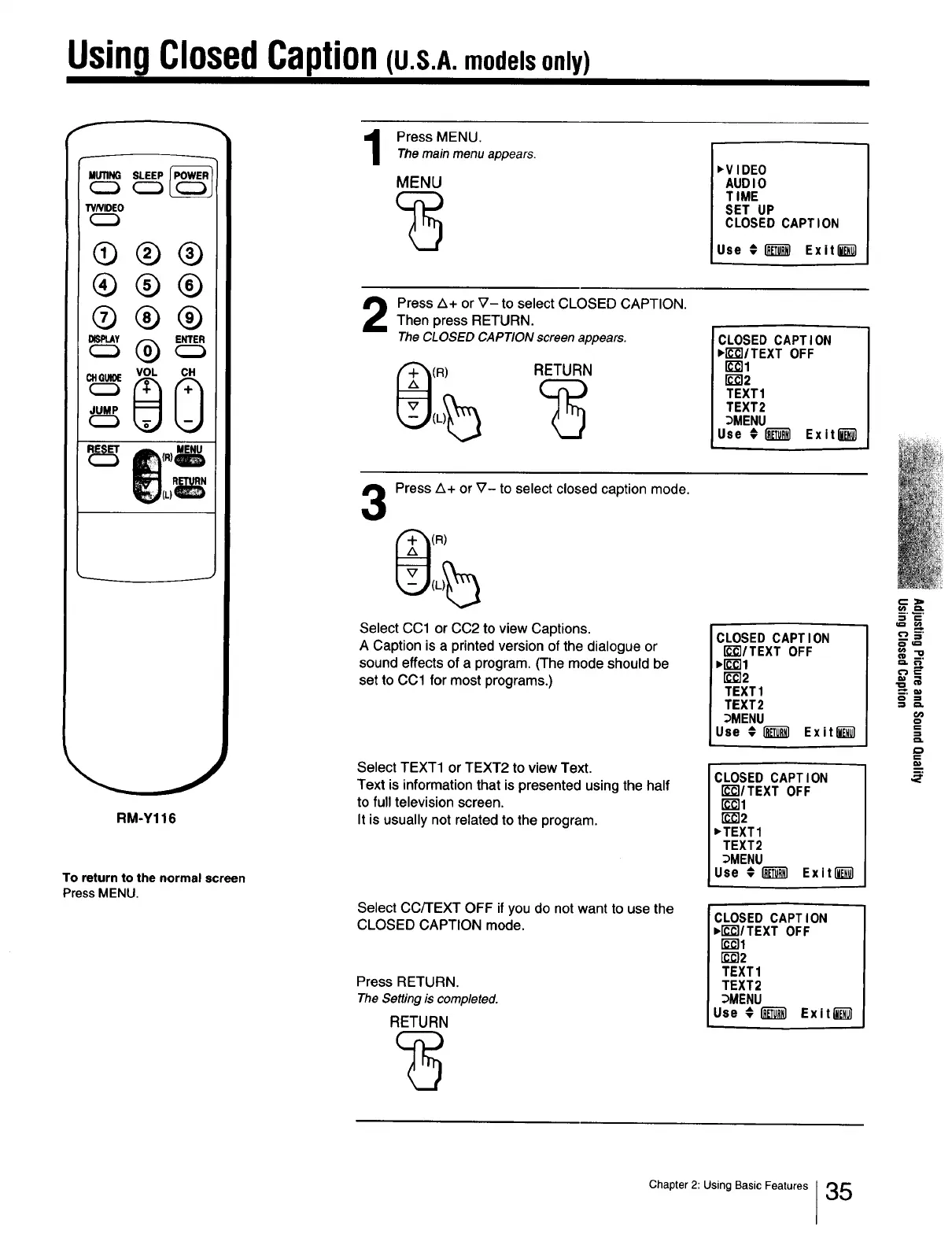
Press MENU.
The main menu appears.
MENU
,VIDEO
AUDIO
TIME
SET UP
CLOSED CAPTION
Use _1"_ Exit l_
Press A+ or V- to select CLOSED CAPTION.
Then press RETURN.
TheCLOSED CAPTION screen appears.
(R) RETURN
!CLOSED CAPTION
,EE]ITEXT OFF
rc-_l
r_2
TEXT1
TEXT2
_MENU
Use €1_ Exit l_
3
Press A+ or V- to select closed caption mode.
(R)
Select CC1 or CC2 to view Captions.
A Caption is a printed version of the dialogue or
sound effects of a program. (The mode should be
set to CC1 for most programs.)
Select TEXT1 or TEXT2 to view Text.
Text is information that is presented using the half
to full television screen.
It is usually not related to the program.
Select Cc/'rEXT OFF if you do not want to use the
CLOSED CAPTION mode.
Press RETURN.
TheSetting is completed.
RETURN
CLOSED CAPTION
IEE'I/TEXTOFF
,lEE11
r_2
TEXT1
TEXT2
_MENU
Use €i_1 Exit_
CLOSED CAPTION
rc-_/TEXT OFF
[E-_I
[J_]2
,TEXT1
TEXT2
_MENU
Use € _ Exitl_l
CLOSED CAPTION
,rd-_/TEXT OFF
[_2
TEXT 1
TEXT2
_MENU
Use # I_ Exit_
E,=_
==a
==
=_
m
_r
Chapter 2: Using Basic Features I 35







 To Next Page