Using the/imer-Actlvated Functions
f
f----
MUTiNG SLEEP
WNIDEO
@®®
®®®
®®®
VOL CH
+gQ
RM-Y116
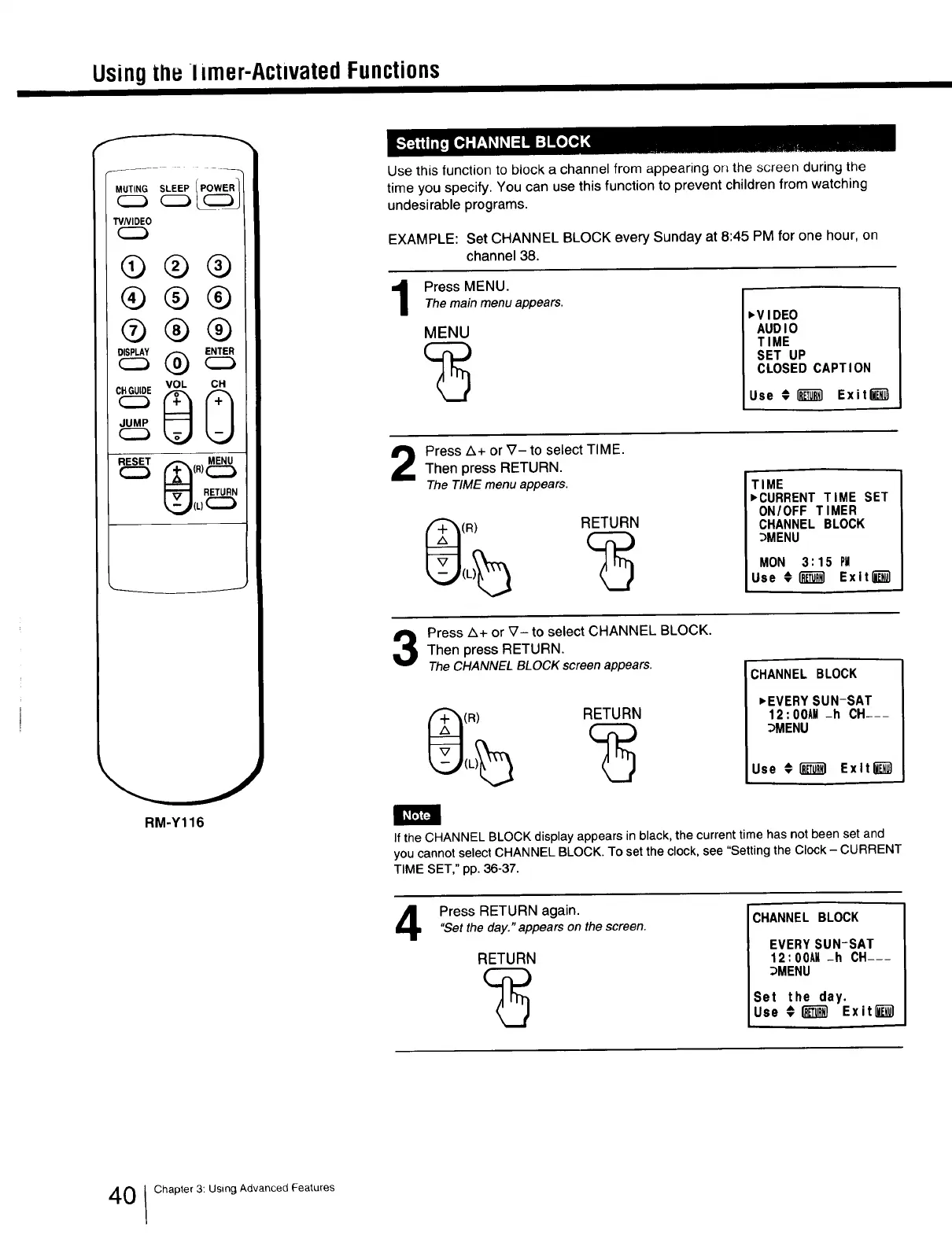
Use this function to block a channel from appearing on the screen during the
time you specify. You can use this function to prevent children from watching
undesirable programs.
EXAMPLE: Set CHANNEL BLOCK every Sunday at 8:45 PM for one hour, on
channel 38.
Press MENU.Themain menu appears.
MENU
,VIDEO
AUDIO
TIME
SET UP
CLOSED CAPTION
Use € (_ Exit_
Press Z_+or V- to select TIME.
Then press RETURN.
The TIME menu appears.
(R)
RETURN
TIME
,CURRENT TIME SET
ON/OFF TIMER
CHANNEL BLOCK
_MENU
MON 3:15 PM
Use €(_ Exit l_l
Press Z_+or _7- to select CHANNEL BLOCK.
Then press RETURN.
The CHANNEL BLOCK screen appears.
(R) RETURN
ICHANNEL BLOCK
,EVERY SUN-SAT
12:00AM -h CH---
:::_MENU
Use #(_ Exlt_)
If the CHANNEL BLOCK display appears in black, the current time has not been set and
you cannot select CHANNEL BLOCK. To set the clock, see "Setting the Clock - CURRENT
TIME SET," pp. 36-37.
Press RETURN again.
"Setthe day." appears on the screen.
RETURN
CHANNEL BLOCK
EVERYSUN-SAT
12:00AM -h CH---
3MENU
Set the day.
Use ¢(m_ Exit_
0 I Chapter 3: Using Advanced Features







 To Next Page