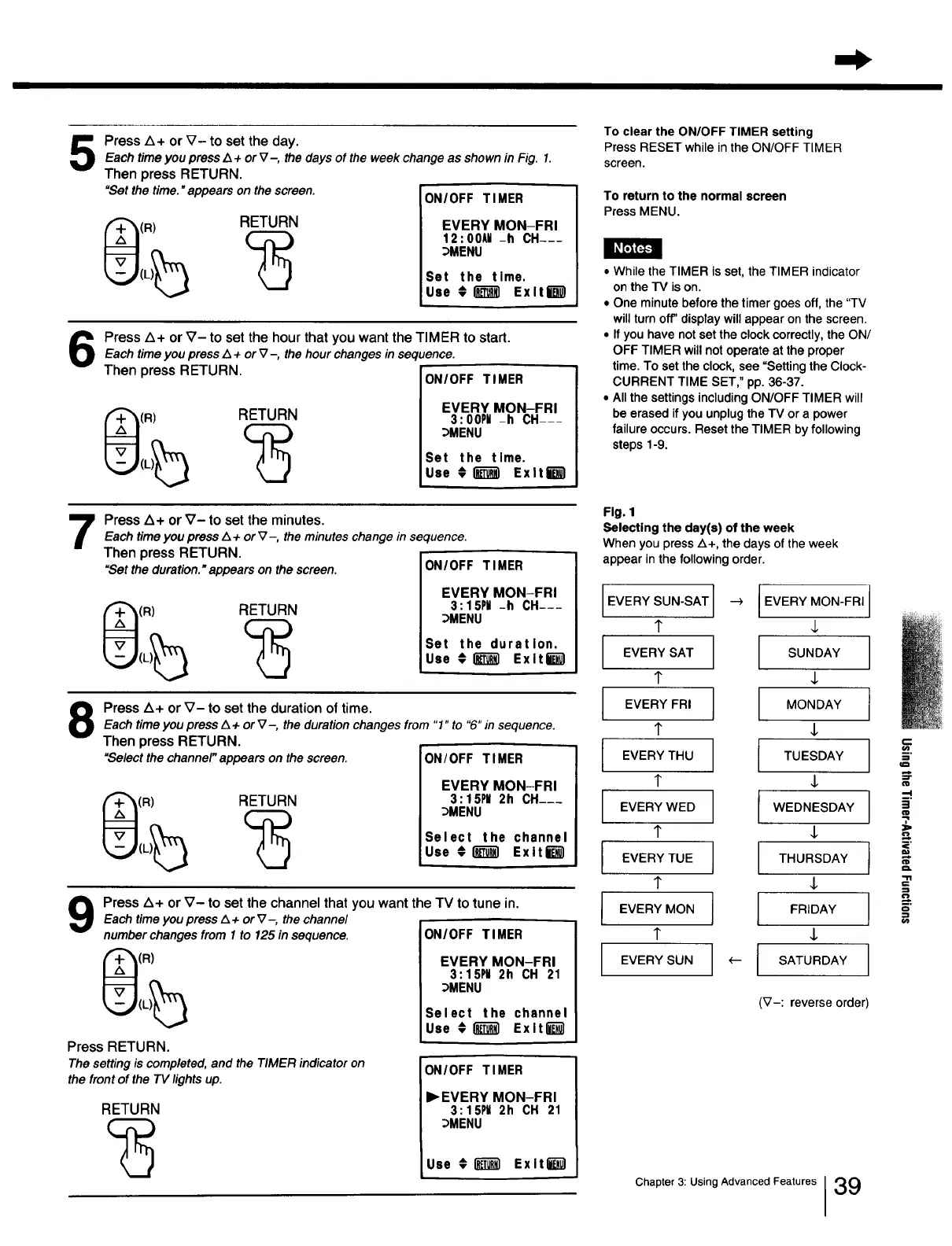
Press A+ or V- to set the day.Each time you press A + or V-, the days of the week change as shown in Fig. 1.
Then press RETURN.
"Set the time. "appears on the screen.
(R) RETURN
ON/OFF TIMER
EVERY MON-FRI
12:00AII-h CH---
_MENU
Set the time.
Use _ _ Exlt_
Press A+ or V- to set the hour that you want the TIMER to start.Each time you press Z_+ or V -, the hour changes in sequence.
Then press RETURN. ON/OFF TIMER
(R)
RETURN
EVERY MON-FRI
3: OOPM-h CH---
_MENU
Set the time.
Use _ _ Exit8
To clear the ON/OFF TIMER setting
Press RESET while inthe ON/OFF TIMER
screen.
To return to the normal screen
Press MENU.
• While the TIMER is set, the TIMER indicator
on the TV is on.
• One minute before the timer goes off, the "TV
will turn off' display will appear on the screen.
• If you have not set the clock correctly, the ON/
OFF TIMER will not operate at the proper
time. To set the clock, see "Setting the Clock-
CURRENT TIME SET," pp. 36-37.
• All the settings including ON/OFF TIMER will
be erased if you unplug the TV or a power
failure occurs. Reset the TIMER by following
steps 1-9.
Press Z_+ or _7- to set the minutes.Each timeyou pressL_+orV-, theminutes change in sequence.
Then press RETURN.
"Set theduration."appearson thescreen.
(R) RETURN
ON/OFF TIMER
EVERY MON-FRI
3: 15PI -h CH---
_MENU
Set the duration.
Use #1_-_] Exlti_
Press Z_+ or V- to set the duration of time.Each timeyou press Z_+ or V-, the duration changes from "1" to "6"in sequence.
Then press RETURN.
"Selectthe channel"appears on the screen. ON/OFF TIMER
(R) RETURN
EVERY MON-FRI
3:15PII 2h CH-__
_MENU
Select the channel
Use #lm_] Exit6
9
Press Z_+ or V- to set the channel that you want the TV to tune in.
Each time you press z_+ or V-, the channel
number changes from 1 to 125 in sequence.
2}(R)
Press RETURN.
The setting is completed, and the TIMER indicator on
the front of the TV lights up.
RETURN
ON/OFF TIMER
EVERY MON-FRI
3:15PU 2h CH 21
_MENU
Select the channel
Use #_ Exltl_l
ON/OFF TIMER
I_EVERY MON-FRI
3:15PU 2h CH 21
_MENU
Use _] Exlt_'_l
Fig. 1
Selecting the day(s) of the week
When you press Z_+, the days of the week
appear in the following order.
EVERY SUN-SAT --) IEVERY MON-FRI
T
EVERY SAT SUNDAY
EVERY FRI I MONDAY
i
I
EVERY THU I TUESDAY
i
I
[
EVERY WED I WEDNESDAY
I
I VERY TUE THURSDAY
I EVERY MON FRIDAY
EVERY SUN (-- SATURDAY
(_7-: reverse order
Chapter 3: Using Advanced Features I39
==
§.
o
==







 To Next Page