AdjustingPicture and SoundQuality
f
MUTING(_ (_SLEEP _P_
TVNIDEO
C2)
Q®®
®®®
®®®
VOL CH
RM-Y116
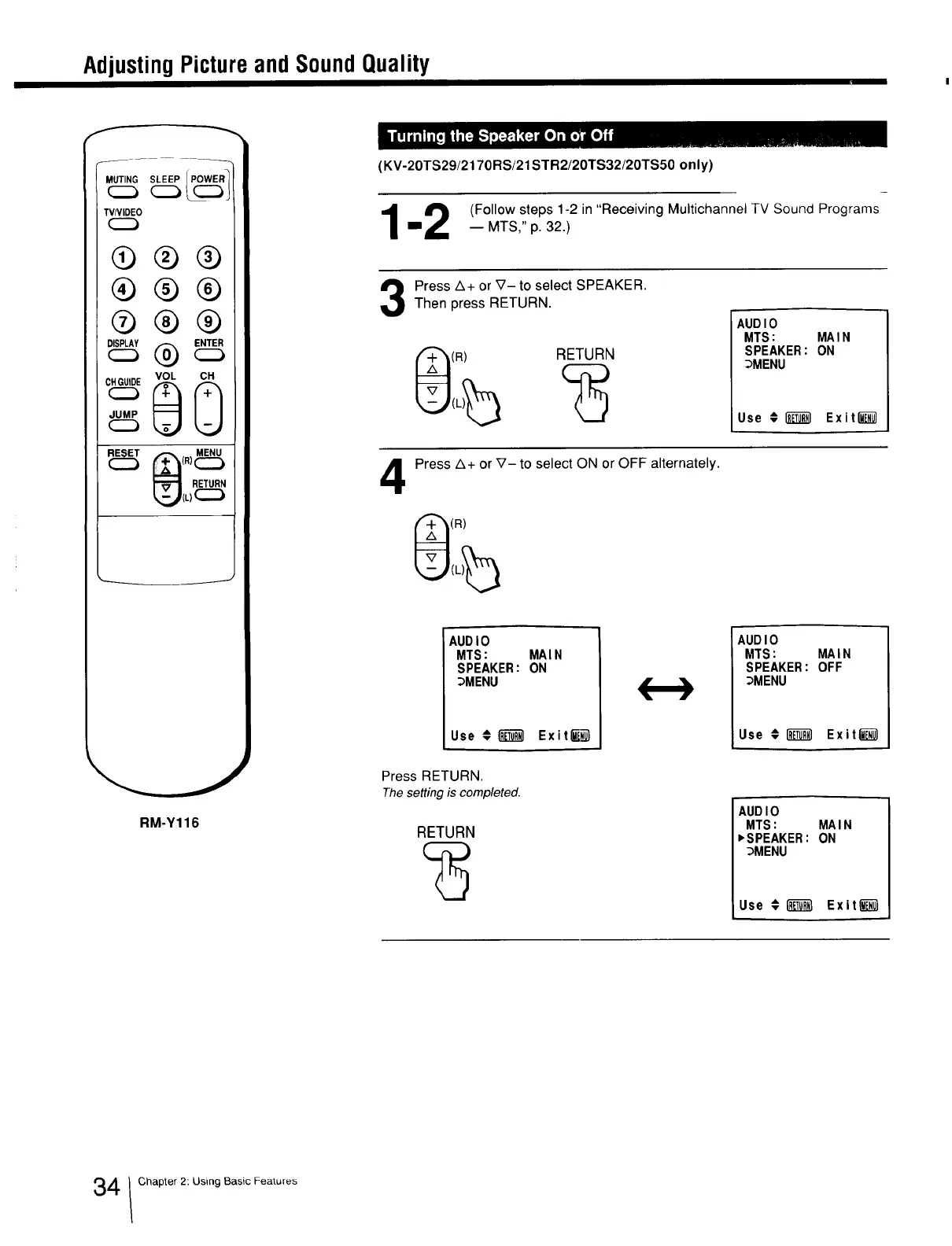
(KV-20TS29/2170RS/21STR2/20TS32/20TS50 only)
12 (FOllOw steps 1-2 in "ReceiVing Multichanr'lel TV 'SOLjndPrOgramSu _ MTS_" p. 32. /
Press A+ or V- to select SPEAKER.Then press RETURN.
(R)
RETURN
AUDIO
MTS: MAIN
SPEAKER: ON
_MENU
Use # _ Exitl_l
4
Press A+ or V- to select ON or OFF alternately.
(R)
AUDIO
MTS: MAIN
SPEAKER: ON
_MENU
Use €[_1 Exitf!_;_
AUDIO
MTS: MAIN
SPEAKER: OFF
_MENU
Use € _ Exit_
Press RETURN.
Thesetting is completed.
RETURN
AUDIO
MTS: MAIN
,SPEAKER: ON
_MENU
Use € _ Exiting]
4 Chapter 2: Using Basic Features







 To Next Page