f ----__
TVNIDEO
Q®®
®®®
®®®
VOL CH
RM-Y116
To return to the normal screen
Press MENU.
W
If you set S VIDEO to ON, the TV
automatically receives S video signals
whenever a VCR with S video is connected.
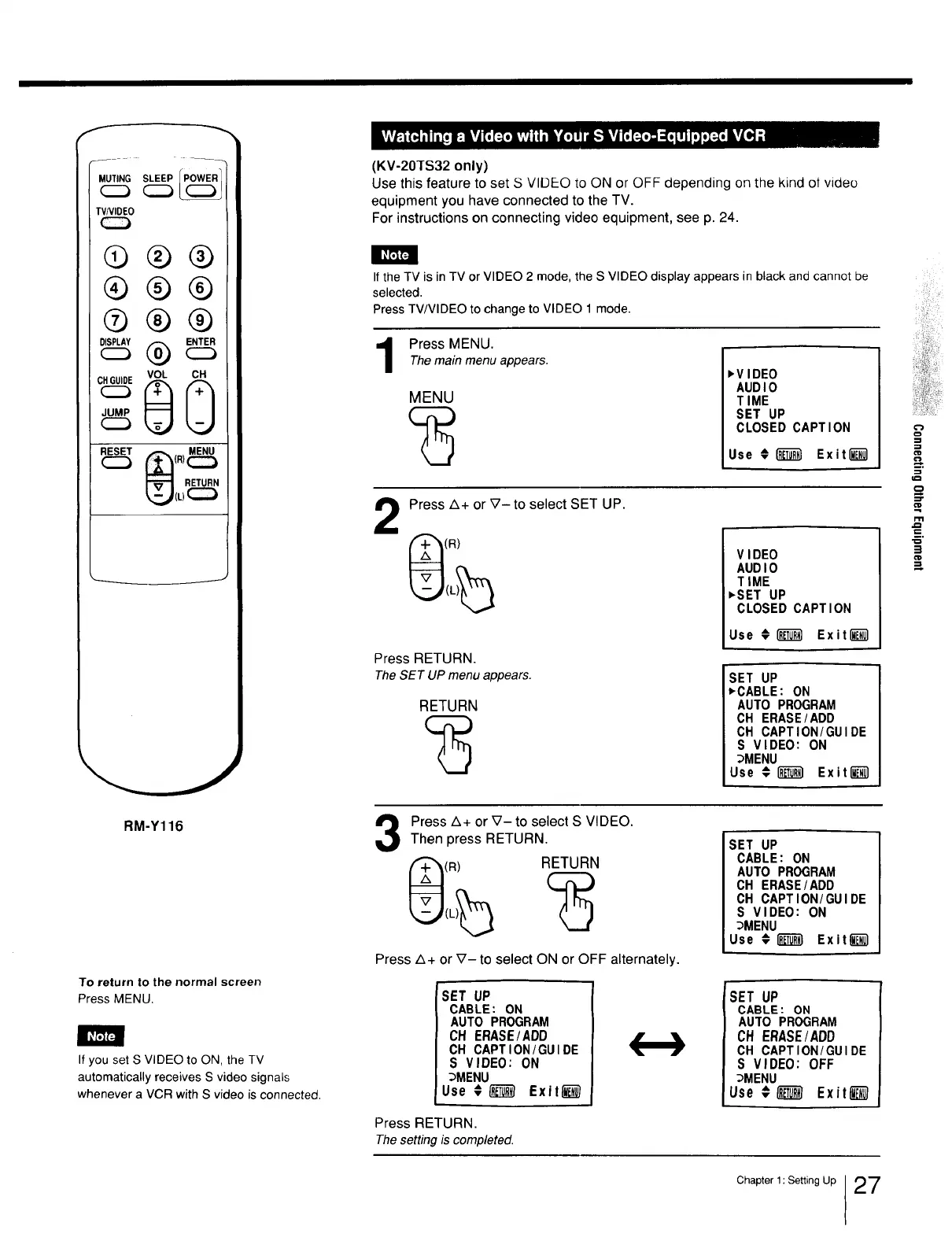
(KV-20TS32 only)
Use this feature to set S VIDEO to ON or OFF depending on the kind of video
equipment you have connected to the TV.
For instructions on connecting video equipment, see p. 24.
If the TV is in TV or VIDEO 2 mode, the S VIDEO display appears in black and cannot be
selected.
Press TV/VIDEO to change to VIDEO 1 mode.
Press MENU.The main menu appears.
MENU
,VIDEO
AUDIO
TIME
SET UP
CLOSED CAPTION
Use € _ Exitl_
€=
.=
Press Z_+ or _7- to select SET UP.
(R)
Press RETURN.
TheSET UP menu appears.
RETURN
VIDEO
AUDIO
TIME
,SET UP
CLOSED CAPTION
Use €1"__ Exit l__l
,
SET UP
_CABLE: ON
AUTO PROGRAM
CH ERASE/ADD
OH CAPTION/GUIDE
S VIDEO: ON
_MENU
Use €_ Exit_l
Press A+ or V- to select S VIDEO.
Then press RETURN.
(a) RETURN
Press Z_+ or V- to select ON or OFF alternately.
SET UP
CABLE: ON
AUTO PROGRAM
CH ERASE/ADD
CH CAPTION/GUIDE
S VIDEO: ON
_MENU
Use € /_ Exit_
Press RETURN.
Thesetting is completed.
SET UP
CABLE: ON
AUTO PROGRAM
OH ERASE/ADD
CH CAPTION/GUIDE
S VIDEO: ON
_MENU
Use #[]_ Exit_
SET UP
CABLE: ON
AUTO PROGRAM
CH ERASE/ADD
CH CAPTION/GUIDE
S VIDEO: OFF
_MENU
Use €_ Exit_
Chapter 1: Setting Up 27







 To Next Page