ConnectingOther Equipment
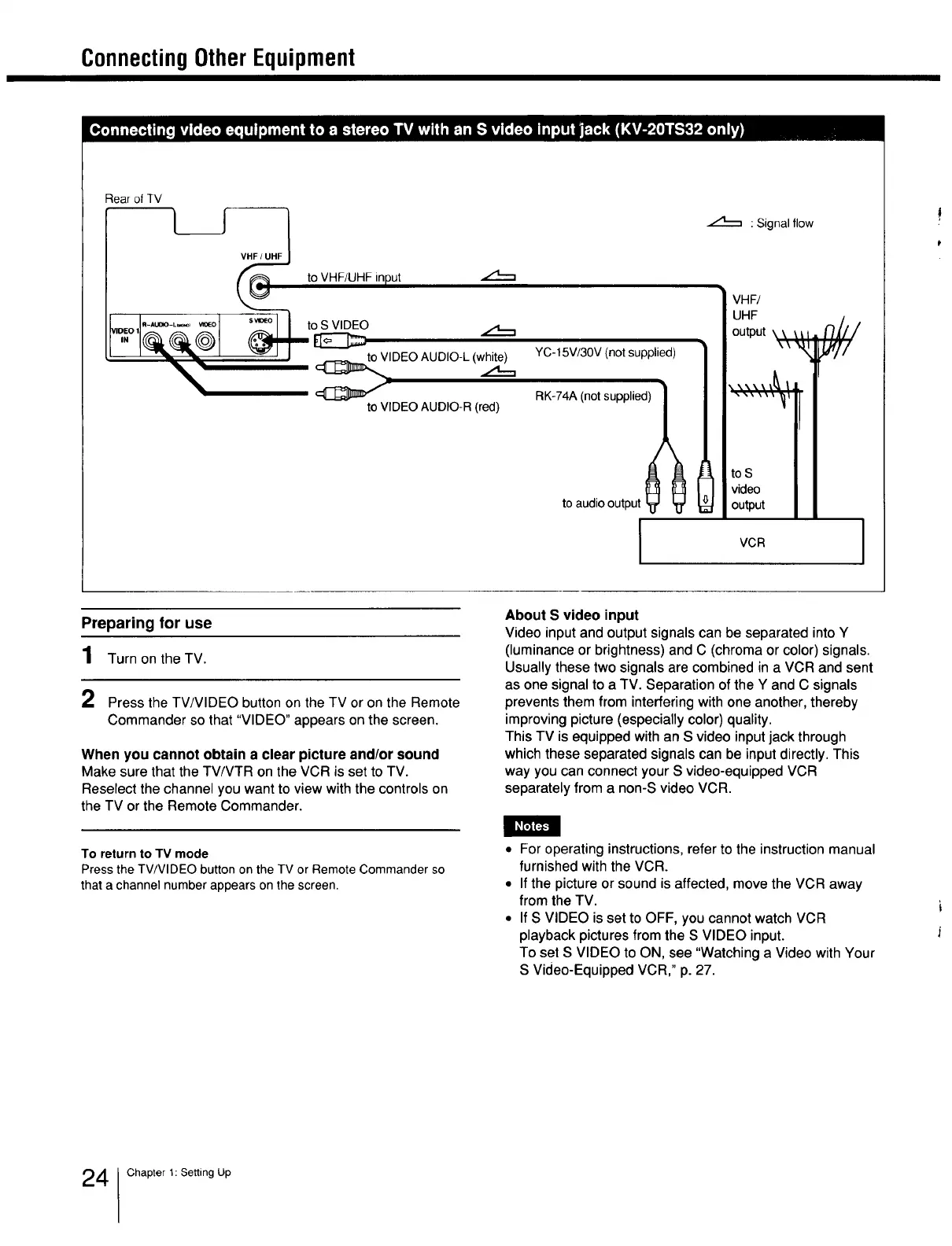
Rear ofTV
[ ] _ toVHF/UHFinput
YC-15V/30V (not supplied)
RK-74A (not supplied)
to audio output _ _
DEOAUDIO-L(w_...,
toVIDEOAUDIO-R(red)
:Signal flow
VHF/
UHF
output \\ \_1 _///
to s
video
output
VCR
Preparing for use
1 Turnon theTV.
2 Press the TV/VIDEO button on the TV or on the Remote
Commander so that "VIDEO" appears on the screen.
When you cannot obtain a clear picture and/or sound
Make sure that the TV/VTR on the VCR is set to TV.
Reselect the channel you want to view with the controls on
the TV or the Remote Commander.
About S video input
Video input and output signals can be separated into Y
(luminanceor brightness)and C (chromaor color)signals.
Usuallythesetwosignalsare combinedin a VCR and sent
as one signalto a TV. Separationofthe Y andC signals
preventsthem from interferingwithoneanother,thereby
improvingpicture(especiallycolor)quality.
ThisTV is equippedwithan S video inputjackthrough
whichthese separated signalscan be inputdirectly.This
way youcan connectyourS video-equippedVCR
separatelyfrom a non-SvideoVCR.
To return to TV mode
Press the TV/VIDEO button on the TV or Remote Commander so
that a channel number appears on the screen.
• For operating instructions, refer to the instruction manual
furnished with the VCR.
• If the picture or sound is affected, move the VCR away
from the TV.
• If S VIDEO is set to OFF, you cannot watch VCR
playback pictures from the S VIDEO input.
To set S VIDEO to ON, see "Watching a Video with Your
S Video-Equipped VCR," p. 27.
4 Chapter t: Setting Up







 To Next Page