5
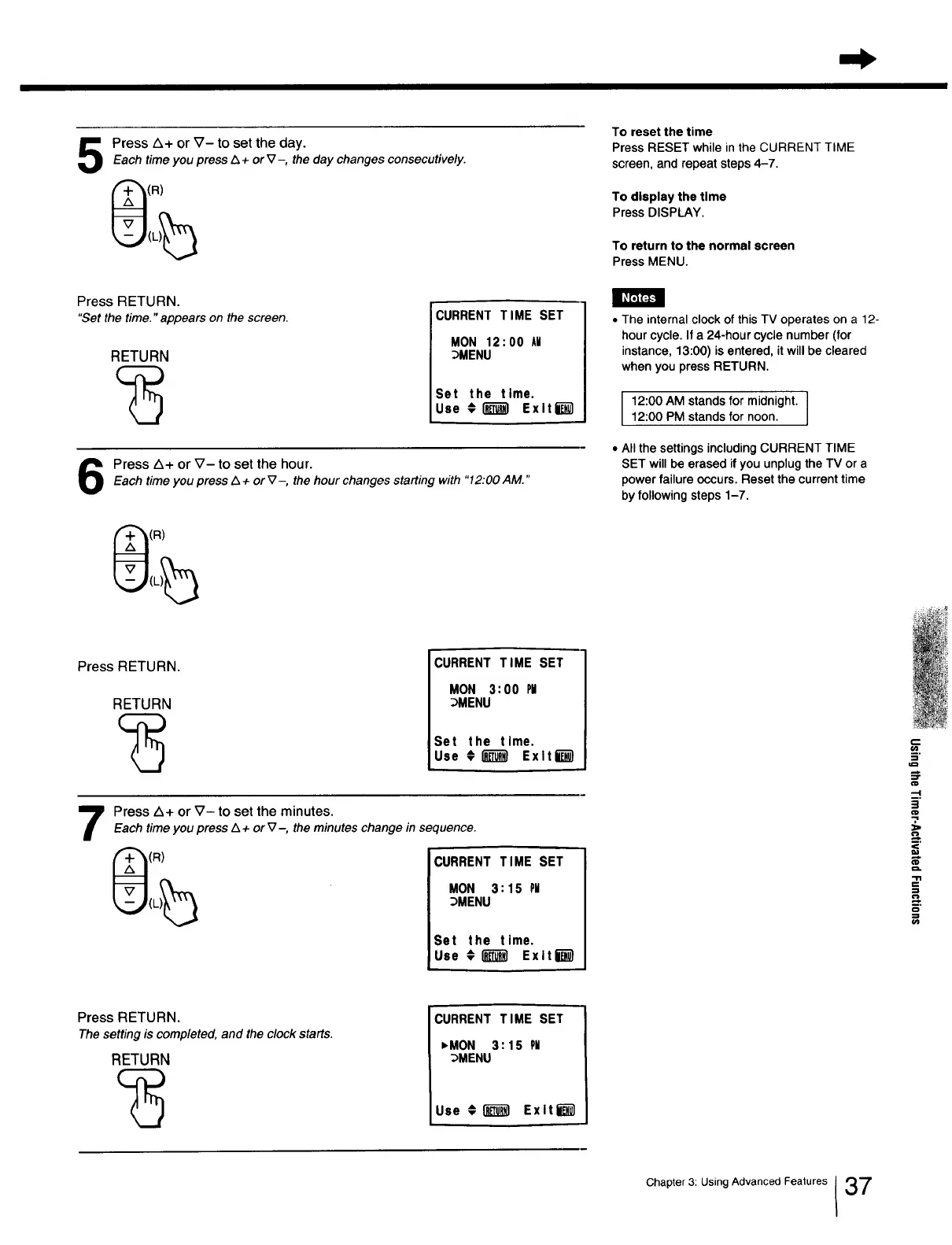
Press Z_+ or V- to set the day.
Each time you press A + or V-, the day changes consecutively.
(R)
To reset the time
Press RESET while in the CURRENT TIME
screen, and repeat steps 4-7.
To display the time
Press DISPLAY.
To return to the normal screen
Press MENU.
I _lLrVJ];_
Press RETURN.
"Set the time." appears on the screen.
RETURN
CURRENT TIME SET
MON 12:00 AI
_MENU
Set the time.
Use @_ Exlti_-_
Press A+ or V- to set the hour.Each time you press Z_+or _7-, the hourchanges starting with "12:00AM."
(R)
• The internal clock of this TV operates on a 12-
hour cycle. If a 24-hour cycle number (for
instance, 13:00) is entered, it will be cleared
when you press RETURN.
12:00 AM stands for midnight. I
12:00 PM stands for noon.
I
• All the settings including CURRENT TIME
SET will be erased if you unplug the TV or a
power failure occurs. Reset the current time
by following steps 1-7.
Press RETURN.
RETURN
CURRENT TIME SET
MON 3:00 PI
_MENU
Set the time.
Use _ ExltD
Press A+ or _7- to set the minutes.
Each timeyoupress L_+ orV-, theminuteschangein sequence.
(R) CURRENT TIME SET
)_ MON 3:15 PII
_.J(L :_MENU
Set the time.
Use #I_I ExltD
--I
§.
"7
€-J
,
Press RETURN.
The setting is completed, and the clock starts.
RETURN
CURRENT TIME SET
,MON 3:15 PH
_MENU
Use ,_ _ Exlt_-_
Chapter 3: Using Advanced Features 137







 To Next Page